

A 2026 study confirms that AI systems can reduce bug triage time by 65%, yet most engineering teams still lose 20% of their week to manual backlog cleaning. You likely recognize the pattern: vague user reports that require endless follow-up emails and critical bugs that get buried under a mountain of low-priority UI noise. It is a frustrating, expensive bottleneck that prevents your best talent from shipping features. When you automate bug triage with AI, you stop treating every ticket like a mystery and start treating your backlog like a strategic asset.
This guide provides a blueprint to eliminate manual investigation and reclaim engineering hours through an AI-driven triage system. You will learn how to maintain a clean, deduplicated backlog in Jira or Linear while automatically assigning severity based on technical data and revenue impact. We will cover the transition from reactive firefighting to a proactive workflow that prioritizes fixes costing your company the most in ₹. By the end of this article, you will have a clear path to implementing an intelligent layer that filters the noise and highlights the signals that matter most for your business growth.
Key Takeaways
- Identify the hidden costs of "triage debt" and how manual backlog cleaning drains 20% of your engineering team's weekly capacity.
- Learn how to automate bug triage with AI to transform vague user reports into high-fidelity tickets with automated titles, summaries, and severity scores.
- Discover how semantic deduplication identifies near-duplicate submissions across different languages, keeping your Jira or Linear workspace noise-free.
- Shift your priority logic from "loudest voice" to "highest value" by ranking bugs based on the real revenue (₹) impact of reporting customers.
- Establish a bi-directional sync between your triage layer and development tools to ensure real-time status visibility for both engineers and customers.
The Triage Debt Crisis: Why Manual Bug Management Fails in 2026
Manual bug management has reached a breaking point. In 2026, software complexity has outpaced the human ability to sort through raw feedback. When engineers act as glorified data cleaners, you aren't just losing hours; you are losing competitive momentum. This process creates a "backlog graveyard" where critical issues vanish under a pile of vague titles and missing logs. The friction between support and engineering is structural. Support teams want to help users quickly, but they often lack the technical tools to provide what developers actually need to fix a bug. This mismatch results in a cycle of follow-up emails that delay resolutions by days or weeks.
Data decay occurs when reports sit in the backlog without enough context to be reproducible. A report titled "Button doesn't work" without environment data or console logs is useless. Over time, these tickets accumulate, making the backlog impossible to navigate. By the time an engineer looks at it, the code has changed, and the report is obsolete. This is why the industry is moving toward a model where you automate bug triage with AI at the point of capture.
The Cost of "Context Switching" in Engineering
Every time a developer stops building a feature to investigate an unverified report, the cost is higher than just the minutes spent reading. It takes an average of 23 minutes to regain deep focus after a distraction. When you fail to automate bug triage with AI, these interruptions compound, creating a massive bottleneck for rapid release cycles.
Manual triage creates a "stop-and-go" rhythm that kills productivity. In a high-pressure environment, the ability to maintain a flow state is the difference between hitting a sprint goal and missing a launch. Automated systems provide the necessary evidence, such as session recordings and metadata, without requiring a single follow-up email. This creates a transparent environment where logic and data dictate priorities.
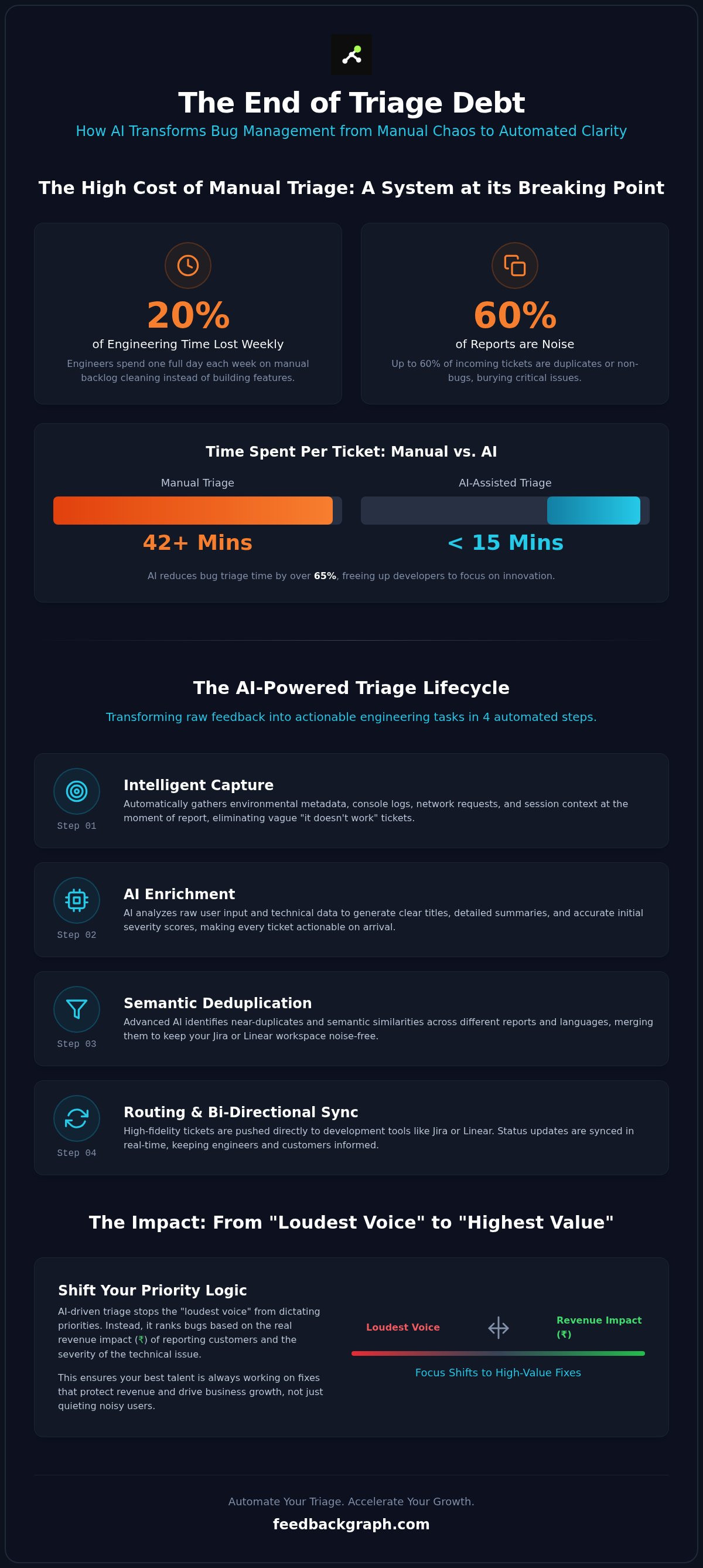
Triage debt is the cumulative delay caused by unverified and unorganized feedback. High-growth teams in India can no longer afford this inefficiency. A 2026 study found that manual triage can take over 42 minutes per ticket, whereas AI-assisted systems cut that to under 15 minutes.
The Signal-to-Noise Problem in SaaS Feedback
The volume of incoming data is often overwhelming. Research indicates that up to 60% of incoming reports are either duplicates or non-bugs. This noise does more than just waste time; it actively damages engineering morale. Developers feel like they are treading water rather than making progress.
A noisy backlog obscures the "signal," those high-impact bugs that actually affect your bottom line in ₹. You can find more details on how to reduce engineering backlog noise to protect your team's focus. Moving to the 2026 standard means shifting from reactive sorting to proactive AI-driven enrichment. By using AI to automatically generate summaries and attach logs, you ensure every ticket in Jira or Linear is actionable from the moment it appears.
How to Automate Bug Triage with AI: The 4-Step Lifecycle
A robust system to automate bug triage with AI follows a logical progression from raw user input to a verified, high-priority ticket. This lifecycle eliminates the guesswork that usually plagues the handoff between support and engineering. By standardizing how data is collected and processed, you ensure that every ticket in your backlog is actionable and accurately ranked. The process moves through four distinct phases:
- Intelligent Capture: Use embedded widgets to gather environmental metadata, console logs, and session context at the moment of the report.
- AI Enrichment: The system analyzes raw input to generate technical titles, detailed summaries, and initial severity scores.
- Deduplication: AI identifies near-matches and semantic similarities to prevent multiple tickets for the same underlying issue.
- Routing and Sync: High-fidelity data pushes directly to Jira, Linear, or GitHub, maintaining a bi-directional link for status updates.
Intelligent Capture and Data Enrichment
The traditional "text box" is a liability. It relies on the user's ability to describe a technical failure, which is often incomplete or inaccurate. Modern triage moves beyond this by capturing the URL, browser version, and network logs automatically. AI then interprets "user-speak" into technical requirements. For example, a user saying "the page froze" is transformed into a report detailing a specific JavaScript heap out-of-memory error. You can use an AI bug title generator to clean up messy reports before they ever reach your developers. This ensures that your engineers spend their time fixing code rather than deciphering vague complaints.
Automated Severity Classification
AI doesn't just read the text; it analyzes the impact on core workflows. By checking the report against your application's critical paths, the system can distinguish between a minor UI glitch and a broken checkout flow. It uses historical data to recognize high-impact regressions that have caused downtime in the past. This provides a consistent standard of severity across thousands of reports without requiring manual oversight. If you want to see how these rankings can be tied to customer value, you should book a demo to explore revenue-based prioritization. This level of visibility ensures that your team always tackles the bugs that matter most to your business health in ₹.
By following this lifecycle, you create a transparent, evidence-based workflow. The transition from Step 1 to Step 4 happens in seconds, providing your team with a filtered, high-signal backlog that drives rapid iteration. It's the most effective way to understand how the technology acts as an intelligent assistant for your engineering leads.
Beyond Sorting: AI-Powered Deduplication and Investigation
Sorting tickets is a prerequisite, but the real efficiency gain happens when you eliminate redundancy. Most engineering backlogs are bloated with "near-duplicates," reports that describe the same technical failure using different language. Traditional systems rely on exact keyword matching, which fails if one user reports a "checkout error" while another mentions "payment page won't load." When you automate bug triage with AI, you move beyond brittle filters to semantic understanding.
LLMs use vector embeddings to map the underlying meaning of a report. This allows the system to identify duplicates across different languages or varying levels of technical detail. Instead of 50 individual tickets, your team sees one "Master Issue" with 50 linked reports. This clustering provides a clear view of the bug's reach and the total revenue at risk in ₹. It transforms a chaotic list into a structured investigation.
Semantic Deduplication vs. Keyword Matching
Keyword filters are inherently limited. They can't recognize that a "404 on profile" and "user page missing" are the same event. AI-powered deduplication understands the context. By analyzing the intent and the attached metadata, the system can reduce backlog size by up to 40%. This isn't just about cleaning; it's about accuracy. It prevents your team from wasting time on a "new" bug that has already been triaged or fixed in a previous sprint.
AI-Driven Root Cause Analysis (RCA)
The investigation phase often consumes more time than the fix itself. An "Investigation Assistant" changes this by instantly scanning console logs and network traces. It connects incoming bug reports to recent code commits or deployments, identifying the exact moment a regression was introduced. This creates a direct link between the user's experience and the engineer's code.
This automated RCA surfaces patterns in logs that a human might overlook during a manual review. It acts as a force multiplier for your senior engineers, allowing them to skip the "discovery" phase and move straight to the fix. For a deeper look at how these systems integrate with your existing workflow, check out the AI bug reporting tools pillar. By automating the investigation, you move from "what happened" to "how to fix it" in seconds. This speed is essential for maintaining high-velocity release cycles in a competitive market.
Implementing a Frictionless AI Triage Workflow
Transitioning to an automated system requires more than just a new tool; it requires a strategic "Triage Layer" that sits between your users and your development stack. When you automate bug triage with AI, the goal is to build a bridge between raw user frustration and structured engineering tasks. This layer should integrate directly with Jira or Linear, ensuring that your developers never have to leave their primary environment to hunt for context. This setup allows for a "Human-in-the-Loop" model where the AI provides the reasoning and suggested priority, but an engineering lead retains final control. This maintains structural integrity while removing the manual labor of data entry.
High-performing teams in India use this workflow to map customer metadata directly to triage logic. By connecting your CRM or billing data, the AI can see the account tier and total revenue in ₹ associated with a reporting user. A bug affecting a high-value enterprise client can be escalated instantly, while a minor UI glitch from a free-tier user is categorized for the next scheduled sprint. This ensures your team always works on the tickets that protect your company's financial health.
Bi-directional Sync with Jira and Linear
The most common failure in manual triage is the "feedback black hole," where users never hear back after submitting a report. A frictionless workflow solves this through bi-directional sync. When a developer moves a ticket to "Fixed" in Jira, the triage layer automatically updates the status in the customer portal and notifies the reporter. This near-instant loop reduces support tickets by 30% because users feel heard without manual intervention. You can manage comments and follow-up questions directly from your dev tool, keeping the conversation tied to the technical record. For a deeper dive into these integrations, see the guide on connecting feedback to dev tools.
Defining Automated Routing Rules
Efficiency depends on getting the right ticket to the right person on the first try. AI-driven routing analyzes the affected product module and assigns the bug to the relevant squad. If the AI detects a failure in the payment gateway, it bypasses general support and lands in the "Payments" team queue. You can also set escalation triggers for critical issues. For example, a "VIP" customer experiencing a "Critical" severity bug can trigger a real-time Slack alert. This ensures that high-stakes regressions are addressed within minutes, not days. This level of automation turns your backlog into a dynamic, profit-focused engine.
FeedbackGraph: The Revenue-First AI Triage Platform
FeedbackGraph provides the essential infrastructure to automate bug triage with AI while keeping your company's business health at the center of every engineering decision. It acts as a sophisticated triage layer that doesn't just sort tickets; it enriches them with the technical and financial context required for rapid resolution. By positioning itself between your users and your issue tracker, FeedbackGraph ensures your engineering team only interacts with high-fidelity, deduplicated data that is ready for a fix. This approach transforms the backlog from a source of friction into a strategic asset for growth.
The platform eliminates the "triage debt" discussed earlier by handling the heavy lifting of data collection and categorization. It uses a two-click capture widget to gather environment logs, metadata, and session context automatically. This means your developers never have to ask for a browser version or console log again. The AI enrichment engine then writes the bug reports for you, generating precise technical titles and summaries that make even the most vague user feedback actionable in seconds.
Ranking Feature Requests and Bugs by Revenue
Most tools treat every user report with the same weight, but FeedbackGraph recognizes that not all bugs are created equal. It is the only platform that connects directly to your CRM data to map every report to the customer's account tier and total revenue in ₹. This visibility allows you to prioritize fixes that protect your most valuable accounts. You move from a "loudest voice" model to a data-driven engineering roadmap. This ensures that your senior talent is always focused on the issues with the highest strategic impact, directly linking engineering output to the company's bottom line.
Getting Started with AI-Driven Triage
Implementation is built for speed and engineering efficiency. You can deploy the FeedbackGraph widget and connect it to your existing stack in under 5 minutes. Once active, the AI agent begins summarizing and categorizing every incoming report instantly. It handles the complex tasks of deduplication and severity assignment, ensuring your Jira or Linear workspace remains noise-free. You can explore the full range of bi-directional integrations to see how status updates flow seamlessly between your developers and your customers.
- Revenue-Based Feedback Ranking: Prioritize your backlog by the real-world financial impact of each issue.
- Bi-directional Sync: Keep Jira, Linear, and GitHub in perfect alignment with your customer portal.
- AI Enrichment: Automatically generate high-fidelity summaries and technical severity scores.
- Real-time Slack Alerts: Get instant notifications for critical bugs affecting high-value accounts.
Ready to reclaim your engineering hours and stop wasting time on manual investigation? Book a FeedbackGraph demo today.
Reclaiming Your Engineering Momentum in 2026
Engineering teams can't afford to lose 20% of their capacity to manual data cleaning. The shift toward an automated triage layer is no longer optional; it is the standard for high-growth software companies. When you automate bug triage with AI, you replace guesswork with evidence-based logic. You gain a clean, deduplicated backlog and a bi-directional sync with tools like Jira and Linear that keeps your entire organization aligned in real-time. This eliminates the "backlog graveyard" and ensures that every ticket is actionable from the moment it is captured.
Prioritizing fixes based on revenue impact ensures that your senior talent focuses on the bugs that protect your most valuable accounts. This data-driven approach removes the friction of support handoffs and stops the decay of unverified reports. It is time to move beyond the triage debt crisis and start shipping features that drive measurable growth in ₹. You have the tools to turn your feedback loop into a competitive advantage.
Take the first step toward a more efficient development cycle. Your team deserves to focus on innovation, not investigation.
Frequently Asked Questions
How does AI prioritize bugs better than a human?
AI prioritizes bugs by removing human bias and processing technical data alongside business metrics in real-time. Unlike a manual reviewer, AI can instantly cross-reference a report with customer revenue in ₹ and technical logs. This ensures that high-value regressions are flagged immediately. It maintains a consistent standard across thousands of reports, preventing the triage fatigue that often leads to human error during manual backlog reviews.
Can AI triage tools integrate with my existing Jira or Linear workflow?
Yes, modern platforms integrate directly with Jira, Linear, and GitHub through bi-directional sync. This means when you automate bug triage with AI, the enriched data pushes straight into your existing issue tracker. Status updates are mirrored across both platforms. If a developer closes a ticket in Jira, the triage layer automatically notifies the reporter, maintaining a closed-loop workflow without any manual data entry from your team.
Does automating bug triage with AI lead to missed critical issues?
No, automation actually reduces the risk of missing critical issues by filtering out the noise that usually buries them. AI systems achieve 85% to 90% accuracy in severity classification, which is significantly higher than the 60% to 70% typically seen in manual methods. By using a human-in-the-loop model, the AI flags the most urgent issues for human confirmation, ensuring nothing falls through the cracks.
What is the difference between bug triage and root cause analysis?
Bug triage is the process of sorting, deduplicating, and prioritizing incoming reports to determine what should be fixed first. Root cause analysis (RCA) is the deeper technical investigation to identify the underlying code failure. While triage focuses on the impact and priority, RCA focuses on the technical solution. AI assists both by grouping similar reports during triage and scanning logs to suggest fixes during RCA.
How much time can an engineering team save by using AI for triage?
Engineering teams can reduce triage time by up to 65%. According to a 2026 study, AI-powered systems can cut the time spent per ticket from 42.3 minutes down to 14.8 minutes. This allows a typical team to reclaim over 200 hours per engineer annually. By removing the need for manual investigation and follow-up emails, your developers spend more time on feature development and high-level architecture.
Is it possible to automate bug reporting for non-technical users?
Yes, you can automate bug triage with AI for non-technical users by using embedded widgets that capture technical context in the background. Users only need to provide a brief description. The system automatically attaches console logs, network traces, and environment metadata. This transforms a vague user complaint into a high-fidelity technical report that is ready for an engineer to investigate without further questions.
What data does an AI bug triage tool need to be effective?
An effective AI triage tool requires three types of data: technical logs, environmental metadata, and business context. Technical logs include console errors and network requests. Metadata covers browser versions and OS details. Business context, such as customer revenue in ₹ or account tier, is essential for prioritizing issues based on financial impact. When these data streams are combined, the AI makes informed decisions about both severity and priority.


