

Engineering teams are burning 20% of their sprint capacity on manual triage. It is a relentless cycle of duplicate reports and vague descriptions that bury your most critical issues under a mountain of noise. You feel the frustration when your senior developers spend hours acting as high-priced data entry clerks instead of shipping code. Deploying a modern AI bug reporting tool is no longer optional for teams that value speed. It is the only way to stop the drain on your productivity.
You already know that a cluttered backlog leads to missed deadlines and customer churn. You'll learn how to eliminate manual engineering triage and prioritize fixes based on real revenue impact using automated workflows. We will explore how FeedbackGraph functions as an intelligent triage layer, deduplicating submissions and assigning severity with precision. This guide previews how to achieve a clean backlog and establish a direct link between technical debt and financial loss.
Key Takeaways
- Reclaim up to 15 hours of engineering time every week by automating the transition from vague feedback to structured, developer-ready tickets.
- Eliminate redundant backlog noise using semantic AI that identifies and merges duplicate reports based on root cause rather than just keywords.
- Discover how to use an AI bug reporting tool to link technical debt directly to ARR, ensuring your team prioritizes fixes that protect the bottom line.
- Streamline your development workflow with bi-directional integrations that keep Jira, Linear, and GitHub in constant sync with customer reports.
Beyond the Widget: Why Manual Bug Triage is the "Hidden Tax" on SaaS Growth
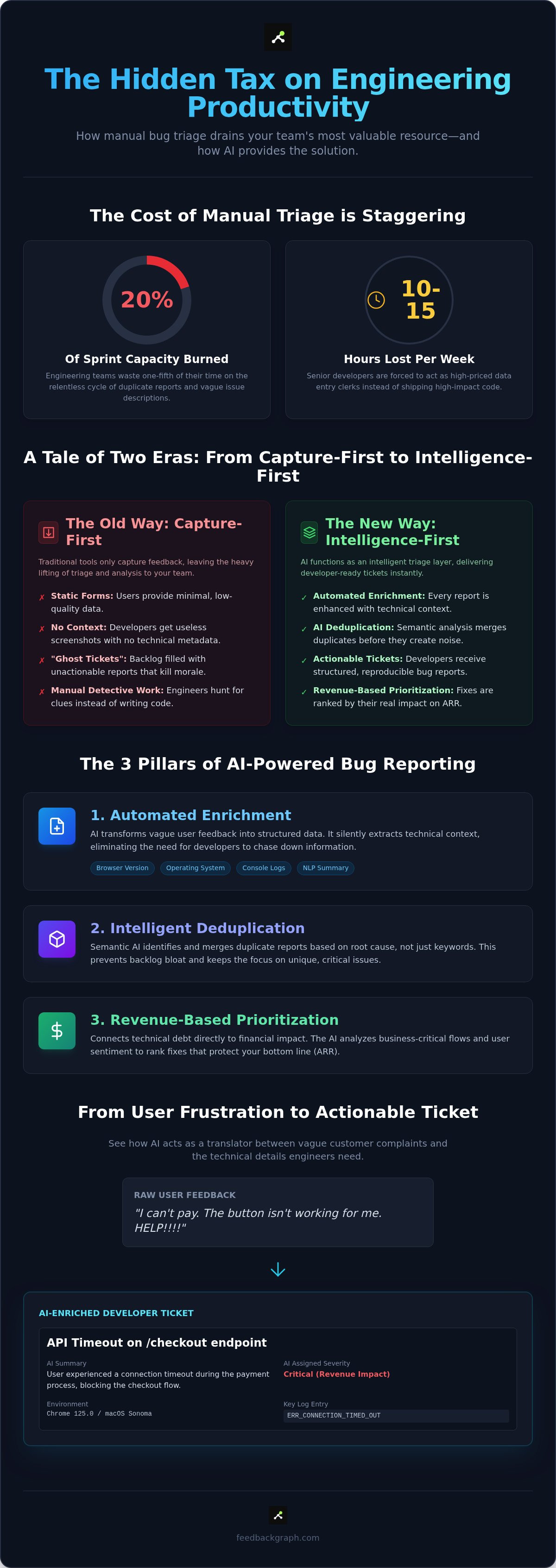
Manual triage is a silent drain on your engineering resources. We call it the "Manual Triage Tax." On average, senior engineers lose 10 to 15 hours every week just trying to decode vague customer reports. They aren't building new features or optimizing infrastructure; they are playing detective. This inefficiency isn't just an operational annoyance. It is a direct drag on your company's ability to scale. If your most expensive talent is stuck clarifying "it doesn't work" messages, your growth is capped by your own backlog.
Traditional bug reporting tools only solve the first half of the problem. They provide a way to capture feedback, but they leave the processing to your team. An AI bug reporting tool flips this dynamic by automating the labor-intensive middle step. By 2026, the industry standard has shifted. If a bug report isn't Jira-ready the second it arrives, your tool is failing you. Modern reporting relies on three specific pillars to eliminate this friction:
- Enrichment: Automatically adding technical context and structured data to every report.
- Deduplication: Identifying and merging similar issues before they hit the backlog.
- Prioritization: Ranking fixes based on their actual impact on your revenue.
The Cost of Backlog Noise in 2026
Backlog noise is more than a messy list of tickets. It creates "ghost tickets" that lack reproduction steps or technical logs, which destroys developer morale. When engineers spend their mornings hunting for context instead of shipping code, your sprint velocity takes a massive hit. This bottleneck is particularly dangerous for bug tracking workflows because it delays critical security patches. We've moved past the "Capture-First" era. In 2026, we're in the "Intelligence-First" era, where raw data is useless without automated analysis.
Why Traditional Bug Trackers Fall Short
Static forms are the enemy of high-quality data. Users hate filling them out, so they provide the bare minimum. Developers then receive a screenshot with no technical metadata, which is effectively useless for debugging. Traditional trackers provide visibility but lack structure. This is where AI steps in as the "Translator." It bridges the gap between customer frustration and engineering logic. It interprets the user's intent and provides the technical evidence your team needs to act immediately. It ensures that every ticket is actionable from the moment it's created.
The Mechanics of AI Bug Enrichment: Turning Raw Feedback into Structured Data
Raw user feedback is notoriously messy. A customer might submit a report that simply says, "The button is broken," which provides zero value to a developer. A high-performance AI bug reporting tool acts as an automated bridge, transforming these vague observations into actionable engineering tasks. Instead of forcing users to fill out complex forms, the technology extracts the necessary context silently in the background.
Enrichment begins the moment a report is submitted via a two-click widget. The system immediately pulls environment metadata, including the browser version, operating system, and recent console logs. It then uses Natural Language Processing (NLP) to generate a concise executive summary. This summary allows product managers and stakeholders to understand the issue at a glance without diving into the technical weeds of a Jira ticket. It ensures that everyone, from the CEO to the junior developer, is looking at the same objective reality.
Step 1: Semantic Analysis and Title Generation
LLMs are exceptionally good at interpreting user intent and technical reality simultaneously. When a user writes, "I can't pay," the AI analyzes the concurrent technical logs to see an ERR_CONNECTION_TIMED_OUT. It then rewrites the ticket title to something descriptive and searchable, such as "API Timeout on /checkout endpoint." AI enrichment is the process of adding technical context to subjective user reports. This standardization is critical for long-term backlog health. It ensures that when you search your issue tracker months later, you find clear, technical descriptions rather than a sea of tickets titled "Help" or "Broken."
Step 2: Automated Severity and Priority Scoring
Determining the urgency of a bug shouldn't be a manual guessing game. The AI evaluates "anger signals" within the user's text alongside the technical impact. It distinguishes between a minor UI glitch that affects a few users and a blocking error that stops the entire checkout flow. By integrating technical logs directly into the enriched report, the tool provides immediate evidence for its severity assignment. This allows your team to skip the initial investigation phase entirely. If you want to see this automation in action, you can book a personalized walkthrough to explore our triage workflows.
This automated scoring ensures that your team always works on what matters most. It eliminates the bias of whoever shouts the loudest in a Slack channel. Instead, you get a data-driven priority list that reflects the actual state of your application and the frustration levels of your users. Every ticket arrives with its own logic, evidence, and priority level already attached. The result is a streamlined path from the initial report to a verified fix, removing the friction of manual interpretation.
Eliminating Backlog Noise: How AI Deduplication Saves Engineering Sprint Cycles
Duplicate tickets are the silent killer of sprint velocity. When three different customers report the same issue using three different phrases, a traditional tracker creates three separate tasks. This is where an AI bug reporting tool becomes an essential asset for data hygiene. It moves beyond simple keyword matching to understand the underlying technical reality of a report. It ensures your developers focus on solving problems, not managing spreadsheets. It’s about maintaining a high-signal backlog that reflects actual work, not redundant noise.
The Problem with Manual De-duping
Manual deduplication is an expensive, error-prone game of whack-a-mole. When two developers unknowingly work on the same root cause from different tickets, you've doubled your labor costs for zero additional value. It’s a waste of high-tier talent that should be shipping features. These duplicates also skew your product data. A single high-frequency bug can look like a systemic failure across multiple features. This leads to poor roadmap decisions based on inflated ticket counts. Communication becomes fragmented across separate threads. It makes it impossible to give customers a unified update when the fix finally ships, leading to a disjointed user experience.
Semantic Clustering: The AI Solution
Semantic clustering replaces the fragility of keyword matching. Traditional tools might miss the connection between "payment failed" and "can't checkout" because the strings don't overlap. An AI-driven system uses vector embeddings to recognize that these reports describe the same failure in the user journey. It identifies the root cause intent by analyzing the semantic meaning of the text alongside technical metadata. It then groups these entries under a single Master Ticket.
The Master Ticket workflow transforms how you handle high-volume feedback. Instead of a chaotic list of 50 individual items, your lead engineer sees one well-documented issue. New reports are appended as additional evidence rather than new tasks. This maintains a clean board in Jira or Linear while preserving customer-specific context. The AI automatically attaches logs, screenshots, and user metadata from all 50 reports to this single ticket. This creates a rich dataset for reproduction that a single manual report could never provide. It turns a noise problem into a data advantage.
This clustering doesn't just clean the view; it enriches the priority. By grouping 50 reports, the AI can calculate the total revenue weighting of that single master ticket. You see exactly how much ARR is at risk from one specific root cause. Implementing these systems is a core part of a modern bug tracking strategy. For a deeper dive into streamlining your queue, read our guide on How to Reduce Engineering Backlog Noise. You gain a comprehensive view of the bug's behavior across different environments without the overhead of manual ticket management.
Prioritizing by Profit: Linking Bug Reports to Revenue Impact
Technical severity is a poor proxy for business value. A "High Severity" crash on an experimental beta feature for free users shouldn't jump the queue ahead of a minor UI glitch that prevents a $50k/year enterprise client from renewing. An AI bug reporting tool eliminates this guesswork by mapping every ticket to your bottom line. It transforms the backlog from a list of technical complaints into a financial risk register. It ensures that your limited engineering resources are always deployed where they generate the most defensive value. You stop fixing bugs in a vacuum and start protecting your most valuable accounts with precision.
Calculating the Revenue Impact of a Bug
Quantifying risk requires more than just a developer's intuition. The AI identifies the reporter's user ID, cross-references their subscription tier, and tracks the frequency of the issue across your entire user base. By integrating directly with your CRM data, the system assigns a "Revenue Leakage" score to every backlog item. This score represents the Annual Recurring Revenue (ARR) currently at risk. It changes the conversation from subjective opinions to objective financial realities. Instead of arguing over "low" versus "medium" priority, your team sees that a specific bug is threatening $12,000 in monthly revenue. For more on this strategy, read about Revenue-Based Feature Ranking to see how profit-first logic applies to your entire product strategy.
Data-Driven Roadmap Defense
Product Managers often act as the buffer between Sales demands and Engineering capacity. Revenue data provides the evidence needed to settle priority disputes instantly. You can now forecast the "Cost of Inaction" for critical bugs, showing stakeholders the specific financial impact of a delayed fix. This forecasting uses historical churn data and account weighting to predict how many high-value users will leave if a problem persists. This positioning rebrands bug fixes as high-stakes revenue retention activities. It moves them out of the "maintenance" category and into the "strategic growth" category. When the data shows that a fix protects a six-figure account, the decision to prioritize it becomes self-evident. It builds trust with leadership because every engineering hour is tied to a measurable business outcome.
Implementing FeedbackGraph: A Frictionless AI Bug Reporting Workflow
FeedbackGraph is not just another feedback collector. It is a purpose-built AI bug reporting tool designed to function as an intelligent triage layer between your users and your engineering backlog. The process begins with a two-click widget that prioritizes speed. Instead of presenting users with a daunting 10-field form, we capture high-fidelity data instantly. The AI handles the heavy lifting of enrichment and deduplication. This ensures your developers never see a ticket that isn't actionable. You get the technical logs and environment metadata you need without adding friction to the user experience. It is a streamlined entry point that respects the user's time and the developer's focus.
The Integration Advantage
Efficiency relies on where your data lives and how it moves. FeedbackGraph features robust, bi-directional sync with industry-standard tools like Jira, Linear, and GitHub. When the AI classifies a report, it routes the issue to the specific Slack channel or development project best suited for the fix. This is not a one-way street. Status updates flow both ways automatically. If a developer moves a ticket to "In Progress" in Linear, that status updates in FeedbackGraph. This transparency is vital for bug tracking workflows where speed is the primary metric. You eliminate the manual overhead of keeping stakeholders informed. You can explore FeedbackGraph features to see how this triage layer functions in a live environment.
The system acts as a central nervous system for your feedback. It keeps your product managers in the loop without requiring them to jump between multiple tabs. By automating the routing process, you ensure that high-priority revenue-impacting bugs reach the right team in seconds rather than hours. It replaces the chaos of manual ticket creation with a methodical, automated pipeline that scales with your user base.
Closing the Feedback Loop
Customer retention depends on a sense of being heard. Most SaaS companies fail here because manual outreach is impossible at scale. FeedbackGraph solves this with a "Closing the Loop" feature. When a bug is marked as fixed in your development tool, the AI drafts a personalized update for the customer. It explains that the issue is resolved and thanks them for their specific input. This creates a "Response-First" culture that helps lower churn rates. Customers who see their feedback turn into real product improvements are more likely to stay and advocate for your brand. It turns a negative experience, like a software bug, into a positive touchpoint for your customer success team. You build trust through transparency and consistent execution.
Reclaiming Your Sprint Velocity in 2026
Manual triage is a relic of a slower era. By automating enrichment and deduplication, you transform your backlog from a source of frustration into a high-velocity engine for growth. Integrating an AI bug reporting tool allows your senior engineers to stop acting as data cleaners and start focusing on high-impact development. You've seen how revenue-based ranking and bi-directional Jira integrations create a transparent, profit-first workflow. For engineers who want to apply this same level of AI-driven efficiency to their personal career path, QuickApply provides a streamlined way to manage the job application process.
FeedbackGraph provides the structural integrity needed to scale your feedback loops without increasing headcount. It's time to eliminate the hidden tax on your SaaS growth and build a more resilient, data-driven product culture. Your team deserves a clean backlog, and your business deserves a roadmap that protects its most valuable accounts. You have the tools to turn raw customer frustration into actionable engineering progress today.
Step into the future of automated triage and watch your engineering efficiency soar.
Frequently Asked Questions
What is an AI bug reporting tool exactly?
An AI bug reporting tool is a software solution that uses artificial intelligence to automate the capture, enrichment, and triage of software defects. It functions as an intelligent triage layer between your users and your engineering backlog. Unlike traditional trackers that just store raw data, these tools interpret user intent and technical logs to create structured, actionable tickets. They ensure your developers never have to decipher vague feedback again.
How does AI deduplication work in bug tracking?
AI deduplication uses semantic analysis and vector embeddings to identify reports that describe the same root cause, even if the wording is different. Traditional keyword matching fails when one user says "payment failed" and another says "can't checkout." The AI recognizes the underlying technical pattern and clusters these reports under a single master ticket. This prevents backlog bloat and stops your team from wasting time on redundant tasks.
Can an AI bug reporting tool integrate with Jira and Linear?
Yes, modern platforms like FeedbackGraph offer deep, bi-directional integrations with Jira, Linear, and GitHub. This ensures that when a ticket is updated in your development environment, the status reflects immediately in the reporting tool. It eliminates the need for manual data entry and keeps your engineering workflow synchronized with customer feedback in real time. This connectivity is essential for maintaining a high-velocity development cycle.
Does using an AI tool make bug reporting slower for the user?
No, it actually accelerates the process by using a two-click widget to capture high-fidelity data without forcing the user to fill out long forms. The AI extracts environment metadata, console logs, and network requests silently in the background. This allows users to report issues in seconds while providing developers with more technical context than a manual form could ever provide. It removes the friction that often stops users from reporting bugs.
How does AI determine the severity of a bug report?
An AI bug reporting tool determines severity by analyzing user sentiment, error frequency, and technical log data simultaneously. By detecting "anger signals" in the text and identifying blocking errors in the application code, the system assigns an initial severity level. This data-driven approach removes the subjectivity of manual triage. It ensures that critical failures affecting your core functionality are flagged for immediate attention.
Is AI-generated bug data reliable for engineering teams?
AI-generated bug data is highly reliable because it is grounded in objective technical metadata like browser logs and stack traces. While a user's description might be vague, the AI enriches the report with verifiable evidence that developers need for reproduction. This structured data reduces the friction of the investigation phase and speeds up resolution time. It provides a level of technical detail that manual reports rarely achieve.
How does linking bugs to revenue help my product roadmap?
Linking bugs to revenue allows product managers to prioritize fixes based on their actual financial impact rather than just technical severity. By cross-referencing reports with CRM data, you can see which issues affect your highest-paying accounts. This provides a clear, evidence-based justification for roadmap adjustments. It helps you protect your Annual Recurring Revenue (ARR) by focusing on the fixes that matter most to your bottom line.
What is bi-directional sync in bug reporting?
Bi-directional sync means that data flows both ways between your reporting tool and your development backlog. When an engineer moves a ticket to "Done" in Jira, the reporting tool automatically updates the status and can even notify the reporting user. This automation closes the feedback loop without requiring manual intervention from your support or product teams. It ensures that customers always know the status of their reports and feel heard.


