

Why is your engineering team still losing hours every week to manual triage and duplicate tickets? Most product leaders accept a cluttered backlog as the inevitable price of listening to their users. You want to empower your customers, but the resulting noise often buries the critical fixes that actually drive growth. Modern customer-facing bug tracking has moved beyond simple intake forms; it's now about automated intelligence and strategic alignment.
You're likely tired of reports that lack technical context and the constant struggle to quantify which bugs are actually hurting your bottom line. This 2026 buyer's guide shows you how to select a system that bridges the gap between feedback and engineering workflows using AI-driven triage and revenue-based prioritization. We'll break down the tools that offer frictionless reporting for users while delivering a clean, data-backed roadmap for your developers. You'll learn how to turn a chaotic feedback loop into a streamlined engine for product excellence.
Key Takeaways
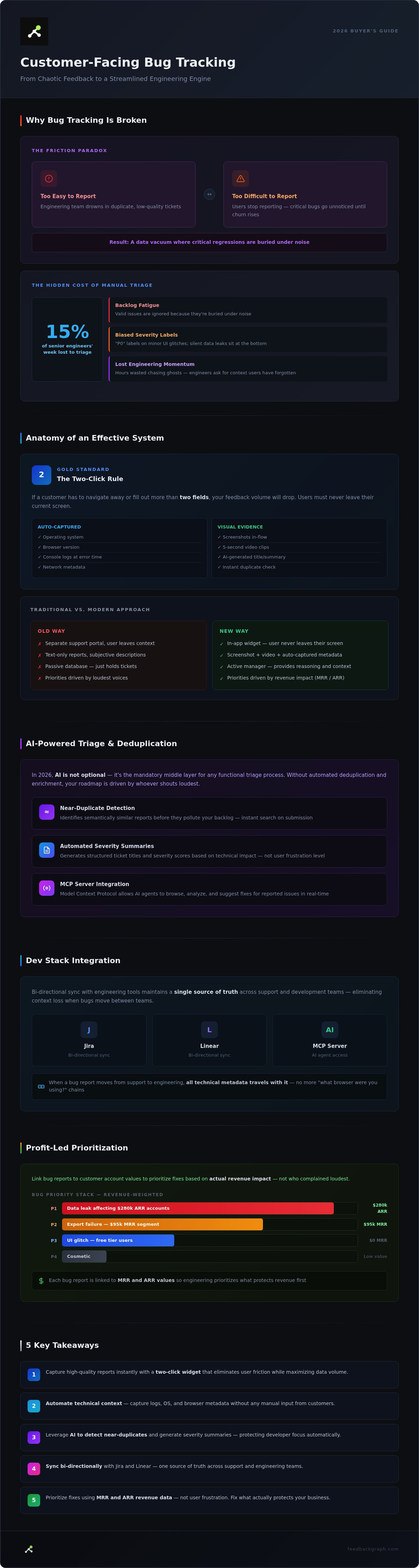
- Capture high-quality reports instantly with a two-click widget that eliminates user friction while maximizing data volume.
- Automate technical context by capturing logs, OS, and browser metadata without requiring manual input from your customers.
- Leverage AI to identify near-duplicates and generate severity summaries within your customer-facing bug tracking system.
- Sync support and engineering workflows bi-directionally with Jira and Linear to maintain a single source of truth across teams.
- Prioritize fixes based on actual revenue impact by linking specific bug reports to customer account values like MRR and ARR.
Why Customer-Facing Bug Tracking is Broken in 2026
The current state of customer-facing bug tracking is built on a fundamental friction paradox. If you make reporting too easy, your engineering team drowns in a sea of duplicate, low-quality tickets. If you make it too difficult by requiring logs and reproduction steps, your users simply stop reporting issues. This creates a data vacuum where critical regressions go unnoticed until they impact your churn rate. Most teams are stuck in the middle; they accept a cluttered backlog as the cost of doing business.
Traditional "ticket-taking" has become a primary bottleneck for engineering velocity. Support-heavy tools like Freshdesk or Zendesk are designed for conversation, not code. They lack the technical metadata, such as browser state or network logs, that developers need to actually fix a problem. When a bug report moves from support to engineering, it often loses its technical pulse. Engineers then waste hours chasing ghosts or asking for more context that the user has already forgotten.
In 2026, AI is no longer an optional feature; it's the mandatory middle-layer for any functional triage process. Without an automated system to deduplicate and enrich reports, your roadmap is driven by whoever shouts the loudest rather than what creates the most value. Systems must evolve from passive databases into active filters that protect developer focus.
The High Cost of Manual Triage
Manual triage is a silent tax on your most expensive talent. When senior engineers spend 15% of their week determining if a report is a duplicate or a new edge case, you aren't just losing time. You're losing momentum. A messy, unquantified backlog creates a psychological toll on product teams, leading to "backlog fatigue" where valid issues are ignored because they're buried under noise. Manual severity classification is almost always biased by the user's frustration level rather than the actual technical impact. This leads to "P0" labels on minor UI glitches while silent data leaks sit at the bottom of the pile.
The Shift from Passive Tracking to Active Management
Modern customer-facing bug tracking has shifted from recording failures to identifying signals for growth. Intelligent systems now act as active managers. They use the Model Context Protocol (MCP) to allow AI agents to browse, analyze, and even suggest fixes for reported issues in real-time. By utilizing an MCP Server, your bug tracking system becomes an active participant in your dev stack. It doesn't just hold a ticket; it provides the reasoning, the revenue impact, and the technical context needed to clear the path for your engineers.
Anatomy of an Effective Customer-Facing Bug Reporting Software
Effective customer-facing bug tracking relies on a simple premise: remove every possible barrier between the user's frustration and the engineer's solution. In 2026, the standard for data collection has shifted. It's no longer enough to provide a text box and hope for the best. A high-performing system must act as a silent observer, capturing the technical reality of a bug without burdening the reporter. This requires a transition from manual data entry to automated enrichment.
The "two-click" rule is now the gold standard for user reports. If a customer has to navigate away from their current screen or fill out more than two fields, your feedback volume will drop. Modern systems solve this by capturing critical metadata automatically. This includes the operating system, browser version, and console logs at the exact moment of the error. When these details are attached to a ticket by default, you eliminate the "what browser were you using?" email chain that slows down resolution times.
Visual evidence has also become non-negotiable. Text descriptions are notoriously subjective. A single screenshot or a five-second video recording provides more clarity than a paragraph of text. By integrating these tools directly into the reporting flow, you provide engineers with an immediate visual reproduction of the issue. This transparency builds trust. When a user sees that their report includes technical logs and visual proof, they feel confident that their problem is being handled professionally.
The In-App Capture Widget
Redirecting users to a separate support portal is a relic of the past. It kills the reporting momentum and creates a disjointed user experience. The modern approach utilizes an in-app widget that lives where the user works. These widgets now leverage AI to generate titles and summaries based on the user's initial input, saving them time while ensuring the ticket is descriptive for the dev team. They also perform an instant search for existing bugs to prevent duplicates before they ever hit your backlog. If you want to see how these elements come together, you can book a brief walkthrough to see a live environment.
Closing the Feedback Loop
Transparency is the best way to reduce support volume. A bi-directional sync ensures that when an engineer moves a ticket to "In Progress" in Jira or Linear, the status updates automatically for the customer. This constant loop prevents the "did you see my report?" follow-up tickets that clutter support queues. You can explore specific FeedbackGraph features to see how bi-directional communication keeps your customers informed without any manual intervention from your team. This automation transforms bug tracking from a black hole into a visible, trustworthy process.
Leveraging AI for Automated Bug Triage and Deduplication
Most bug tracking systems act as passive databases. They store information but do nothing to process it. In 2026, high-velocity teams use AI as an active filter to manage the influx of reports. Leveraging AI for automated triage transforms customer-facing bug tracking from a manual chore into an automated pipeline. This shift allows engineers to focus on code rather than administrative cleanup. It turns a chaotic stream of feedback into a structured, actionable backlog.
The primary ROI of AI in this space is the elimination of noise. Smart systems now perform real-time deduplication by identifying "near-duplicates" that traditional keyword-based searches miss. Beyond simple sorting, AI provides smart routing. It analyzes the technical content of a report to send UI glitches directly to frontend teams while routing API failures to backend engineers. This happens instantly, removing the need for a human middleman to move tickets between departments.
Sentiment analysis adds an emotional layer to this technical data. By identifying which bugs are causing the highest levels of user frustration, the system can flag issues that threaten customer retention. This ensures that a minor but highly visible bug doesn't sit in the backlog while users grow increasingly resentful. It combines technical reality with user experience to provide a holistic view of product health.
Eliminating the Duplicate Nightmare
AI identifies near-duplicates by comparing semantic meaning rather than just matching keywords. If one user reports "the button is broken" and another says "submit doesn't click," the AI recognizes they are describing the same failure. It can group 50 individual reports into a single "Master Issue" for your engineering team. This prevents backlog bloat and gives developers a clear view of how many users are affected by a single root cause. You can read more about AI Bug Triage to see how this semantic grouping accelerates your response time.
Automated Severity Classification
AI-driven bug enrichment is the process of adding technical context to raw user feedback to make it developer-ready. Traditional systems rely on users to set severity, which is a recipe for inaccuracy. AI changes this by analyzing system logs and user descriptions to set objective severity levels. It distinguishes between "Severity" (the technical impact on the system) and "Priority" (the business urgency). By looking at the logs captured by your reporting widget, the AI can see if an issue is a silent data error or a simple rendering bug, ensuring your team tackles the most dangerous issues first.
Integrating Bug Tracking with Your Existing Dev Stack
Integration is the backbone of any professional customer-facing bug tracking strategy. If your feedback loop doesn't connect directly to where your engineers work, you're just creating another silo of manual labor. One-way webhooks are no longer sufficient in 2026. They leave the customer-facing side of the house in the dark, forcing support teams to manually check Jira or Linear for status updates. A modern stack requires bi-directional synchronization that treats your dev tools as the ultimate source of truth while keeping the customer informed in real-time.
A true bi-directional sync ensures that when an engineer moves a ticket from "Backlog" to "In Progress" in Linear, that change is reflected instantly in your reporting widget. This transparency reduces the burden on support and builds trust with your users. Comments, technical attachments, and even video recordings should flow between platforms without manual copying. This creates a seamless bridge between the user's experience and the developer's environment, ensuring that no technical context is lost in transit.
Jira and Linear: The Source of Truth
Engineers shouldn't have to leave their primary workspace to understand a customer's problem. Modern systems automate issue creation, moving from a customer report to a fully populated Jira ticket in seconds. This automation includes the transfer of all technical metadata, such as browser logs and network state. For practical setup tips on maintaining this connection, refer to this guide on bi-directional Jira feedback sync. When your systems talk to each other, your team spends less time on administration and more time on shipping code.
Workflow Automation and Slack Integration
Slack integration transforms your communication tool into a triage command center. Instead of a generic firehose of notifications, AI-determined severity allows for precision routing. A critical database regression shouldn't sit in a general feedback channel; it should trigger an immediate alert in a dedicated emergency channel. This ensures that the most damaging issues reach the right engineers immediately. By using Slack as a triage hub, product managers can approve or reject tickets with a single click, maintaining velocity without leaving their primary workspace.
Strategic integration also means aligning bug reports with business value. By mapping customer segments like Free vs. Enterprise to development priority, you ensure your team focuses on the fixes that protect your most valuable accounts. This revenue-based prioritization is further enhanced by the rise of MCP servers. These servers allow AI agents to interact with your bug tracker, analyze technical logs, and even propose fixes before a human ever touches the ticket. This creates a highly efficient, automated pipeline from user report to resolved issue.
Profit-Led Prioritization: Ranking Bugs by Revenue Impact
Stop relying on gut feeling to manage your backlog. Most product leaders prioritize based on which customer shouts the loudest or which engineer has the strongest opinion. This approach is reactive and financially blind. In 2026, high-performance teams treat customer-facing bug tracking as a financial exercise. You need to know exactly how much a specific bug costs your company in potential churn or lost expansion revenue.
The most effective way to align engineering effort with business goals is through the "Revenue-at-Risk" metric. This isn't a vague estimate. It's a concrete calculation that aggregates the total account value (MRR or ARR) of every user who has reported or been impacted by a specific issue. When you can show that a "minor" UI glitch is actually frustrating $200,000 worth of recurring revenue, the conversation around prioritization changes instantly. You move from subjective debates to objective, data-driven execution.
FeedbackGraph automates this process by linking your bug reports directly to your customer data. By utilizing Revenue-Based Feedback Ranking, the system reorders your backlog based on financial weight. This ensures your engineers are always working on the fixes that protect your bottom line. It transforms the backlog from a list of technical failures into a prioritized roadmap for capital preservation.
Quantifying the Revenue Impact
Identifying which bugs affect your highest-paying customers is the first step toward a rational roadmap. Without this data, your team might spend a week fixing an edge case for a handful of free-tier users while an Enterprise-blocking regression sits in the "To Do" column. Using revenue data allows you to justify engineering resources for "boring" bug fixes that might otherwise be ignored in favor of flashy new features. For a deeper look at this methodology, check the guide on ranking feature requests by revenue. This profit-first mindset ensures that every sprint delivers maximum business value.
Building the Data-Driven Roadmap
Presenting "Revenue-at-Risk" reports to stakeholders simplifies the buy-in process for technical debt and maintenance. When you can present a chart showing the dollar value attached to your bug list, the tension between shipping new features and fixing existing ones disappears. You aren't just "fixing bugs" anymore; you're securing the company's financial future. This transparency builds trust across the organization and provides a clear reasoning for every development decision. Every functional claim is backed by a description of the underlying financial impact.
Ready to stop guessing and start quantifying? Start your free trial with FeedbackGraph to rank your backlog by dollar value today and turn your bug tracker into a profit-protection engine.
Modernize Your Engineering Pipeline for 2026
Your engineering team's time is too valuable to waste on manual triage and duplicative noise. Adopting a modern customer-facing bug tracking system allows you to protect developer focus while maintaining deep transparency with your users. By implementing AI-powered triage, you can cut manual work by 70% and ensure that every ticket arrives enriched with the technical context needed for a first-touch fix.
High-growth SaaS teams are already leveraging these intelligent filters to scale their efficiency without increasing their support headcount. Seamless bi-directional sync with Jira, Linear, and GitHub ensures that your development tools remain the ultimate source of truth. This shift transforms your backlog from a list of technical failures into a strategic asset aligned with your business goals.
Aligning your fixes with revenue impact ensures your roadmap always reflects your true priorities. When you bridge the gap between user feedback and engineering workflows, you stop reacting to noise and start building for growth. It's time to turn your feedback loop into a competitive advantage.
Frequently Asked Questions
What is the difference between bug tracking and issue management?
Bug tracking specifically identifies and monitors software defects and regressions to ensure they reach a technical resolution. Issue management is a broader category that encompasses everything from feature requests to internal task management and general project coordination. Professional customer-facing bug tracking requires specialized tools that capture technical environment data, which is often unnecessary for general issue management tasks.
How does AI help in deduplicating customer bug reports?
AI uses semantic similarity to compare the underlying meaning of reports rather than just matching keywords. It clusters near-duplicates by analyzing user descriptions and technical logs simultaneously. This prevents your backlog from swelling with 50 different tickets that all stem from the same root cause. Engineers can then address one master issue while the system automatically keeps all 50 reporters updated on the progress.
Can I sync customer-facing bug reports directly with Jira or Linear?
You can sync reports directly using bi-directional integrations that maintain a single source of truth across your stack. When a report is submitted, the system automatically creates a corresponding ticket in Jira or Linear with all technical metadata attached. Any status change or comment made by an engineer in the dev tool reflects back to the customer-facing side instantly, which eliminates manual data entry and status checking.
Is a dedicated bug tracking widget better than an email support alias?
A dedicated widget is superior because it captures technical metadata like console logs and browser state automatically at the source. Email relies on the user to provide these details, which leads to incomplete reports and endless back and forth communication. Widgets also allow for immediate deduplication and AI-powered title generation, which streamlines the triage process before it ever reaches your engineering team.
How do I calculate the revenue impact of a specific software bug?
You calculate revenue impact by aggregating the total account value of every customer affected by a specific bug. Modern systems use revenue-based feedback ranking to quantify this metric automatically by linking reports to your CRM or billing data. This allows product managers to prioritize fixes based on financial weight rather than just technical severity or the volume of reports.
What technical data should a customer-facing bug report automatically capture?
A high-quality report should capture the user's browser version, operating system, current URL, and console logs. It's also critical to include network request data and the exact state of the application at the time of the error. Capturing this technical context automatically ensures that engineers have everything they need to reproduce the issue without asking the user for more information.
How do I keep customers updated on the status of their reported bugs?
You keep customers updated through automated status triggers that sync with your engineering workflow. When a ticket moves to "In Progress" or "Resolved" in your dev stack, the system sends an automatic notification to the reporter. This transparency reduces support volume by preventing follow-up inquiries while building long-term trust with your user base through consistent communication.


