

Your senior engineers are likely losing 25% of their work week to a task a machine now performs with 90% accuracy. Manual triage is a friction point that drains high-value talent. You've seen the pattern: lead developers sifting through vague user feedback and closing duplicate tickets instead of shipping code. It's a waste of engineering hours that stalls your delivery cycle and clouds your product roadmap.
You can't scale a product on a backlog full of noise. To stay competitive in 2026, you must automate bug triage with AI to transform raw user signals into high-fidelity engineering data. This shift does more than just categorize tickets; it maps every issue to its direct revenue impact. We agree that your team's time is better spent on architecture than on administrative sorting. This guide provides a roadmap to eliminate manual sorting and implement a bi-directional workflow that prioritizes what matters. You'll learn to build a clean, automated backlog that slashes time-to-fix for your most critical issues while ensuring every task is backed by clear business logic.
Key Takeaways
- Stop wasting up to 15 hours per week on manual ticket sorting. Reclaim senior engineering time by offloading administrative triage to intelligent, automated systems.
- Discover how to automate bug triage with AI to eliminate backlog noise and deduplicate reports before they ever reach your sprint planning.
- Shift from subjective severity labels to objective prioritization by mapping every bug report directly to its specific revenue impact.
- Implement a frictionless data capture strategy using a two-click widget that enriches reports with AI-generated titles and technical context automatically.
- Bridge the gap between customer pain and engineering action with bi-directional sync across Jira, Linear, and GitHub.
The Hidden Engineering Tax: Why Manual Bug Triage Fails in 2026
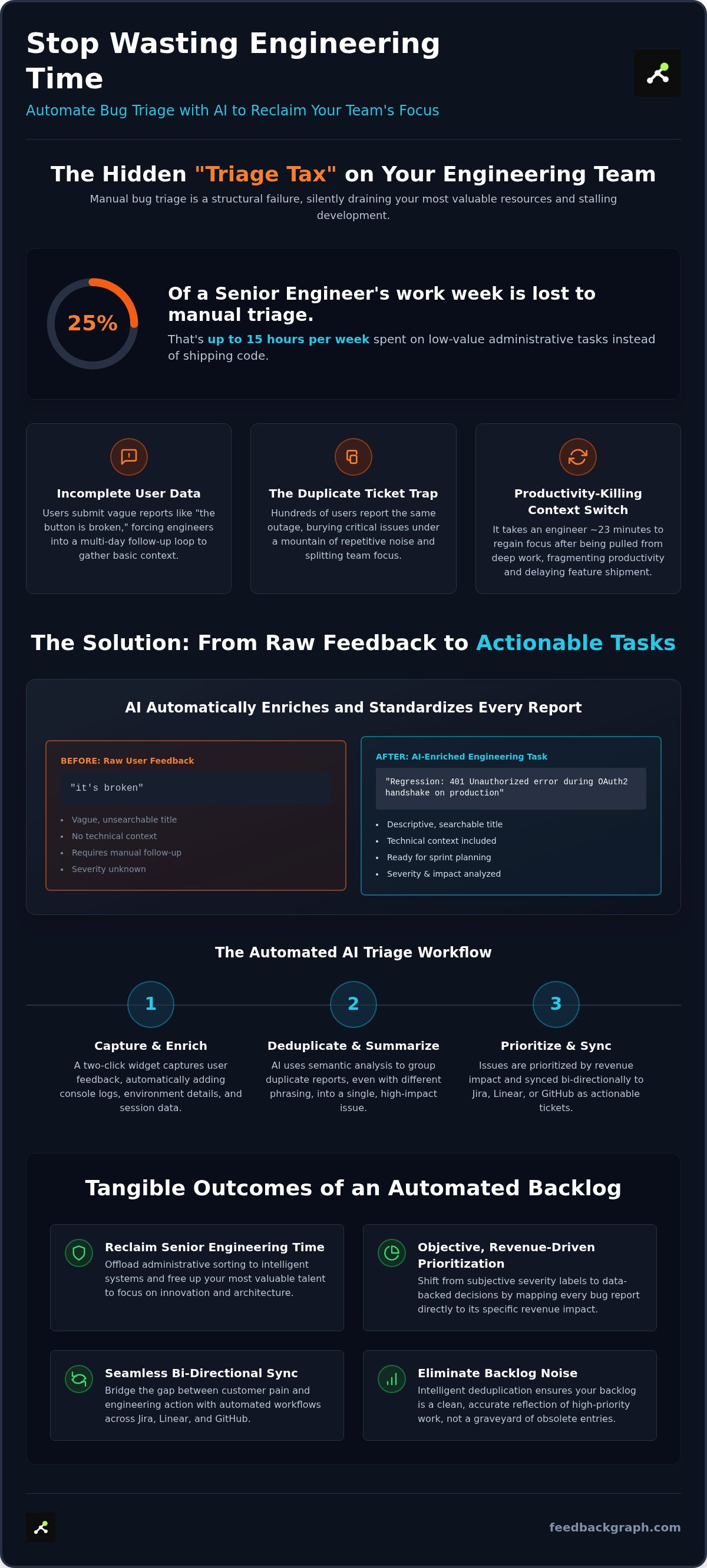
In the current engineering landscape, senior developers are paying a "Triage Tax" that costs your organization 10 to 15 hours of high-value work every week. This isn't just a minor inconvenience; it's a structural failure. When your most expensive talent spends 25% of their time manually sorting tickets, they aren't shipping features or optimizing architecture. They're acting as expensive data entry clerks. As SaaS platforms scale, the sheer volume of user input makes manual oversight impossible to maintain. If you fail to automate bug triage with AI, your development velocity will eventually hit a wall.
The cost extends beyond simple hours. Context switching is a silent productivity killer. Every time an engineer is pulled from deep work to verify a report, it takes approximately 23 minutes to regain their original focus. This constant fragmentation leads to "Data Decay" within your bug tracking system. Reports sit unverified, losing technical relevance as the codebase evolves, eventually turning your backlog into a graveyard of obsolete entries.
The Problem with Incomplete User Data
Users are rarely trained QA professionals. They don't provide console logs, environment details, or clear reproduction steps. Instead, they submit vague titles like "the button is broken." This creates a massive follow-up bottleneck. Manual triage requires engineers to chase users for basic information, turning what should be a quick fix into a multi-day communication loop. Without automated enrichment, your team spends more time gathering data than actually solving the problem.
The Duplicate Ticket Trap
Backlog bloat is often driven by duplicate reports. When a service goes down, hundreds of users might report the same issue. Manual systems struggle to group these signals efficiently, leading to fragmented data. This causes several operational failures:
- Engineers waste hours investigating issues already assigned to other team members.
- Critical, high-impact bugs are buried under a mountain of repetitive noise.
- Strategic visibility is lost because you can't see the true scale of a single failure.
Effective bug tracking requires deduplication at the point of entry. By identifying patterns across multiple reports, you can consolidate feedback into a single, high-fidelity task that reflects the true scope of the problem.
The Mechanics of AI-Powered Triage: From Raw Feedback to Actionable Tasks
AI Bug Triage is the automated engine that captures, enriches, and routes issues without human intervention. It moves beyond simple keyword matching. By using Large Language Models (LLMs), the system parses natural language to extract technical intent from vague descriptions. This process transforms messy user feedback into high-fidelity engineering tasks that are ready for the sprint. Research into an AI-powered bug tracking framework demonstrates that machine learning can now classify issues with significantly higher precision than traditional rule-based systems. These models don't just read text; they understand technical context.
A core component of this workflow is the generation of descriptive, searchable bug titles. When a user submits a report, the AI analyzes the interaction logs and the user's description to create a title that actually means something to a developer. Instead of "it's broken," the system produces "Regression: 401 Unauthorized error during OAuth2 handshake on production." This immediate clarity allows engineers to search the backlog effectively and understand the scope of work before they even open the ticket. See how these mechanics work in a live environment by exploring a customized workflow demo.
Semantic Deduplication: Cleaning the Noise
Backlog noise often stems from the same issue being reported in different ways. One user might report a "login failure," while another describes a "spinning wheel on the auth page." Traditional systems fail to connect these dots. Semantic deduplication is the process of mapping disparate user reports to a single root cause. AI identifies these "near-duplicate" reports by analyzing the underlying meaning and technical signatures rather than just looking for matching words. This groups similar issues into a unified view, providing a clear picture of a bug's total impact on your user base.
Automated Severity and Summarization
Manual severity assignment is often subjective and inconsistent. AI changes this by evaluating report content against your specific business logic and real-time system logs. Current data shows that AI can achieve 85-90% accuracy in severity classification, compared to just 60-70% for manual methods. This objective ranking ensures that high-impact failures move to the front of the line immediately.
The system also generates concise "Executive Summaries" for every ticket. These summaries distill complex reports into actionable bullet points, highlighting the environment, the expected behavior, and the actual failure. This drastically reduces the "Time to Understand" (TTU), a critical engineering metric. When an engineer can grasp the problem in seconds, the path to a resolution becomes much shorter.
Beyond Sorting: Quantifying Revenue Impact for Prioritization
Not all bugs are equal. A minor CSS alignment issue on a free-tier dashboard doesn't carry the same weight as a broken API endpoint for a million-dollar enterprise account. Yet, traditional triage often treats them identically based on arrival time or support agent persistence. To build a truly efficient engineering culture, you must shift from "Squeaky Wheel" prioritization to a "Profit-First" model. When you automate bug triage with AI, you gain the ability to map every incoming report directly to its financial consequence. This ensures that your most expensive talent is always focused on the issues that threaten your bottom line.
Profit-First triage is a necessity for scaling SaaS organizations. By moving away from subjective severity labels, you replace guesswork with hard data. This transition allows your team to move faster while maintaining a clear focus on customer retention. When you automate bug triage with AI, you create a system that thinks like a CFO, evaluating every ticket through the lens of business risk before it ever touches an engineer's desk.
Mapping Bugs to Customer Value
AI-native triage engines integrate directly with your billing stack to identify the dollar value at risk in real time. When a bug is captured, the system cross-references the user's subscription tier and lifetime value. This creates a high-fidelity backlog where issues affecting your most critical accounts automatically rise to the top. This logic follows the same principles found in software for ranking feature requests by revenue, ensuring that engineering resources are always allocated to the highest-leverage tasks. You're no longer guessing which fix will prevent the most churn; you're acting on verified financial data.
Data-Driven Roadmap Decisions
This financial lens transforms how you view your product's weaknesses. Instead of seeing a list of technical failures, you see a map of systemic risks. Triage data becomes a strategic asset that identifies which modules are costing the most in lost revenue or support overhead. Over time, these bug trends evolve into clear feature requests that drive product growth. It's about moving beyond reactive patching. When you Quantify revenue impact of every bug, you can justify major refactors or new features based on their potential to protect and grow your bottom line. This level of visibility turns the engineering department into a direct driver of business value rather than just a cost center.
Strategic Implementation: Integrating AI Triage into Your Workflow
Implementing an automated system requires a methodical approach. You can't simply layer AI over a broken process. To successfully automate bug triage with AI, start by deploying a frictionless capture widget. This ensures high-quality data entry at the source, capturing technical logs and environment details without user effort. High-fidelity input is the foundation of accurate automation; if the data is poor, the triage logic will fail.
Follow these five steps to transition from manual sorting to an AI-native workflow:
- Step 1: Deploy a Capture Widget. Use a two-click tool to gather technical context, console logs, and session data automatically.
- Step 2: Configure Enrichment Rules. Set specific parameters for severity and auto-tagging based on your product's architecture.
- Step 3: Connect Your Stack. Establish a bi-directional sync with Jira, Linear, or GitHub to keep all teams aligned.
- Step 4: Define Routing Logic. Create rules that send issues to the correct dev squads based on the AI's component classification.
- Step 5: Monitor Success. Track the "Triage-to-Fix" ratio to measure how automation is accelerating your resolution cycle.
Bi-directional Sync: The End of Manual Status Updates
Manual status updates are a productivity leak that creates friction between engineering and customer-facing teams. When you connect your feedback loop to your development tools, status changes in Jira reflect back to the customer automatically. This maintains a single source of truth across product and engineering, ensuring everyone knows exactly where a ticket stands in the lifecycle. This synchronization eliminates the need for "status check" meetings and redundant Slack threads. For a deeper look at these connections, consult the 2026 guide to dev tool integrations.
Leveraging MCP Servers for Deep Context
Modern triage requires more than just reading a ticket; it requires deep architectural context. The Model Context Protocol (MCP) allows your AI to access internal documentation and system logs securely. MCP servers act as the "knowledge bridge" between your codebase and your triage AI. By utilizing MCP servers for product management, you give your triage engine the brain power to analyze issues against your specific technical stack. This level of integration ensures the AI understands not just what the bug is, but exactly where it lives within your system architecture.
FeedbackGraph: The AI-Native Engine for Automated Bug Management
FeedbackGraph isn't a passive repository for user complaints. It's an active engineering partner designed to automate bug triage with AI by focusing on technical enrichment rather than just support ticket volume. While other platforms prioritize the support agent's inbox, FeedbackGraph prioritizes the developer's sprint. It acts as the bridge between raw customer pain and high-fidelity engineering action. By utilizing Jira and Linear integrations, it ensures that every enriched bug report flows directly into your existing ecosystem without manual intervention. This system doesn't just sort issues; it translates them into a language your engineers actually speak.
The platform's AI engine specifically generates descriptive titles and objective severity scores for every entry. This removes the ambiguity that typically stalls the triage process. Because the system understands the technical context of your product, it provides the clarity needed to move from report to resolution in record time. FeedbackGraph stands alone as the only solution that ranks every bug by its direct impact on your Monthly Recurring Revenue (MRR), turning your backlog into a profit-driven roadmap.
Frictionless Capture for High-Fidelity Data
The "Two-Click" approach is the core of our data integrity strategy. Traditional bug reporting fails because long, manual forms discourage users from providing detail. FeedbackGraph replaces these forms with a widget that captures console logs, environment metadata, and session context automatically. This saves hours of engineering time previously spent on manual follow-ups. When you have high-fidelity data from the start, the AI can perform more accurate deduplication and summarization. You can explore these visual capture details in the FeedbackGraph features overview.
Closing the Loop with AI
Automation shouldn't stop once a bug is assigned. FeedbackGraph closes the feedback loop by automating status updates for your customers. When a developer merges a fix in GitHub or closes a ticket in Linear, the system can notify the affected users automatically. This proactive communication reduces support ticket volume by up to 40% because users aren't left wondering if their issue was heard. This level of transparency builds trust and protects your brand's reputation. For more on how these workflows integrate into a broader strategy, see our AI bug reporting tool pillar. It's time to stop managing noise and start shipping solutions.
Future-Proof Your Engineering Workflow
Reclaiming 15 hours a week for senior developers isn't just about efficiency; it's about protecting your innovation cycle. By shifting to a profit-first triage model, you ensure that every engineering hour is spent protecting your MRR rather than wrestling with vague user reports. The transition to AI-native management is a strategic move toward a cleaner backlog and faster resolution times. You've seen how revenue-based ranking eliminates the "squeaky wheel" bias. Now, it's time to implement these mechanics to protect your team's focus and drive measurable business value.
Deciding to automate bug triage with AI allows you to replace manual friction with high-fidelity, revenue-mapped tasks. Trusted by engineering teams globally, FeedbackGraph provides the structural integrity needed to scale. With bi-directional sync for Jira, Linear, and Slack, your single source of truth remains intact across the entire organization. Stop paying the triage tax and start shipping code that matters.
Build a more resilient engineering culture where data, not noise, dictates your roadmap. Your team is ready to move faster; give them the tools to do it.
Frequently Asked Questions
How accurate is AI at classifying bug severity?
AI classification is highly precise because it evaluates reports against objective business logic and real-time system data. While manual methods often suffer from inconsistent labeling, automated systems maintain a uniform standard across every ticket. This objective approach ensures that high-priority issues never get buried under minor UI reports. By choosing to automate bug triage with AI, you eliminate the human bias that often leads to mismanaged backlogs and delayed critical fixes.
Does automating bug triage replace the need for QA engineers?
Automation is a force multiplier for your quality assurance team rather than a replacement. It handles the high-volume, low-complexity work of sorting and deduplicating raw feedback. This transition frees up your QA engineers to focus on high-impact activities like exploratory testing and complex root cause analysis. By offloading the administrative burden of triage, your team can spend more time ensuring the structural integrity of your codebase.
Can AI triage tools integrate with Jira and Linear simultaneously?
FeedbackGraph supports bi-directional sync with multiple platforms, including Jira and Linear, at the same time. This flexibility is essential for organizations where different squads utilize different project management tools. The system acts as a centralized intelligence layer, routing enriched bug reports to the specific workspace that handles a particular product component. Status updates then flow back to the original reporter automatically, regardless of which tool the developer uses to close the ticket.
How does AI handle duplicate bug reports with different descriptions?
The system uses semantic deduplication to identify issues that share the same underlying root cause, even if the user descriptions vary wildly. Instead of looking for exact word matches, the AI analyzes the technical intent and captured metadata to group "near-duplicate" reports. This prevents backlog bloat and provides a unified view of an issue's impact. By consolidating these signals, the platform ensures that engineers don't waste time investigating the same bug twice.
Is it possible to rank bugs based on the revenue of the reporting customer?
FeedbackGraph allows you to rank bugs by their direct impact on your Monthly Recurring Revenue (MRR). By integrating with your billing data, the system identifies which bugs are affecting your most valuable enterprise accounts. This "Profit-First" model ensures that engineering resources are always allocated to the tasks that protect your bottom line. It transforms the backlog from a list of technical chores into a strategic roadmap for customer retention.
What technical data does an AI bug reporting tool capture automatically?
The two-click capture widget automatically gathers comprehensive technical context to ensure engineers have everything they need to reproduce the issue. This includes console logs, network requests, environment metadata, and session details. By capturing this data at the point of failure, the tool eliminates the need for manual follow-up questions. This high-fidelity input allows the AI to generate more accurate summaries and severity assignments, accelerating the entire "triage-to-fix" cycle.
How long does it take to set up an AI-powered triage workflow?
Most teams can deploy a basic triage workflow in under an hour. The process involves installing the capture widget, connecting your project management tools like Jira or Linear, and defining your initial enrichment rules. Once the bi-directional sync is established, the system begins processing incoming reports immediately. While the AI continues to learn and refine its logic over time, the immediate reduction in manual sorting provides instant ROI for senior engineering leads.
Can AI triage handle bug reports in multiple languages?
Modern triage engines are natively multilingual and can process feedback in dozens of languages without manual translation. The AI parses the user's intent and generates standardized technical summaries for your engineering team. This is a massive advantage for global SaaS products that need to automate bug triage with AI across different regions. It ensures that a critical report submitted in any language is prioritized and understood by your developers in seconds.


