

A bug title isn't just a label. It is the critical metadata that determines your engineering team's ROI and triage speed. Most backlogs are buried under vague reports like "error on checkout" or "app crashed," forcing senior developers to waste hours on manual investigation. Implementing a professional AI bug title generator stops this friction at the source. It converts raw, messy user feedback into precise, technical headlines that your team can actually use. This isn't just about better naming; it is about reclaiming the hours lost to administrative overhead.
You know the frustration of a cluttered backlog where duplicate issues hide real priorities and stall your roadmap. It's an expensive drain on resources that delays critical feature releases. This article teaches you how to transform those vague reports into actionable engineering tickets using automated intelligence. We will look at how FeedbackGraph uses AI-powered deduplication and bi-directional sync with tools like Linear and GitHub to streamline your workflow. By the end, you'll see exactly how to fix your backlog debt and keep your engineers focused on shipping code.
Key Takeaways
- Stop wasting engineering hours on manual triage by understanding how vague titles directly inflate your Mean Time to Resolution (MTTR).
- Deploy an AI bug title generator to automatically parse technical context from user feedback into clear, actionable engineering tickets.
- Master the anatomy of a perfect ticket by focusing on technical precision—[Component] + [Observed Behavior]—rather than generic, non-technical headlines.
- Build a seamless automation pipeline that syncs enriched, deduplicated bug data directly into your existing Jira or Linear workflow.
- Learn how to scale your triage process by ranking issues based on revenue impact and eliminating duplicate entries automatically.
The High Cost of Poorly Titled Bug Reports
Vague bug titles are a silent drain on engineering velocity. When a report arrives with a headline like "app is broken" or "error on page," the triage process immediately stalls. This lack of clarity forces engineers to stop deep work to play detective. They must hunt for logs, request screenshots, and cross-reference timestamps just to understand the basic nature of the problem. It's a reactive cycle that turns your bug tracking system into a source of frustration rather than a tool for progress.
There's a direct, measurable relationship between title quality and Mean Time to Resolution (MTTR). A precise title allows for immediate routing to the correct team. A vague one ensures the ticket bounces between departments for days. Beyond speed, poor naming conventions are the primary cause of backlog bloat. Without a standardized AI bug title generator, identical issues are logged multiple times under different descriptions. This creates a mountain of technical debt that obscures real priorities and discourages the team. You can't fix what you can't identify, and you can't prioritize what you can't see.
A cluttered, disorganized backlog creates significant psychological friction. High-performing developers value efficiency and clear goals. When they're met with a wall of "messy" tickets, motivation drops. The backlog stops being a roadmap and starts feeling like a graveyard of unresolved problems. This atmosphere leads to burnout and a culture where bugs are ignored because the cost of understanding them is too high.
Quantifying the Triage Tax
Every minute a Product Manager spends deciphering a user report is a minute lost to strategic planning. Triage Tax is the cumulative lost productivity from manual issue clarification. For a mid-sized engineering team, this tax can consume dozens of hours per sprint. Poor titles also mask the severity of critical failures. A "minor UI glitch" might actually be a symptom of a breaking database connection. If the title doesn't reflect the technical reality, the fix stays at the bottom of the pile until the system fails completely.
The Searchability Problem
Manual titles make historical data useless. If an engineer fixed a similar race condition six months ago, they won't find it by searching for "bug." Standardized titles created by an AI bug title generator ensure that every ticket is indexed with technical precision. This turns your workspace into a searchable knowledge base. You can find more ways to clean up your workflow in our guide on how to reduce engineering backlog noise. Automated naming ensures that Jira, Linear, and GitHub remain sources of truth rather than dumping grounds for noise.
What is an AI Bug Title Generator and How Does It Work?
An AI bug title generator is a specialized Large Language Model (LLM) designed to synthesize raw user feedback into high-density technical summaries. While generic headline makers focus on engagement, technical issue generators prioritize resolution. These systems ingest multiple data streams simultaneously. They don't just read the user's text; they parse browser metadata, environment variables, console logs, and visual cues from screenshots to reconstruct the failure event. By applying NLP and Machine Learning Techniques, the system identifies the specific entities involved in a crash or glitch. It isolates the "who" (the user segment or persona), the "what" (the specific failure state), and the "where" (the component or endpoint) with surgical precision.
The intelligence lies in the multi-modal analysis. By correlating a user's complaint with the associated console logs, the AI distinguishes between a local client-side error and a global server outage. This distinction is the difference between a low-priority UI ticket and a P0 incident. You can see this technical parsing in action to understand how it fits your specific stack and reduces manual triage overhead.
Context-Aware Extraction
Modern AI understands the underlying architecture of your application. It identifies whether a user is complaining about a "broken button" or if the issue is actually a 403 Forbidden error on the /api/v1/checkout endpoint. This process translates vague, non-technical language into engineering-ready terminology. The output follows a strict "Action-Object-Context" structure. Instead of "I can't pay," the generator produces "[Fails to Initialize] [Payment Gateway] [Checkout Page]." This format ensures that any developer reading the title instantly knows the scope and environment of the issue without clicking into the ticket details.
Deduplication Logic
A core function of technical AI is preventing backlog bloat through semantic deduplication. Traditional bug tracking relies on exact keyword matches. This often fails when two users describe the same crash using different words. Semantic logic analyzes the technical footprint and intent of a report rather than just the text. It compares the new issue against existing backlog entries in real-time. If a similar stack trace or UI failure pattern exists, the AI flags it as a duplicate. You can explore how FeedbackGraph features automate this enrichment and deduplication to keep your workspace clean and actionable.
How to Implement AI Title Generation in Your Workflow
Transitioning from manual triage to an automated pipeline requires a structured approach. You don't just "add AI" to your stack; you build a data flow that connects customer pain to engineering action. A successful implementation follows a five step framework: capture, transform, route, enrich, and sync. By automating the front end of your bug reporting process, you ensure that every ticket entering your backlog is pre-validated and technically sound. This shift allows your team to move away from administrative gatekeeping and back to high-value feature development.
The core of this transition is the AI bug title generator. It acts as the intelligent layer that translates raw inputs into the standardized language of your engineering organization. When configured correctly, this system follows your specific naming conventions, ensuring that every ticket in Linear or Jira looks and feels like it was written by a senior engineer. This consistency is essential for maintaining a high-velocity development cycle in 2026.
Step 1: Capture High-Fidelity Data
The output of any generator is only as good as the data it consumes. Relying on a simple text box for user reports is a recipe for vague tickets and manual follow-ups. You must implement capture mechanisms that grab browser metadata, environment variables, and console logs at the moment of the report. Using an in-app widget ensures this technical context is bundled with the user's description. This high-fidelity data provides the necessary context for the AI to generate precise titles. You can explore various capture strategies in our overview of bug tracking use cases to see how to best position these tools within your product.
Step 2: Automate the Transformation
Once you have the data, the AI takes over to map raw feedback into structured fields. This involves more than just summarizing text. The system analyzes the logs and metadata to assign severity levels and categorize the issue by component. This application of AI in software development is what separates modern teams from those still stuck in manual triage. For critical system failures, you can set up a "human-in-the-loop" verification step. This ensures an engineer or PM reviews the generated title and severity before it hits the production backlog. Managing this flow effectively requires a dedicated AI bug reporting tool that understands the nuances of technical triage.
Step 3: Route to Engineering Tools
The final step is the bi-directional sync. An AI bug title generator shouldn't operate in a vacuum. It must push generated tickets directly into Jira, Linear, or GitHub. This integration preserves the link between the engineering ticket and the original customer voice. When an engineer moves a ticket to "Done," the status update should flow back to the customer automatically. This creates a closed-loop system where reporters feel heard and engineers never have to leave their primary workspace to update a stakeholder.
div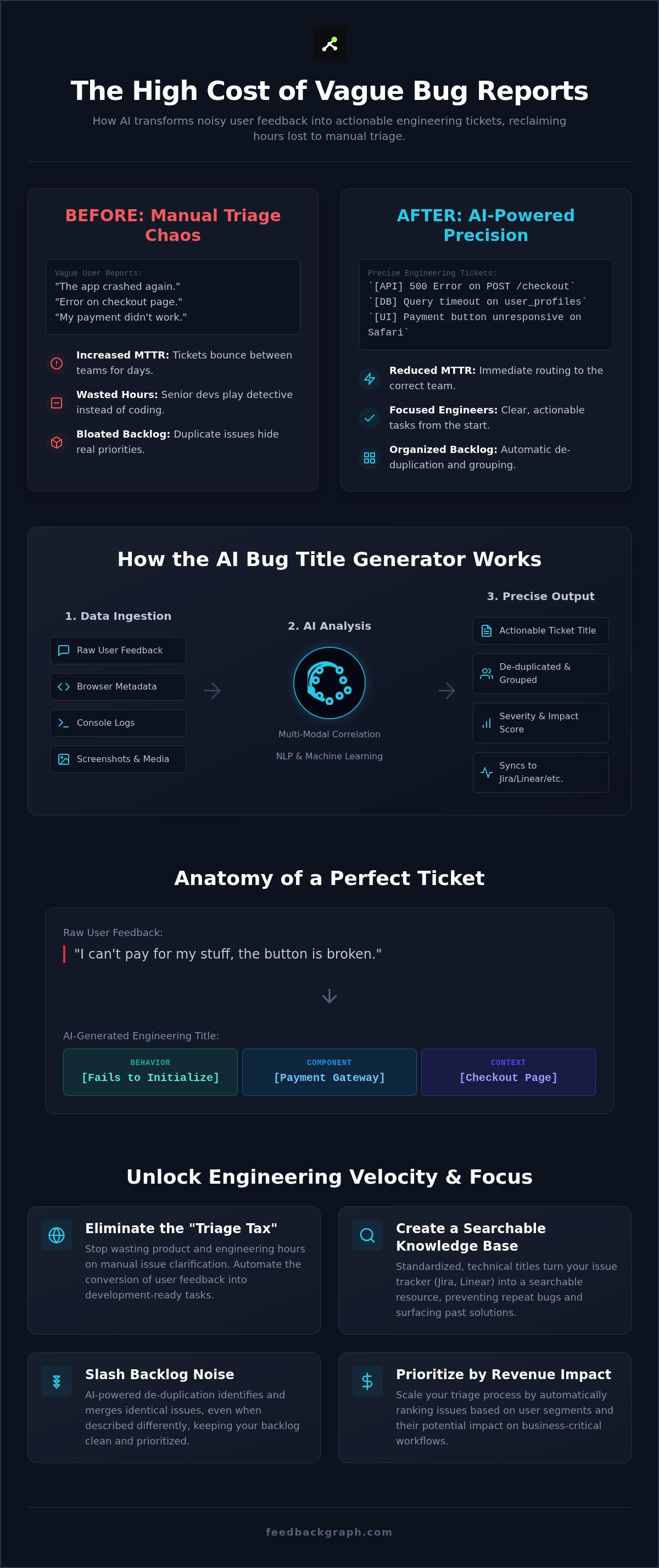
Evaluating AI Title Quality: Precision vs. Catchiness
Marketing tools optimize for "catchiness" to drive clicks. Software engineering tickets require the opposite. A "catchy" bug title is a red flag that suggests a lack of technical depth. In 2026, an effective AI bug title generator prioritizes semantic precision over engagement. It ignores the user's emotional state and focuses on the underlying system failure. This objective approach ensures that every ticket is an actionable instruction rather than a vague complaint. By removing the bias of the reporter, you create a standardized language that your entire engineering organization can trust.
The anatomy of a perfect bug title follows a rigid structure: [Component] + [Observed Behavior] + [Expected Condition]. This format allows an engineer to understand the scope of the problem in less than two seconds. By stripping out adjectives like "frustrating" or "slow" and replacing them with data points like "Safari/iOS" or "3500ms latency," the AI reduces the cognitive load on your team. This noise reduction is critical for high-volume backlogs where every second of investigation adds to your Mean Time to Resolution (MTTR). Including environment data directly in the title prevents the "works on my machine" stalemate that plagues manual triage cycles.
From "It Broke" to "Checkout API: 500 Error on Guest Pay"
Real-world user reports are often incomplete. A customer might submit a ticket titled "it broke," which provides zero value to the triage team. An AI bug title generator cross-references that report with session metadata to produce a headline like "Checkout API: 500 Internal Server Error during Guest Checkout." While a manual report might read "payment failed again," an AI-generated title specifies "Stripe Integration: Timeout error during 3D Secure verification on Chrome/Windows." This level of detail accelerates the "Time to First Response" because the ticket can be automatically routed to the correct backend team without a PM intervention. Precision acts as a filter, ensuring that only valid, reproducible issues reach your developers.
Revenue-Based Title Enrichment
Precision isn't just technical; it's financial. The best generators don't just describe what happened; they describe who it happened to. By linking tickets to your CRM, the AI can append the dollar value of the reporting customer directly to the issue headline. This allows you to rank bugs by the revenue impact they represent rather than just the order they were received. A crash affecting a $50k/year enterprise account should always sit above a UI glitch reported by a free-tier user. You can learn more about this prioritization logic in our guide on Revenue-Based Feature Ranking. This enrichment turns your backlog into a profit-first roadmap that aligns engineering effort with business outcomes.
Scaling Your Triage with FeedbackGraph
FeedbackGraph transforms the chaotic intake of user reports into a streamlined, high-velocity pipeline. While a basic AI bug title generator might solve the naming problem, it doesn't address the underlying triage bottleneck. FeedbackGraph functions as a comprehensive AI bug title generator and triage engine, providing a full automation layer for your engineering workflow. It enriches every report with severity assessments and technical summaries, then routes them to your existing stack with bi-directional sync. Whether your team lives in Jira, Linear, or GitHub, the data remains consistent and actionable across all platforms. This integration ensures that Slack notifications aren't just noise; they are structured alerts that drive immediate engineering progress.
Maintaining a lean backlog requires more than just better titles. FeedbackGraph uses automated deduplication to identify semantic similarities between new reports and existing tickets. This prevents the accumulation of duplicate entries that typically clutter a growing product's roadmap. By applying revenue-based feedback ranking, the platform turns your bug tracking into a profit center. You stop guessing which issues matter most and start fixing the bugs that represent the highest financial risk. This data-driven approach aligns your technical efforts with tangible business growth.
The End of Manual Triage
The traditional "Triage Meeting" is a relic of manual processes that consumes hours of productive time. FeedbackGraph eliminates these sessions through automated enrichment and intelligent routing. By the time an engineer sees a ticket, it already contains the necessary logs, metadata, and a precise title. FeedbackGraph’s MCP server also allows for seamless integration with modern AI agents, enabling your automated tools to query and update feedback data autonomously. This creates a self-sustaining ecosystem where information flows without friction. You can find more strategies to connect customer feedback to dev tools in our comprehensive 2026 guide.
Getting Started with AI-First Reporting
Transitioning to an intelligent dashboard ends the era of manual spreadsheets and fragmented feedback. You can deploy an AI-enriched feedback widget in minutes, immediately improving the quality of incoming data. This setup provides a single source of truth for your product, engineering, and customer success teams. It's time to stop managing noise and start shipping value. Focus your team on the features and fixes that move the needle for your bottom line and user experience.
Start your free trial of FeedbackGraph today
Reclaim Your Engineering Velocity in 2026
Triage debt is a choice, not a necessity. By deploying a technical AI bug title generator, you stop the constant leak of engineering hours spent on manual clarification. We've explored how precise naming conventions and automated metadata capture transform vague user reports into actionable, high-fidelity tickets. This transition doesn't just clean up your workspace; it fundamentally accelerates your development lifecycle. Moving forward, your team's success depends on how effectively you link these technical fixes to tangible business outcomes.
FeedbackGraph provides the essential infrastructure to make this shift permanent. With bi-directional Jira and Linear sync, AI-powered deduplication, and revenue-impact ranking for every bug, your backlog becomes a strategic asset rather than a source of friction. You don't have to settle for a messy environment that stalls your roadmap and frustrates your best talent. Building a profit-first engineering culture starts with the data you capture today.
It's time to empower your developers to focus on what they do best: shipping high-impact features. Take the first step toward an automated, noise-free future and watch your team's productivity surge.
Frequently Asked Questions
What is an AI bug title generator?
An AI bug title generator is a specialized tool that uses Large Language Models to transform messy user feedback and technical metadata into clear, standardized engineering headlines. It parses raw data like console logs and browser environment details to create technical summaries. This automation eliminates the ambiguity of vague user reports and ensures every ticket is technically actionable from the moment it's created.
How does an AI bug title generator improve engineering efficiency?
It improves efficiency by drastically reducing the time spent on manual triage and investigation. By providing precise, descriptive titles, the tool allows engineers to understand the scope and location of a bug instantly. This clarity accelerates Mean Time to Resolution (MTTR) and prevents senior developers from wasting time on administrative clarification or hunting for missing context.
Can an AI bug title generator identify duplicate issues?
Yes, advanced generators use semantic similarity analysis to flag potential duplicates in real-time. Instead of relying on exact keyword matching, the AI compares the technical footprint and intent of new reports against existing backlog entries. This keeps your development environment lean and prevents redundant work on the same system failure, saving significant engineering resources.
Does an AI bug title generator work with Jira or Linear?
Professional tools like FeedbackGraph offer bi-directional sync with industry-standard platforms including Jira, Linear, and GitHub. This integration ensures that enriched bug data flows directly into your existing project management tools. Status updates and comments then sync back to the original feedback source automatically, maintaining a closed-loop communication system without manual data entry.
What data does the AI need to generate an accurate bug title?
The generator requires a combination of user descriptions and high-fidelity technical metadata to be effective. Key inputs include browser environment details, console logs, network requests, and screenshots. This multi-modal data allows the AI to correlate a user's complaint with the specific API endpoint or UI component that failed, resulting in a surgical level of descriptive precision.
Is AI-generated bug reporting more accurate than manual reporting?
AI-generated reporting is more accurate because it removes human bias and emotional language from the triage process. While users often submit vague or subjective titles like "it's broken," the AI focuses on objective technical facts. This results in standardized tickets that provide a reliable, searchable source of truth for the entire engineering organization.
How do I ensure the AI doesn’t misinterpret technical bugs?
You can maintain accuracy by implementing a human-in-the-loop verification step for critical or complex issues. Most systems allow PMs or lead engineers to review and adjust generated titles before they are pushed to the production backlog. This oversight combines the speed of automation with the nuanced judgment of your technical team to ensure 100% architectural alignment.
Can I customize the naming convention of the generated titles?
Yes, you can configure the AI to follow your team's specific naming architecture and structural preferences. Whether you use a [Component] + [Action] format or a [Severity] + [Description] model, the generator adapts its output to match your internal standards. This consistency ensures that every ticket feels familiar to your developers and fits perfectly into your established workflow.


