

What if your AI assistant didn't just summarize meetings, but actually managed your backlog by pulling live data from Jira and Linear? Most product managers in India's fast-paced tech hubs spend nearly half their day trapped in a loop of context switching and manual data entry. You're likely tired of siloed data making your AI insights feel disconnected from reality. It's time to stop acting as a human bridge between your tools and your intelligence layer.
Implementing an MCP server for product management changes the game by creating a neural bridge between your AI agents and your production environment. You'll discover how to transform your assistant into a powerful partner that syncs directly with your existing stack to automate feedback triage and speed up roadmap planning. This guide covers the shift to stateless architecture in the latest 2026 protocol updates and provides a clear path to building a unified, data-driven PM workflow that eliminates friction and maximizes output.
Key Takeaways
- Understand how an MCP server for product management creates a secure interface for AI agents to read and write directly to your technical backlog.
- End manual data entry and context switching by providing AI assistants with real-time access to your Linear and Jira data.
- Master the setup of MCP-compatible clients like Claude Desktop and Cursor to bridge the gap between LLMs and your production tools.
- Use FeedbackGraph to rank feature requests based on customer revenue and impact instead of gut feeling.
What is an MCP Server for Product Management?
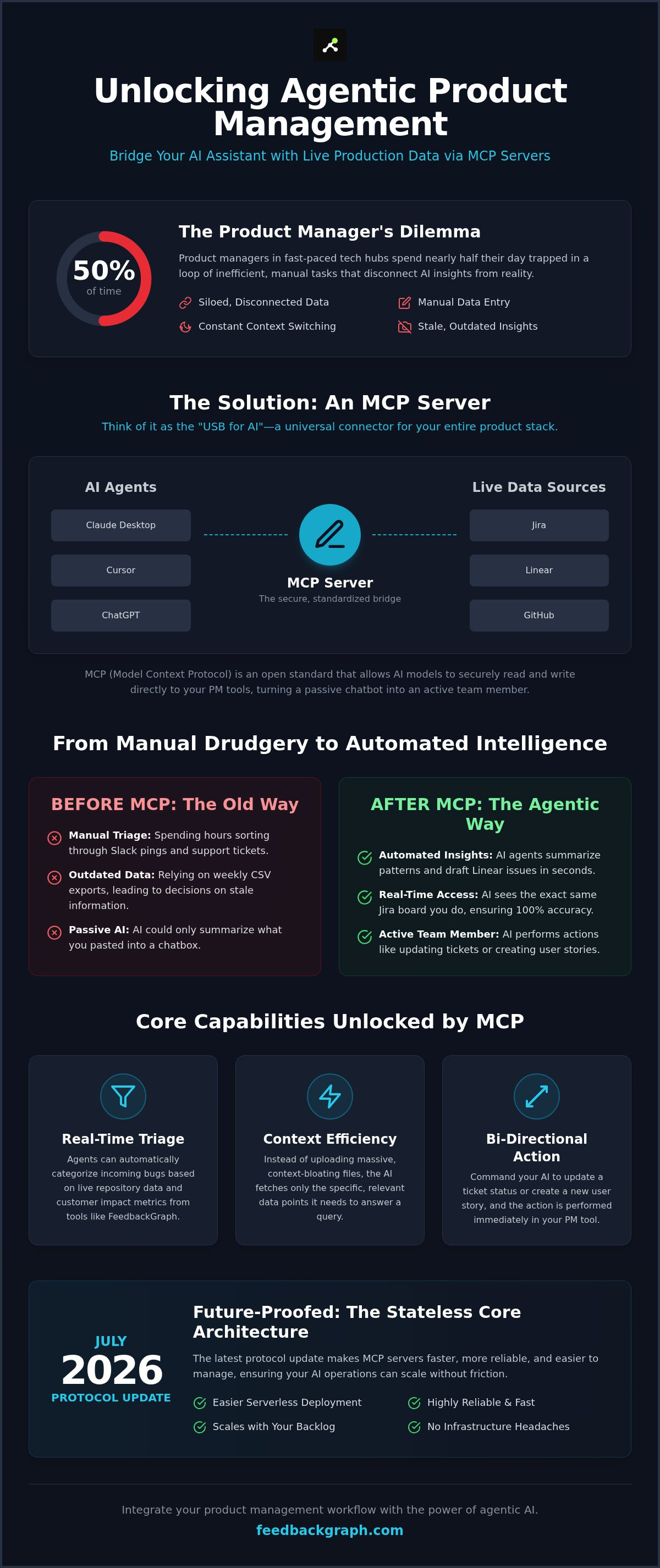
A Model Context Protocol (MCP) server is an open standard that allows AI models to securely access your product management tools. In the past, AI was limited to what you could copy and paste into a chat box. By 2026, the landscape has shifted. An MCP server for product management enables AI to read and write directly to your backlog, turning a passive chatbot into an active team member. It isn't just about talking about your product; it's about the AI performing actions within your workflow.
The system relies on three core components that work in tandem to eliminate manual overhead. The Host is your AI client, such as Claude or ChatGPT. The Protocol is the Model Context Protocol (MCP) itself, acting as the secure communication layer. Finally, the Server is the connector that exposes your specific data sources, like Jira, Linear, or GitHub, to the AI agent. This architecture ensures that your data remains under your control while providing the AI with the context it needs to be useful.
The 'USB for AI' Analogy for Product Teams
Think of MCP as the universal connector for your software stack. Before this standard, connecting an AI to a new tool required building custom API integrations for every single prompt or workflow. This was expensive and slow. MCP acts as a standardized interface between LLMs and external data sources, allowing you to plug your PM tools into any compatible AI model instantly. It removes the need for bespoke middleware, letting you focus on product strategy rather than data plumbing. You can find technical implementation details in the FeedbackGraph documentation to see how these connections are structured.
Why PMs are Adopting MCP in 2026
The industry has moved toward agentic workflows where AI performs multi-step tasks autonomously. For a product manager, this means the AI sees the exact same Jira board or Linear project you do in real time. There's no lag and no outdated document uploads. This visibility allows for several key advantages:
- Real-time Triage: Agents can categorize incoming bugs based on live repository data and customer impact.
- Context Efficiency: Instead of bloating the context window with massive file uploads, the AI fetches only the specific data points it needs to answer a query.
- Bi-directional Action: You can ask an AI to update a ticket status or create a new user story based on a meeting transcript, and it happens immediately in your PM tool.
By July 2026, the protocol transitioned to a stateless core architecture. This update makes servers easier to deploy on modern serverless infrastructure. It ensures that your MCP server for product management remains fast and reliable even as your backlog grows to thousands of issues. This technical shift allows PM teams to scale their AI operations without worrying about infrastructure maintenance or session timeouts.
Eliminating Context Switching: The Strategic Value of MCP
Context switching isn't just a minor annoyance; it's a strategic drain on product velocity. For a PM in India's competitive SaaS market, every minute spent syncing data between tabs is a minute lost on user growth. An MCP server for product management provides a direct pipeline to your data, ending the era of manual copy-pasting. You no longer need to act as a human middleware between your AI and your backlog. This integration allows you to query your entire product history through a single natural language interface, accelerating decision-making from hours to seconds.
The transition from static data to live access is critical for accuracy. Uploading a CSV of bug reports from last week is useless for a sprint that changed this morning. IBM's explanation of MCP highlights how this protocol enables models to retrieve specific, current information rather than relying on outdated training data. By grounding every response in real-time facts, you eliminate the risk of the AI referencing completed tasks or non-existent issues. This shift frees you from the grind of manual triage, allowing you to refocus on high-level product vision and strategy.
From Manual Triage to Automated Insights
Product managers can now leverage AI agents to connect customer feedback to dev tools automatically. Instead of reading through 100+ Slack pings or customer support tickets, an agent uses the MCP connection to summarize patterns and draft Linear issues in seconds. This cross-platform visibility across GitHub, Jira, and communication channels ensures no critical bug remains buried in the noise. It transforms a reactive workflow into a proactive one where insights are generated the moment data enters the system.
Real-Time Data Access for AI Agents
There is a fundamental difference between an AI trained on data and an AI accessing it via MCP. Training is static; MCP is dynamic. Real-time access prevents AI hallucinations in roadmap planning by grounding every recommendation in the latest sprint updates and live bug reports. When the AI "sees" the same Jira board you do, its suggestions remain relevant to your current capacity and technical debt. To see this real-time synchronization in action, you can book a technical demonstration. This level of precision ensures that your AI partner isn't just guessing based on patterns but acting on verified, live information from your production environment.
Top 7 MCP Servers for Modern Product Teams
By July 2026, the Claude Connectors Directory has expanded to over 950 servers. Selecting the right MCP server for product management is now a matter of choosing which data streams you want your AI to influence. These servers act as specialized plugins that grant AI models the authority to perform tasks across your stack. They move beyond simple data retrieval, enabling agents to execute complex workflows across multiple platforms simultaneously. This ecosystem allows you to build a custom intelligence layer that fits your specific development lifecycle.
Issue Tracking and Backlog Management Servers
Linear and Jira remain the primary engines for ticket management. Their MCP implementations allow AI agents to create user stories, update ticket statuses, and assign tasks based on real-time conversations. You can optimize this workflow by using the FeedbackGraph bug tracking use case. This ensures your AI isn't just creating tickets, but feeding them with enriched data that includes customer sentiment and technical context. It prevents the "garbage in, garbage out" problem that plagues many basic AI integrations.
The FeedbackGraph MCP server stands out by connecting AI to revenue-ranked customer feedback. This allows your agent to prioritize a backlog based on actual customer spend rather than just ticket volume. When you combine this with GitHub's MCP server, you bridge the gap between product requirements and code commits. AI can verify if a feature described in a PRD has actually been merged into the main branch, effectively automating your 'Definition of Done' checks. This cross-tool verification ensures that what you planned is what was actually delivered to production.
Analytics and Feature Flag Monitoring
Visibility into live production environments remains a major hurdle for product teams. The LaunchDarkly MCP server solves this by allowing you to ask your AI assistant which features are currently live for specific user segments. It queries the feature flag state directly, eliminating the need to navigate complex dashboards during a high-pressure sync meeting. You get immediate answers about release status without pinging an engineer.
Integrating a PostHog or Mixpanel MCP server brings product analytics directly into your AI prompts. You can ask the agent to correlate a recent feature release with immediate usage drops or engagement spikes. This real-time visibility ensures your roadmap adjustments are based on evidence, not intuition. Finally, Google Drive and Notion MCP servers act as the knowledge glue. They allow AI to find product specs and PRDs without you searching through nested folders. This ensures every strategic decision is supported by the most recent version of your internal documentation, keeping the entire team aligned on the latest vision.
How to Set Up and Use an MCP Server in Your Workflow
Deploying an MCP server for product management is a configuration task, not a coding project. You don't need to be a developer to bridge your AI assistant to your production environment. By following a structured implementation path, you can move from a disconnected chat interface to a fully integrated product partner in less than ten minutes. This process creates a secure, standardized link between your intelligence layer and your operational data.
- Step 1: Choose your client. Download Claude Desktop or an IDE like Cursor. These are the primary hosts for MCP servers as of August 2026.
- Step 2: Locate the config. Open your
mcp_config.jsonfile. On macOS, this is typically found in your Application Support folder under the Claude directory. - Step 3: Authenticate. Add your API keys and server URLs for tools like Jira, Linear, or GitHub. Ensure you use environment variables if your specific server setup requires them.
- Step 4: Initialize. Restart your AI client. You should see a tool icon or a confirmation message indicating that the new capabilities are active and ready for use.
- Step 5: Execute. Start prompting. Use commands like "Check my Linear backlog for all high-priority bugs" to verify that the bi-directional connection is functioning correctly.
Choosing Your AI Client for MCP
Claude Desktop remains the leading choice for product managers due to its stable support for the latest 2026 stateless protocol updates. It offers a clean interface for non-technical users while handling complex data retrieval in the background. For technical PMs who work closely with engineering teams, Cursor is an emerging powerhouse. It leverages MCP to provide "product-aware" coding assistance, allowing you to bridge the gap between PRDs and actual implementation. Always check if your company's LLM provider supports the 2026-07-28 specification to ensure your workflow remains future-proof.
Security and Data Privacy Considerations
Security is paramount when connecting AI to your proprietary roadmap. Local MCP servers are generally safer for sensitive product data because the processing happens on your machine rather than a third-party cloud. When managing API permissions, always follow the Principle of Least Privilege. Grant your AI agents only the read or write access they strictly need for their specific tasks. This ensures that your internal feedback and sensitive roadmap data stay within your corporate firewall. Protecting your intellectual property is as important as the efficiency gains you achieve through automation.
The product manager's role is evolving from manual data coordination to strategic orchestration. By 2026, the standard has moved beyond simple data capture. Using an MCP server for product management allows you to transition into an agentic workflow where your AI doesn't just suggest ideas; it executes them. FeedbackGraph acts as the intelligent bridge that powers autonomous action across your entire toolchain, transforming how teams handle rapid growth in India's competitive software market.
AI-Powered Triage Meets MCP
FeedbackGraph enriches incoming data before an AI agent even processes a request. It performs AI-powered deduplication and severity tagging as pre-requisites for any effective protocol usage. Without this layer, AI agents often struggle with noisy or redundant inputs that waste compute and time. You can explore the underlying engine by reviewing the FeedbackGraph features page. This structured approach ensures that when your AI agent queries the server, it receives high-quality context rather than raw, unorganized feedback. By cleaning the data at the source, you enable the AI to make more accurate decisions about what needs immediate attention.
Automating the Feedback-to-Ticket Pipeline
You can now use natural language to move high-value items from 'Feedback' to 'Committed' status instantly. Bi-directional sync ensures that as a ticket moves through Jira or Linear, the customer who requested the feature is updated automatically via Slack or email. This closes the loop without human intervention. Revenue-based feedback ranking turns the backlog from a cost center into a profit driver by ensuring every development hour is spent on the most financially impactful features. Instead of guessing based on ticket volume, you ask the AI: 'Which feature request represents the highest total contract value for our Indian enterprise segment?'
The ultimate outcome is the 'Autonomous Triage' workflow. A user submits a bug through a widget; FeedbackGraph identifies the revenue impact, deduplicates it against existing issues, and the MCP server creates a prioritized Jira ticket. This happens without a PM ever touching the data. It allows you to focus on product strategy and long-term vision while the AI handles the operational heavy lifting. This automation ensures that your development team always works on the most valuable tasks, maximizing the ROI of every sprint.
Transitioning to an Agentic Product Strategy
The shift toward agentic workflows is the 2026 reality for high-growth Indian tech teams. Bridging your AI assistant to your production tools eliminates the friction of context switching and manual data entry. Implementing an MCP server for product management moves your workflow from passive summaries to active, bi-directional synchronization. This architecture ensures every bug report and feature request is grounded in live data rather than outdated documentation.
Leveraging revenue-based feedback ranking and AI-powered bug triage allows your team to focus strictly on high-impact work. Seamless Jira and Linear integrations mean your roadmap updates in real time as customer needs evolve. You are no longer managing a static backlog. You are orchestrating an intelligent system that prioritizes growth and technical integrity.
Take the first step toward an automated, profit-focused product lifecycle. Your team deserves a workflow built for speed and precision.
Frequently Asked Questions
Is an MCP server the same as an API integration?
No, an MCP server isn't a direct replacement for an API but rather a standardized interface that sits on top of it. While a traditional API integration requires custom code for every tool, MCP provides a universal language for AI models to communicate with those tools. This architecture allows you to connect multiple product management apps to an AI client without building bespoke middleware for each one, significantly reducing technical debt.
Do I need to be a developer to set up an MCP server for my PM tools?
You don't need to be a software developer to set up an MCP server for product management. Most implementations require only basic configuration of a JSON file and the input of your existing API keys. While a technical background helps with advanced troubleshooting, the 2026 ecosystem focuses on low-code setup through desktop clients like Claude or specialized IDEs. This makes the technology accessible to any product leader who can manage a configuration file.
Which AI models currently support the Model Context Protocol?
By August 2026, every major AI provider has adopted the standard, including Anthropic's Claude, OpenAI's GPT models, and Google DeepMind's Gemini. You can access these capabilities through supported desktop clients or development environments like Cursor. These clients act as the host for your MCP servers, allowing the models to fetch real-time data from your product stack securely and perform multi-step actions across different platforms.
How does an MCP server handle data security and SOC2 compliance?
MCP servers enhance security by allowing local data processing, which keeps sensitive roadmap information within your corporate firewall. Most enterprise-grade servers support granular permissions, ensuring the AI only accesses the specific data it needs for a task. While the protocol itself is a communication standard, compliance depends on your chosen server's architecture and your existing tool's security settings. Always verify that your server implementation follows the principle of least privilege.
Can I use multiple MCP servers at the same time in one AI chat?
Yes, you can run multiple MCP servers simultaneously to orchestrate tasks across different platforms. This allows an AI agent to pull a bug report from GitHub, check its revenue impact in FeedbackGraph, and create a corresponding ticket in Linear within a single conversation. This cross-tool visibility is the primary strategic benefit of using an MCP server for product management, as it eliminates the need for manual data coordination.
What happens if my PM tool's API changes-will the MCP server break?
If a tool's underlying API changes, the MCP server implementation must be updated to reflect those changes. However, because the protocol standardizes the interface, you won't need to rewrite your AI prompts or internal workflows. The server acts as an abstraction layer that protects your agentic workflows from the volatility of individual SaaS updates. This ensures your automated triage and roadmap planning remains stable even as your technical stack evolves.
Is there a cost associated with using MCP servers for product management?
Most MCP servers are open-source components that utilize your existing SaaS subscriptions, so there's often no direct fee for the protocol itself. You'll still pay for your primary tool subscriptions, such as Linear's Business plan at approximately ₹1,350 per user monthly. FeedbackGraph offers its server as part of its standard subscription to help teams manage enriched feedback data and revenue-based ranking without additional infrastructure costs.
Can an AI agent delete my Jira tickets or Linear issues via an MCP server?
An AI agent can only perform actions that you explicitly authorize through your API permissions and server configuration. By following the principle of least privilege, you can restrict the agent to "read-only" or "create" permissions while blocking "delete" capabilities. This ensures your backlog remains safe from accidental deletions while still benefiting from automated triage and organization. You maintain full control over what the AI can and cannot modify.


