

What if your engineering team never had to ask "how do I reproduce this" again? Every vague "it's broken" message costs your team hours of wasted sprint time and potentially thousands of ₹ in lost productivity. You know the frustration of a backlog filled with duplicates and tickets that lack basic technical context. When you deploy intelligent in-app bug reporting for SaaS, you stop the manual chase. You replace guesswork with precision data that flows directly into your development workflow.
This 2026 guide teaches you how to transform those messy user complaints into actionable engineering tasks using AI-powered enrichment. We'll show you how to automate the capture of full technical logs and environment details while maintaining a frictionless user experience. You'll learn to sync these insights with Jira or Linear and use revenue-based ranking to prioritize fixes that protect your bottom line. It's time to build a cleaner backlog and a faster path to resolution.
Key Takeaways
- Capture high-fidelity data like JS console logs and network payloads automatically to eliminate reproduction guesswork.
- Modernize your workflow with in-app bug reporting for SaaS to stop users from leaving your application to report issues.
- Deploy AI-powered deduplication to identify near-identical reports and prevent your engineering backlog from becoming unmanageable.
- Connect bug reports directly to ARR by ranking issues based on the revenue impact of the reporting customer.
- Align your reporting widget with your brand identity to maintain a professional, cohesive user experience while gathering critical technical context.
What is In-App Bug Reporting for SaaS?
In-app bug reporting for SaaS is a native feedback mechanism embedded directly within your application's interface. It allows users to report issues without ever leaving their current workflow. This represents a fundamental evolution of the traditional bug tracking system, shifting the burden of data collection from the customer to the software itself. It's a proactive approach to quality that prioritizes user retention and engineering speed.
By 2026, the standard for user experience has shifted toward "two-click" reporting. Friction is a churn driver. If a user must navigate to an external support portal, find a login, and manually type their browser version, they will simply close the tab instead. Modern systems use an intelligent assistant to capture technical data silently. This moves your team from handling raw, messy data to receiving structured, engineering-ready tickets immediately. Using in-app bug reporting for SaaS ensures that feedback is contextual and high-fidelity from the moment it is submitted.
The Death of the Manual Support Ticket
Traditional manual tickets create "support ping-pong," a cycle where engineers ask for screenshots and users provide incomplete answers. This back-and-forth wastes hours of expensive development time. The primary culprit is a lack of environment context, such as console logs or network payloads. The Context Gap is the distance between a user's vague description of a failure and the technical evidence required to fix it. Without an automated bridge, this gap forces your team to guess rather than solve. High-performing teams in India's competitive SaaS market use these tools to eliminate this friction entirely.
Core Components of a Modern In-App System
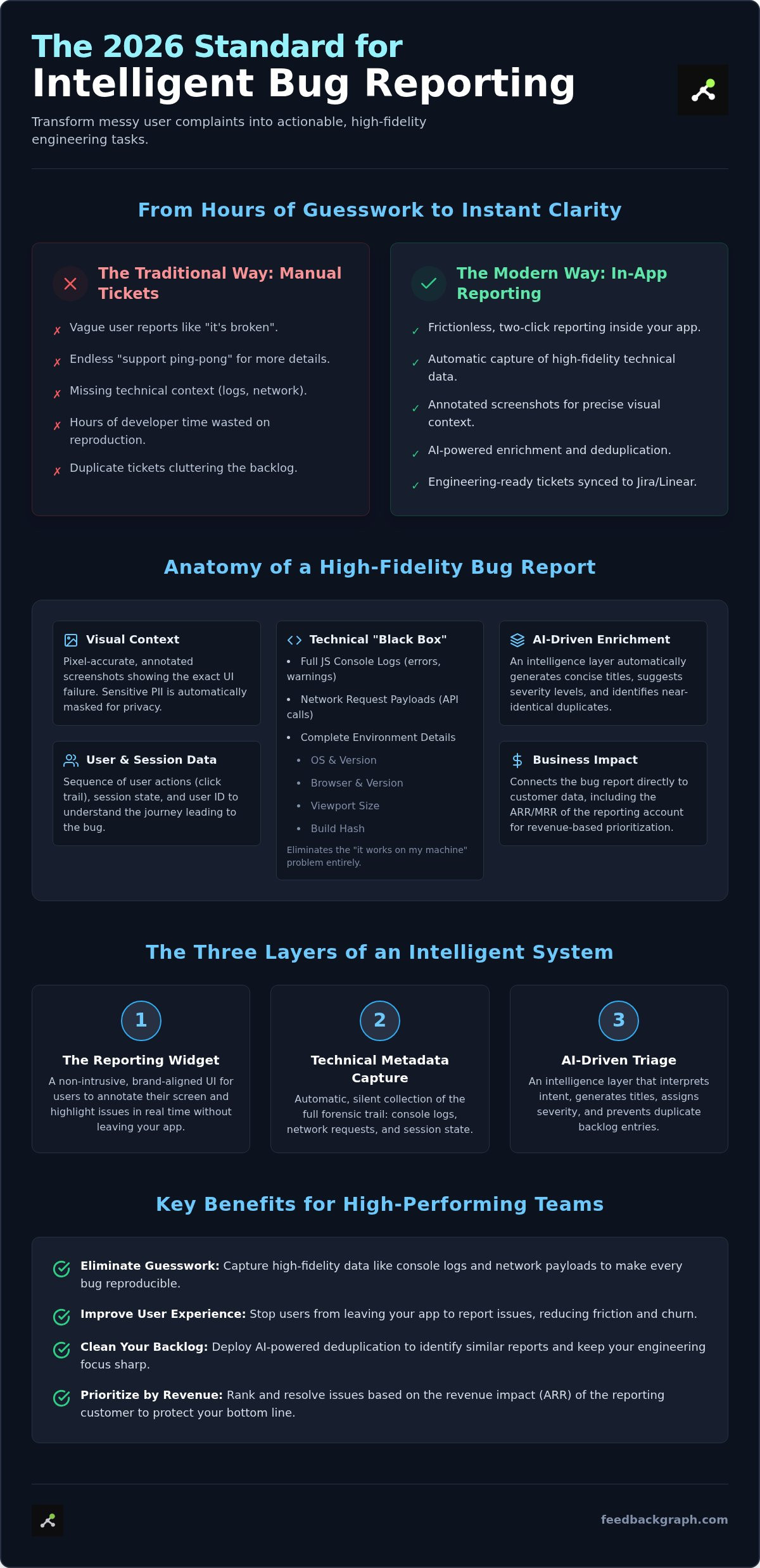
A robust system requires three distinct layers to function as an intelligent assistant for your engineering team:
- The Reporting Widget: A visual, non-intrusive interface that allows users to annotate their screen and highlight issues in real time.
- Technical Metadata: Automatic capture of JS console logs, network requests, and session state to provide a full forensic trail of the error.
- AI-Driven Enrichment: An intelligence layer that interprets user intent, generates concise titles, and assigns severity levels based on the captured data.
This structural integrity ensures that every report is actionable. Instead of a vague complaint, your team receives a ticket enriched with the exact technical data needed to push a fix. You can explore how these components integrate into your workflow at feedbackgraph.com/features. By automating the capture of technical context, you remove the manual triage burden from your developers.
The Anatomy of a High-Fidelity Bug Report
A high-fidelity report is the difference between a quick fix and a week-long investigation. When you implement in-app bug reporting for SaaS, you move beyond text descriptions. You capture a comprehensive dataset that includes visual evidence, technical metadata, and business impact. This forensic package provides engineers with everything they need to resolve issues without asking follow-up questions. It transforms a user's frustration into a structured technical task.
Modern reporting doesn't just describe a problem; it proves it. It captures the user's environment, including the OS, browser version, and specific build hash. This data ensures that developers can replicate the exact conditions of the failure. By layering AI on top of this data, you can automatically generate concise titles and summaries. This enrichment ensures your backlog remains readable and organized from the moment a report arrives.
Visual Bug Reporting for Rapid Resolution
Ambiguity kills development velocity. Developers often struggle to understand exactly where a layout broke or which specific component failed in a complex UI. By using visual bug reporting for SaaS, you provide pixel-accurate coordinates and annotated screenshots. This visual context allows engineers to see the interface exactly as the user did at the moment of the error. Privacy is equally critical in this process. Professional tools automatically mask sensitive PII (Personally Identifiable Information) during the capture, ensuring data security without requiring manual user intervention.
Technical Metadata: No More "It Works on My Machine"
The "it works on my machine" excuse usually stems from a lack of environment data. High-fidelity reports capture the "state" of the application instantly. This includes viewport size, session state, and the sequence of user actions leading to the bug. Even more vital are the JS console logs and network payloads. These act as a "black box" recorder for your software. They show the exact API responses and errors that preceded a crash. FeedbackGraph automates the collection of these developer-grade logs, so users never have to open DevTools. To see how this level of detail can transform your sprint planning, book a personalized demo and explore the forensic depth of our reports.
Business context is the final piece of the anatomy. Every report should link to account value and plan type. This allows your team to follow proven Strategies For Prioritizing Internal Bugs based on fiscal impact. If a customer on a ₹5,00,000 annual plan encounters a critical blocker, that report should automatically jump to the top of the queue. Linking technical severity with revenue data ensures your engineering resources are always focused on the most valuable fixes.
AI Triage: Turning Backlog Noise into Engineering Action
Engineering teams often face an "infinite backlog" that leads to burnout. It's not just the volume of bugs; it's the noise. Without intelligent filtering, critical blockers get lost in a sea of minor CSS tweaks and duplicate reports. Implementing in-app bug reporting for SaaS with an AI layer changes this dynamic. It moves the triage process from manual review to automated intelligence. This shift allows your team to reclaim hours previously spent on administrative overhead.
Automation turns your backlog into a strategic asset rather than a dumping ground for complaints. By processing incoming data through an intelligent assistant, you ensure that every ticket is high-quality and actionable. This process standardizes the reporting pipeline, making it easier for product managers and developers to align on priorities. It creates a transparent workflow where the most impactful issues always receive the attention they deserve.
Eliminating Duplicate Tickets Automatically
AI analyzes report content, visual data, and technical logs to identify near-duplicate issues. Instead of five separate tickets for the same API failure, you get one consolidated record. This grouping allows engineers to focus on root causes rather than redundant data entry. It drastically increases speed by ensuring your team only solves each problem once. Reducing this noise ensures that high-priority issues remain visible and actionable. Automated deduplication prevents the mental fatigue associated with managing a cluttered board and keeps your sprint velocity high.
AI-Generated Summaries and Severity
Users often describe bugs in vague terms like "it's not working." AI acts as a translator, converting this user-speak into technical requirements. By utilizing modern AI bug reporting tools, you can calculate severity based on actual system impact and user reach. AI generates a concise, searchable bug title by distilling the user's narrative and technical logs into a single, punchy phrase. This standardization makes your Jira or Linear boards instantly searchable and highly organized.
Beyond titles, AI evaluates the system state to distinguish between a minor annoyance and a true blocker. It cross-references the reported error with your application's critical paths. If a bug impacts the checkout flow or a core feature, the AI escalates it immediately. This ensures your response time aligns with the severity of the issue, protecting your user experience and your revenue. You can manage these automated workflows and see the results in real-time through the FeedbackGraph dashboard.
Best Practices for Implementing In-App Reporting
Successful implementation requires a balance between visibility and utility. You don't want your reporting widget to obstruct critical UI elements like checkout buttons or navigation menus. Place the trigger in a consistent, logical location such as the help menu or a floating action button. Customizing the widget to match your SaaS brand identity is equally vital. A native look and feel increases user trust and encourages adoption, making in-app bug reporting for SaaS feel like a core feature rather than a third-party afterthought.
Segmentation is your best tool for managing volume. You should treat internal QA reports differently from external customer feedback. Internal teams might require deeper access to session replays and experimental build hashes, while external users need a streamlined, frictionless interface. By segmenting these flows, you ensure that your engineering pods receive the most relevant data without being overwhelmed by low-priority noise. This keeps your development cycle moving without unnecessary interruptions.
Integrating with Your Existing Dev Stack
A reporting tool is only as good as its integration. You must establish a bi-directional sync with platforms like Jira, Linear, and Slack. This ensures that when a developer updates a ticket status, the user receives an automatic notification in-app. It closes the feedback loop and builds long-term user loyalty. You can capture in-app customer feedback without disrupting the user journey by triggering the widget only during specific events or via a dedicated support link.
Routing is the final step in a mature workflow. Use the technical metadata captured at the source to route bugs to specific engineering pods automatically. For example, a network error in the billing module should bypass general triage and land directly in the fintech team's backlog. This precision reduces resolution time and prevents tickets from languishing in the wrong queue. It ensures that the right experts see the right problems immediately.
Privacy and Performance Considerations
Performance impact is a critical metric for any SaaS application. Your reporting widget must be lightweight to avoid degrading Core Web Vitals like LCP (Largest Contentful Paint) or FID (First Input Delay). Use asynchronous loading to ensure the widget doesn't block the main browser thread. A slow app is a bug in itself, so your feedback tool shouldn't become part of the problem. Efficiency must be baked into the implementation from day one.
Compliance with GDPR and SOC2 is mandatory in 2026. Your system must provide automated tools to mask PII (Personally Identifiable Information) in screenshots and technical logs before they reach your servers. You also need granular control over data retention policies. Ensure you can set custom expiration dates for session data and logs to align with your company's privacy standards and local Indian regulations. This methodical approach protects both your users and your legal standing while maintaining high-fidelity data capture.
Revenue-Based Prioritization: The Next Frontier
Not all bugs are created equal. Traditional triage focuses strictly on technical severity, but it often ignores the financial weight of the reporter. When you implement in-app bug reporting for SaaS, you must view every issue through the lens of Annual Recurring Revenue (ARR). This approach ensures your engineering resources are allocated to the most valuable accounts first. It's the only way to scale a SaaS business without losing your highest-paying customers to unresolved friction. You move from fixing code to protecting revenue.
Ranking feature requests and bugs by the revenue of reporting customers provides a clear roadmap for your product team. It allows you to identify trends among your most profitable segments. If three of your top 10 accounts report the same issue, that bug is effectively a high-priority financial risk. This level of visibility transforms the engineering backlog from a list of errors into a prioritized list of revenue-saving opportunities. It aligns your development velocity with your business growth goals.
Quantifying the Cost of a Bug
By linking user IDs to subscription tiers and contract values, you can quantify the exact cost of technical debt. A minor UI glitch for an Enterprise client paying ₹50,00,000 annually often takes precedence over a major bug for a Free user. This isn't just about favoritism; it's about business survival and churn prevention. Using FeedbackGraph, you can generate Revenue Impact reports that show product stakeholders exactly how much ARR is at risk. This data-driven approach moves prioritization from subjective opinion to objective fiscal strategy. You stop guessing which tickets matter and start following the data.
Bi-directional Sync and the Customer Loop
Capturing the bug solves only half the problem. You must close the loop to turn a negative experience into a moment of customer delight. Bi-directional sync allows you to connect Jira or Linear status updates directly back to the FeedbackGraph widget. When an engineer pushes a fix, the system can automatically notify the original reporter. This transparency validates their input and proves you're actively maintaining the platform. It's a powerful retention tool in the competitive Indian SaaS market.
Automating this cycle provides several strategic benefits:
- Reduced Support Overhead: Users don't need to email support to check on a bug's status.
- Increased Trust: Proactive notifications show that your team is responsive and methodical.
- Enhanced UX: The fix notification brings the user back into the app, reinforcing the product's value.
Turning bug reports into moments of customer delight requires a seamless flow of information. When your users see their feedback translated into tangible improvements, they become long-term advocates. This automated loop ensures that no report ever falls into a "black hole," maintaining a high standard of professional accountability across your entire organization.
Stop Chasing Bugs and Start Protecting Revenue
Modern software development moves too fast for manual triage and vague support tickets. By implementing in-app bug reporting for SaaS, you eliminate the context gap that stalls engineering velocity. You've seen how high-fidelity data, such as console logs and network payloads, provides a forensic trail that makes reproduction instantaneous. AI-powered triage further streamlines your workflow by automating deduplication and severity classification, ensuring your team only tackles the most critical issues.
Prioritizing fixes based on revenue impact ensures your development efforts protect your bottom line. Integrating these insights with a bi-directional Jira or Linear sync creates a closed-loop system where users feel valued and engineers stay focused. It's time to replace the noise of an infinite backlog with the precision of an intelligent assistant. Build a more resilient product and a more efficient team today.
Your engineering team deserves a cleaner backlog and your customers deserve a frictionless experience. Start transforming your feedback cycle into a competitive advantage.
Frequently Asked Questions
Is in-app bug reporting better than a support email?
Yes, it's significantly more efficient than support emails because it removes the manual data entry burden from the user. Emails often arrive with vague descriptions that lead to endless back-and-forth communication. In-app bug reporting for SaaS captures the exact technical state of the application at the moment of failure. This ensures your engineering team receives a complete forensic package, including logs and environment data, instead of a simple "it's broken" message.
Can I use in-app bug reporting for internal QA testing?
Absolutely, this is a standard use case for high-performing engineering teams. Internal QA teams can use the same widget to report issues from staging or beta environments with full technical enrichment. By segmenting internal reports from customer feedback, you maintain a clean data flow. This allows your developers to distinguish between pre-release bugs and live production issues, ensuring that internal testing remains as efficient as your external support.
How does AI help in deduplicating bug reports?
AI uses pattern recognition to compare incoming reports against your existing backlog. It analyzes technical logs, visual coordinates, and the user narrative to identify near-duplicate issues. Instead of five separate tickets for a single API failure, the AI clusters them into one master record. This prevents your engineering backlog from becoming unmanageable and ensures that your team focuses on solving root causes rather than managing redundant data entry.
Does an in-app reporting widget slow down my website?
No, a well-engineered widget won't degrade your site's performance. Professional reporting tools use asynchronous loading to ensure the script doesn't block the main browser thread. This prevents any negative impact on Core Web Vitals like Largest Contentful Paint (LCP). By prioritizing speed, the reporting system remains non-intrusive. It provides a robust feedback mechanism without adding latency to the user experience or slowing down your core application workflows.
What technical data is captured in an automated bug report?
Each report captures a comprehensive "black box" of technical data. This includes JS console logs, network request payloads, and the application's session state. It also records environment details like OS, browser version, and viewport size. This automated capture provides engineers with the exact forensic evidence needed to replicate and fix a bug. It eliminates the need for users to manually find and report their technical specifications or reproduction steps.
Can I sync in-app bug reports directly to Jira or Linear?
Yes, bi-directional sync with Jira and Linear is a core feature of modern reporting systems. When a report is submitted, it flows directly into your development stack as a structured ticket. Updates in Jira can then sync back to the reporting widget to notify the user of progress. Using in-app bug reporting for SaaS ensures that your engineering workflow remains unified and that users are never left wondering about the status of their fix.
Is in-app bug reporting secure for sensitive user data?
Security is a primary design requirement for in-app reporting tools. These systems employ automated masking to redact PII (Personally Identifiable Information) from screenshots and technical logs before storage. Compliance with GDPR and SOC2 standards ensures that data handling meets strict legal requirements. In the Indian market, this methodical approach to privacy protects both your company and your users while maintaining the high-fidelity data capture necessary for rapid bug resolution.
How do I prioritize bugs by revenue impact?
You prioritize by linking user identifiers to their respective subscription tiers and contract values. This allows the system to rank bugs based on the revenue at risk. For example, a minor issue affecting an Enterprise client on a ₹10,00,000 annual plan should jump to the top of the queue. This data-driven approach moves prioritization from subjective guesswork to objective financial strategy, ensuring your team always works on the most impactful fixes.


