

Connecting customer feedback directly to your GitHub repository is the fastest way to destroy your engineering velocity. While "closing the loop" sounds strategic, a raw feed usually results in a backlog buried under vague tickets and duplicate reports. In 2026, with code churn projected to double, your developers can't afford to spend five hours a week playing air traffic control for the inbox. You need an intelligent buffer that thinks like a lead engineer before a single line is added to your repository.
It's a common struggle; manual triage consumes valuable sprints and leaves customers wondering if their reports ever reached you. This guide demonstrates how to master the flow of customer feedback to GitHub issues using an AI-enriched pipeline that automates deduplication and severity ranking. We'll break down the exact workflow to achieve a clean, actionable backlog and real-time status syncing that keeps your users satisfied without distracting your dev team from their primary objectives.
Key Takeaways
- Eliminate the "cannot reproduce" cycle by capturing structured technical metadata directly through a frictionless capture widget.
- Architect a resilient pipeline for customer feedback to GitHub issues using the GitHub Issues API and real-time webhooks.
- Deploy an AI triage layer to automatically deduplicate incoming reports and assign severity scores before they reach your engineering backlog.
- Maintain total transparency by syncing developer comments and issue statuses back to the customer in real-time.
- Utilize revenue-based ranking to justify your roadmap and ensure engineering resources target the most valuable feature requests.
The Engineering Bottleneck: Why Manual Triage is a Growth Killer
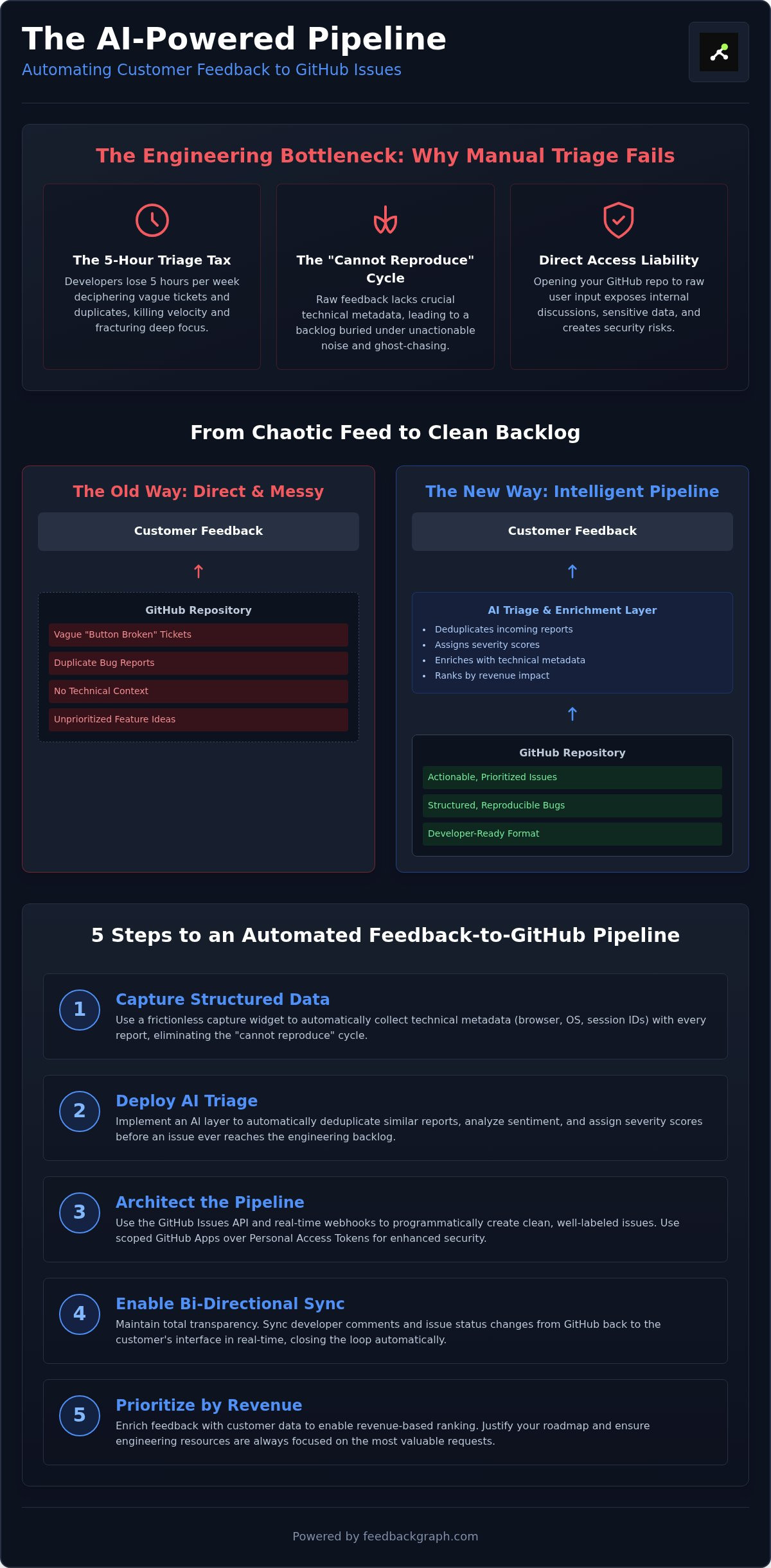
Manual triage isn't just a chore; it's a structural drain on your product's momentum. Every time an engineer stops coding to decipher a vague support ticket, you lose velocity. This context switching forces high-value talent to oscillate between IDEs and support queues, fracturing their deep focus. Without a system to map customer feedback to GitHub issues intelligently, your repository becomes a dumping ground for noise rather than a roadmap for progress. The friction of moving between disparate tools creates a massive hidden cost that most teams simply accept as part of the job.
Vague reports lead to the dreaded "cannot reproduce" cycle. A user says "the button is broken," but doesn't mention their browser, OS, or account state. Engineers then spend entire sprints chasing ghosts. This visibility gap hides the actual customer impact. A bug affecting a high-value enterprise account looks exactly like a minor UI glitch from a free-tier user unless you enrich the data. Relying on manual copy-pasting from support tools to GitHub further compounds the risk. Information gets lost, traceability vanishes, and the link between the code and the customer's pain is broken.
The Problem with Direct Customer Access to GitHub
Opening your repository to raw user input is a security and operational liability. Direct access exposes internal discussions, sensitive branch structures, and technical debt to the public eye. More importantly, it lowers the "noise floor." Raw feedback often lacks the technical context required for a fix. Maintaining a professional barrier allows you to filter out the static while ensuring high-quality data reaches your developers. Traditional Enterprise Feedback Management (EFM) systems collect data, but they often fail to translate that data into a developer-centric format, leaving engineers to bridge the gap manually.
Quantifying the Cost of Manual Triage
The financial impact of manual triage is staggering. If a senior engineer spends five hours a week clarifying tickets, you are burning significant capital on administrative overhead alone. This is the "triage tax": the hidden cost of processing unverified data instead of shipping features. When fixes are delayed due to poor data, customer churn increases and revenue leaks. Your team needs a pipeline that transforms raw input into actionable intelligence without the manual grind. By automating the flow of customer feedback to GitHub issues, you protect your engineering hours and focus on high-impact development.
Technical Architecture for Syncing Feedback to GitHub
Constructing a resilient pipeline for customer feedback to GitHub issues requires a move beyond basic integrations. You need a robust architecture that handles data enrichment, security, and real-time synchronization without compromising your repository's integrity. A direct connection between a support form and your repo is a liability; instead, successful teams implement a structured middleware layer that acts as an intelligent buffer. This architecture ensures that every piece of data entering your development environment is structured, validated, and actionable.
The GitHub Issues API serves as the foundation of this workflow. By utilizing the POST /repos/{owner}/{repo}/issues endpoint, you can programmatically generate tickets that include pre-defined labels and milestones. Security is paramount here. Avoid using broad Personal Access Tokens (PATs) in favor of scoped GitHub Apps, which provide more granular permissions and better audit trails. Effective mapping converts messy end-user feedback into clean GitHub Markdown, automatically injecting technical metadata like browser versions, user session IDs, and account tiers into the issue description.
Leveraging the GitHub Issues API
Success starts with precise data categorization. Use the API to apply labels such as bug, customer-request, or high-revenue-impact during the creation phase. This allows your team to utilize GitHub's native filtering capabilities immediately. Beyond creation, the API enables bi-directional comment syncing. When a developer asks a question in a GitHub comment, the middleware detects the event via a webhook and pushes that query back to the customer's interface, maintaining a single thread of truth across both platforms.
Introduction to MCP Servers for Workflow Automation
In 2026, the Model Context Protocol (MCP) has become the standard for connecting AI agents to development tools. MCP servers bridge the gap between your feedback data and your codebase. Using MCP servers for product management allows an AI to query your repository state and assign issues based on real-time code ownership. If a bug report identifies a fault in the checkout flow, the system identifies the last developer to commit to that module and assigns the issue automatically. This removes the manual assignment bottleneck entirely. To see how this automation scales, you can schedule a technical walkthrough of our MCP implementation.
Webhooks maintain this real-time flow by listening for repository changes. When an engineer closes an issue or moves it to a "In Review" column on a GitHub Project board, the webhook triggers an update to the customer. This ensures that users receive progress reports exactly when they happen, rather than days later after a manual support check-in. This automated loop turns customer feedback to GitHub issues into a competitive advantage by slashing response times and keeping your roadmap transparent.
5 Steps to Automate Your Feedback-to-GitHub Pipeline
Automating the transition from customer feedback to GitHub issues requires a shift from passive collection to active intelligence. You cannot scale a product by manually copy-pasting bug reports into your repository. A modern pipeline must act as an automated filter that validates, enriches, and prioritizes data before it ever touches your backlog. This five step process ensures your engineering team receives only high-signal, actionable tickets that drive actual product value.
Step 1: Capturing High-Quality Input
Friction is the enemy of data. If your feedback process requires more than two clicks, your users will simply ignore it. Deploying a dedicated widget for capturing customer feedback in app allows you to gather structured input without disrupting the user experience. By capturing technical metadata like browser versions, OS details, and current URLs automatically, you eliminate the back-and-forth emails that typically plague manual support cycles. This structured approach ensures every report arrives with the context an engineer needs to begin a fix immediately.
Step 2: AI Enrichment and Formatting
Raw user descriptions are notoriously vague. A report stating "the checkout is broken" is useless until it's transformed into "Error 500 on Checkout Page in Safari 17.4". Implementing an AI triage layer allows you to summarize long user stories into concise GitHub issue descriptions automatically. Following the lead of GitHub's AI-powered feedback workflow, you can use large language models to generate technical titles and severity scores. AI-generated titles improve repository searchability by replacing generic phrases with technical keywords and error codes that developers actually search for.
The final three steps solidify the integrity of your repository. First, apply deduplication logic to ensure that five different users reporting the same UI glitch result in a single, consolidated GitHub issue. Second, configure bi-directional syncing so that when an engineer moves a ticket to "Done," the customer receives an instant notification. Finally, implement revenue-based ranking. By mapping customer feedback to GitHub issues alongside account value, you can prioritize fixes for your highest-paying clients first. This data-driven approach ensures your engineering resources are always focused on the issues with the greatest financial impact on your business.
Solving the "Noisy Backlog" Problem with AI Triage
A cluttered GitHub repository isn't just an eyesore; it's a productivity killer. When you map customer feedback to GitHub issues without a filter, the noise floor rises until critical bugs are indistinguishable from minor UI suggestions. AI triage solves this by acting as a high-fidelity gateway. It identifies near-duplicate reports through semantic analysis, merging similar complaints before they ever touch your repository. This prevents your engineers from wasting time on redundant tickets and keeps the backlog focused on unique, actionable items.
Beyond deduplication, AI provides an objective layer of severity classification. It distinguishes between a site-wide outage and a simple typo in seconds. By layering in sentiment analysis, the system identifies frustrated users before their dissatisfaction leads to churn. This automated processing ensures that the most urgent technical failures rise to the top of the queue immediately, bypassing the delays of manual human review. It turns a chaotic stream of consciousness into a structured queue of work.
The End of Manual Triage
Traditional triage meetings are a relic of slower development cycles. AI replaces these time-consuming sessions by pre-labeling every incoming report with technical tags and priority markers. This allows your team to scale feedback management without hiring more support staff or project managers. You can see the ROI of automated bug severity classification in teams that have eliminated manual sorting entirely. The result is a self-cleaning repository that stays organized as your user base grows.
Data-Driven Prioritization
Popularity metrics like "upvotes" are often misleading. A feature requested by 100 free-tier users might be less critical than a fix required by one enterprise client paying ₹10,00,000 per year. Effective systems integrate directly with your billing data to provide revenue-based ranking. This maps every issue to its real-world financial impact. You can learn more about ranking feature requests by revenue to ensure your engineering resources always support your bottom line. By prioritizing by profit, you justify every sprint to your stakeholders with hard data.
Closing the Loop: Bi-directional Sync with FeedbackGraph
Capturing data is only half the battle. To truly scale your product, you must close the communication loop between your engineering team and your users. Mapping customer feedback to GitHub issues should never be a one-way street where reports vanish into a repository. FeedbackGraph creates a bi-directional bridge that ensures information flows back to the reporter as soon as progress is made. This transparency transforms your development process from a private operation into a visible commitment to your users.
When an engineer merges a pull request and closes a GitHub issue, the system triggers an automatic notification to the original reporter. This removes the manual overhead of support teams having to track down which users were affected by a specific fix. Two-way commenting further streamlines this process. If a developer needs more information, they can comment directly within GitHub. FeedbackGraph then syncs that technical query back to the user via the feedback widget, keeping the conversation consolidated in a single thread across both platforms.
Building Trust Through Transparency
The psychological impact of a "Your bug has been fixed" notification is a powerful retention lever. It proves to your customers that you are listening and acting on their input. This level of responsiveness is critical for maintaining high satisfaction scores in the competitive Indian SaaS market. Providing a seamless bug tracking experience for non-technical users removes the friction of complex development tools. By providing a public roadmap view powered by real-time GitHub data, you provide transparent fix timelines that significantly reduce the volume of "Is it fixed yet?" support tickets.
Getting Started with FeedbackGraph
Modernizing your workflow is a matter of minutes, not days. Connecting your GitHub repository takes under five minutes through our secure integration portal. Once connected, you can define AI triage rules that match your specific engineering requirements. You choose which labels to apply, how to handle duplicates, and which severity scores trigger immediate alerts. This automated infrastructure allows your team to focus on writing code instead of managing spreadsheets. Ready to transform your workflow? Book a demo to see GitHub sync in action and eliminate the manual triage bottleneck for good.
Future-Proof Your Engineering Pipeline
The era of manual triage is over. High-growth teams no longer have the luxury of wasting senior engineering hours on vague tickets or duplicate reports. By implementing an AI-powered buffer, you transform the flow of customer feedback to GitHub issues into a streamlined engine for product growth. This architecture doesn't just organize data; it enriches every report with technical context, automated severity scores, and revenue impact metrics. You protect your developers from context switching while ensuring that every sprint targets the most valuable fixes.
Your repository should be a source of truth, not a dumping ground for noise. With bi-directional sync across GitHub, Jira, and Linear, your team maintains total visibility without leaving their preferred tools. The revenue-based prioritization dashboard ensures that stakeholder decisions are backed by hard financial data. This methodical approach allows you to scale your feedback management infrastructure without adding administrative headcount, keeping your operations lean and your users satisfied through real-time updates.
Take control of your backlog and eliminate the triage tax. Your team deserves a workflow that values their deep focus and rewards your most valuable customers with rapid, transparent resolution.
Frequently Asked Questions
How do I automatically sync customer feedback to GitHub issues?
You can automate this process by connecting a feedback capture widget to the GitHub Issues API via a middleware layer. This pipeline ensures that customer feedback to GitHub issues flows without manual data entry. By configuring webhooks, you maintain a real-time data stream that populates your repository with structured tickets the moment a user submits a report.
Can I deduplicate bug reports before they are sent to GitHub?
Yes, deploying an AI triage layer allows you to identify near-duplicate reports using semantic analysis. The system compares incoming text against existing issues in your repository to merge similar complaints automatically. This prevents backlog bloat and ensures your engineers focus on unique, high-signal problems rather than repetitive UI glitches or redundant support tickets.
Is it safe to connect my private GitHub repository to a feedback tool?
Security is maintained by using scoped GitHub Apps rather than broad Personal Access Tokens. This approach allows you to grant granular, repository-level permissions, ensuring the tool only accesses the specific data required for syncing. Professional tools also adhere to SOC 2 Type II standards, providing a secure environment for your internal code and sensitive customer data.
What is the best way to prioritize feature requests in a GitHub backlog?
The most effective method is revenue-based ranking, which maps feedback to actual subscription data. Moving beyond simple upvotes allows you to identify which requests come from your highest-paying enterprise clients in India. This data-driven strategy justifies your roadmap to stakeholders and ensures engineering resources target the most profitable opportunities for the business.
How does bi-directional sync work between GitHub and customer feedback tools?
Bi-directional sync uses webhooks to monitor changes in both your feedback platform and GitHub. When a developer closes an issue or leaves a technical comment, the update pushes back to the customer interface instantly. This creates a continuous communication loop that keeps both parties aligned without requiring manual status checks or repetitive email updates from your support team.
Can AI generate technical bug reports from vague customer descriptions?
AI transforms vague statements like "it is broken" into technical summaries enriched with metadata. It analyzes the user's environment, captures browser details, and generates a structured GitHub Markdown description. This automation saves hours of engineering time by providing the exact context required to reproduce and fix the bug without the usual back and forth emails.
Do I need to write custom code to map feedback to GitHub issues?
No, modern integration platforms provide pre-built connectors that handle the technical mapping for you. You simply define the logic for how user descriptions should appear as GitHub issue fields. While the GitHub API is available for custom workflows, most teams prefer out-of-the-box solutions to achieve faster implementation and reduce the burden on their own internal developers.
How can I notify customers when their reported GitHub issue is resolved?
You can set up automated triggers that fire when a GitHub issue status changes to "Closed" or "Done." The system sends a real-time update to the original reporter via the feedback widget or email. This transparency builds user trust and significantly reduces support ticket volume by confirming that the specific problem has been addressed in the latest code release.


