

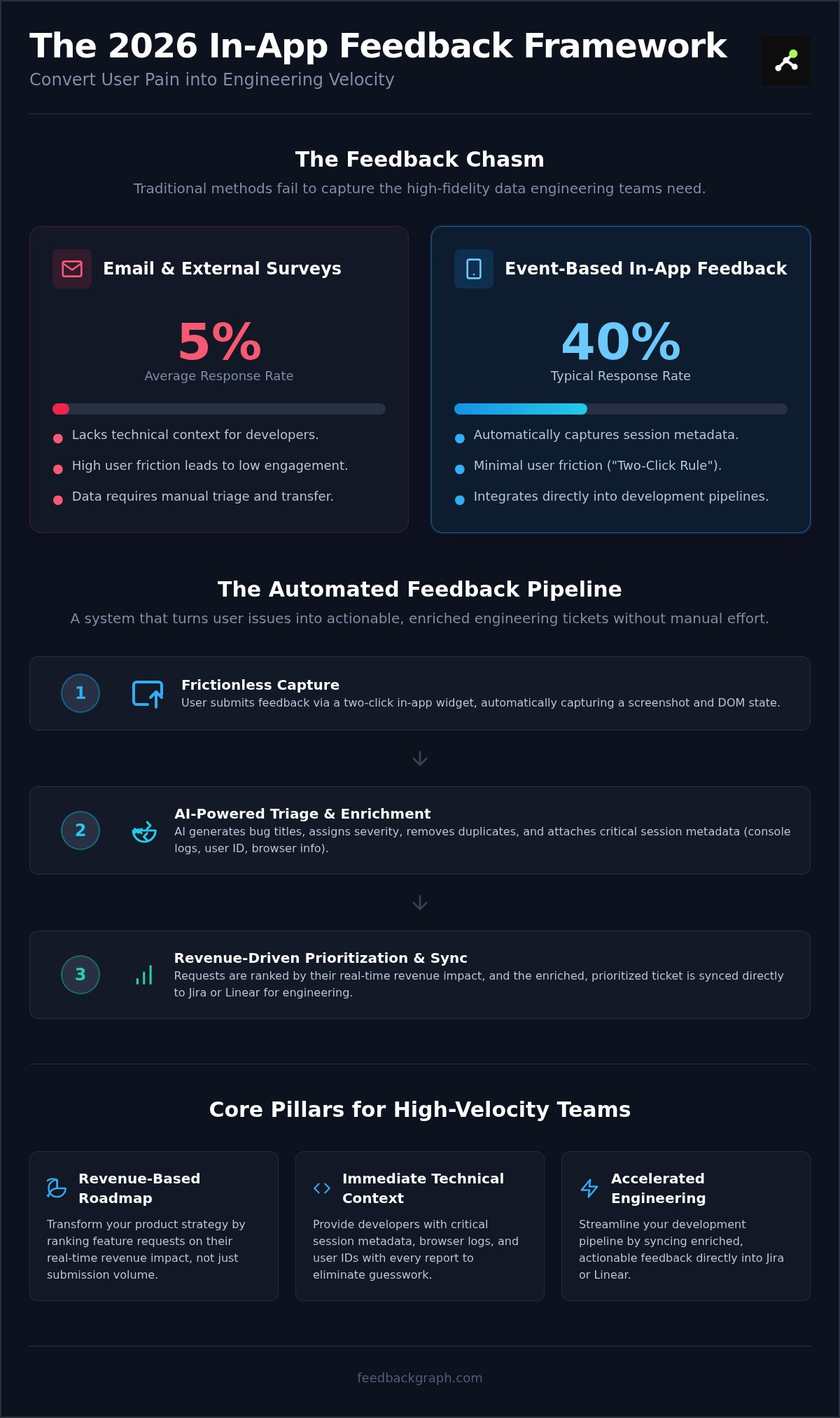
Current data shows that event-based in-app surveys achieve response rates up to 40%, while email outreach often stalls at 5%. If you don't effectively capture customer feedback in app, you're missing the high-fidelity data required to scale. You've likely struggled with feedback fatigue from intrusive surveys or bug reports that lack technical context. Manual triage shouldn't drain your development time, and duplicate requests shouldn't clutter your backlog.
You need a system that converts user pain into engineering velocity. This 2026 guide provides the technical and strategic framework to implement feedback loops that drive revenue. We'll show you how to automate metadata capture, streamline your Jira pipeline, and rank every request by its quantifiable business impact. It's time to replace guesswork with a data-driven roadmap that prioritizes your most valuable users.
Key Takeaways
- Eliminate user friction by deploying a two-click widget that captures high-quality insights without disrupting the product experience.
- Automate your engineering backlog with AI-driven triage that generates bug titles, assigns severity, and removes duplicate reports instantly.
- Learn how to capture customer feedback in app alongside critical session metadata to provide developers with immediate technical context.
- Transform your product roadmap by ranking feature requests based on their real-time revenue impact rather than simple submission volume.
- Streamline your development pipeline by syncing enriched feedback directly into Jira or Linear to accelerate engineering velocity.
Why Traditional SaaS Feedback Methods Fail Engineering Teams
Traditional methods treat feedback like a suggestion box. It's a black hole. When you try to capture customer feedback in app using generic forms, the data arrives stripped of technical utility. Slack messages and email threads lack the structure needed for engineering action. They die in the transition to Jira because they require manual translation. This gap creates friction that slows down your entire delivery cycle and leaves your product team guessing.
Engineering velocity depends on context. A bug report without browser logs, user IDs, or session metadata is just a riddle. Developers waste hours on reproduction attempts that shouldn't happen. This "Cost of Context" is a hidden tax on your roadmap. By 2026, the industry has shifted toward customer feedback management systems that prioritize technical data over vague user opinions. You need quantitative, engineering-ready data, not just qualitative noise.
Intrusive pop-ups are failing your users. Recent data shows that standard in-app surveys now see a median response rate of just 13%. Users are exhausted by constant interruptions. High-performing teams optimize how they capture customer feedback in app by focusing on event-based, frictionless capture that respects the user journey. If you disrupt the workflow, you lose the data.
The High Price of Friction-Heavy Reporting
Every minute an engineer spends chasing a missing console log is a minute not spent building features. Friction-heavy reporting doesn't just slow down dev cycles; it causes "silent churn." Your power users don't have time for ten-field forms. If reporting a bug is harder than ignoring it, they'll simply leave. This creates a dangerous disconnect between Customer Success and Engineering. Success sees the volume of complaints, while Engineering only sees the low-quality tickets that survive the manual triage process.
Moving from Manual Triage to Automated Data Pipelines
Manual spreadsheets are where SaaS growth goes to die. They are slow, prone to error, and impossible to scale. Modern DevOps requires a "Single Source of Truth" where every user issue is enriched automatically. This transition requires sophisticated bug reporting software that acts as a pipeline, not a warehouse. You need a system that captures data, cleans it, and routes it to the right team without human intervention. This shift ensures that every piece of feedback is treated as a technical asset, not a support burden.
Mechanics of Seamless In-App Feedback Capture
Frictionless capture is the foundation of high-quality data. To effectively capture customer feedback in app, you must balance passive and active collection methods. Passive capture utilizes a permanent, low-profile entry point like a side-tab or a Floating Action Button (FAB). It stays out of the way until the user needs it. Active capture, conversely, uses event-based triggers to solicit input during specific milestones. High-performing SaaS teams often look at proactive customer feedback examples from leaders like Uber or Slack to understand how to time these requests without causing fatigue.
You must adhere to the Two-Click Rule. Every additional field or interaction layer reduces your submission volume. If a user has to navigate through multiple menus to report a bug, they'll likely abandon the process. Visual context is equally critical. Text descriptions are notoriously unreliable for debugging complex UI issues. Implementing visual bug reporting for SaaS ensures that every submission includes an automatic screenshot and the current DOM state. This gives your engineers the "what" and the "where" without a single follow-up question.
Performance shouldn't be an afterthought. Your feedback SDK must load asynchronously to avoid impacting Core Web Vitals. If your capture tool slows down the initial page load, it's a liability to your product's health. You want a lightweight footprint that prioritizes the user experience while still gathering deep technical insights. To see how to balance performance with deep data capture, you can book a technical walkthrough with our team.
Choosing Between Low-Code Widgets and Custom APIs
Speed-to-market often dictates the use of pre-built, low-code widgets. These tools provide immediate utility and require minimal engineering resources to deploy. However, for deeply integrated or highly branded experiences, headless APIs are the superior choice. They allow you to capture customer feedback in app while maintaining total control over the UI. When evaluating your options, prioritize SDKs with a small bundle size to ensure your app stays fast and responsive across all devices.
The Anatomy of a High-Conversion Feedback Trigger
The best triggers are contextual and non-intrusive. A Floating Action Button is a standard for web-based SaaS, but mobile applications often benefit from gesture-based triggers like "shake-to-report." You should also consider automated triggers. If your application detects a 404 error or a logic failure, the system can automatically prompt the user for feedback. This proactive approach captures the user's frustration in the moment, providing the most accurate data for your development team to act upon.
Leveraging AI for Real-Time Feedback Enrichment
Raw feedback is a liability; enriched feedback is an asset. When you capture customer feedback in app, the goal isn't just to listen. It's to build a technical profile of the event. Modern systems silently harvest session state, console logs, and network requests the moment a user clicks "submit." This background data provides the context engineers need to reproduce issues without a single follow-up question. You're no longer asking the user what happened; you're looking at the data that proves it.
LLMs have moved beyond basic sentiment analysis to identify functional intent. They distinguish between emotional outbursts and specific feature gaps. A frustrated user might type "this is garbage," but the AI identifies the underlying request for a streamlined export process. This prevents your product team from getting bogged down in negativity while missing the actual requirement. By prioritizing intent over sentiment, you ensure your roadmap reflects what users actually need to stay productive.
Efficiency isn't about flashy features; it's about friction removal. As the classic Harvard Business Review article Stop Trying to Delight Your Customers argues, loyalty is built by reducing the effort required to solve a problem. Automated triage and deduplication are the technical realization of that philosophy. They ensure that once you capture customer feedback in app, the path to a technical solution is as short and painless as possible.
Automating the Severity Classification
AI analyzes user language against the current app state to assign severity automatically. If a user tags an issue as "Low" but the network logs show a series of failed API calls on a critical checkout page, the system elevates the priority to "Critical." This removes human error from the triage process. AI enrichment is the process of turning raw text into structured engineering data. This structured approach filters out non-actionable noise before it ever hits your development queue.
Deduplication: The Secret to Engineering Sanity
Backlog noise destroys engineering focus and ruins sprint planning. FeedbackGraph uses AI to group near-identical reports, consolidating dozens of similar complaints into one master ticket for your team. This prevents your developers from wading through 50 versions of the same CSS bug. When the master ticket is closed in Jira or Linear, the system can automatically sync status updates across all original reporters. You maintain total transparency with your user base without any manual status management.
Step-by-Step Roadmap to Implementing In-App Feedback
Implementing a robust system requires a tactical approach. First, audit your existing feedback leakage points. Slack channels, support tickets, and direct emails often act as silos where critical data disappears. You must consolidate these into a single stream. Second, define your core data requirements. To effectively capture customer feedback in app, you need more than a comment; you need the User ID, plan type, and session logs attached to every submission. This ensures your team spends time fixing issues rather than identifying them.
Next, deploy your capture tool. Selecting a customer feedback widget for Jira or Linear ensures your data flows directly into your existing project management stack. Once deployed, map your feedback categories to specific workflows. Bugs should route to engineering, while feature requests go to product management. Finally, establish a "Closed-Loop" protocol. Use automation to update users the moment their issue is resolved. This builds trust and encourages future engagement without adding manual work for your team.
Integrating Feedback into the Developer Workflow
Engineers shouldn't have to switch tools to understand a bug. Establish a bi-directional sync so that comments in Jira reflect back to the original feedback record. You can automate ticket creation based on AI-detected keywords or severity levels. This ensures that critical logic errors route to GitHub Issues immediately, while long-term feature requests populate your roadmap. High engineering velocity depends on keeping developers in their IDE, not chasing down context in a separate dashboard.
Establishing High-Quality Data Standards
Quality data starts at the point of capture. Configure required fields like "expected behavior" to ensure submissions are actionable, but keep the UI lean to prevent friction. Data privacy is non-negotiable in 2026. Ensure your system automatically scrubs PII (Personally Identifiable Information) before any AI processing occurs. Finally, test the pipeline across multiple user environments to verify that session logs and metadata are attaching correctly every time you capture customer feedback in app.
Turning Captured Feedback into a Revenue Engine
Popularity is a poor proxy for profit. Most product teams fall into the trap of prioritizing the "most requested" features, but high volume doesn't always equal high value. The ability to capture customer feedback in app provides the raw data needed to calculate the precise ARR impact of every entry in your backlog. By shifting from a volume-based model to a revenue-based ranking system, you ensure that engineering resources are allocated to the projects that protect and grow your bottom line. This isn't just about listening to users; it's about quantifying their financial influence on your roadmap.
Data-driven prioritization transforms how you communicate with executive stakeholders. Instead of presenting a list of bugs, you present a list of revenue risks. When you can demonstrate that a specific logic error is affecting accounts worth 2.4 million in Total Contract Value (TCV), the conversation around resource allocation changes. You move from subjective "opinions" to objective financial justification. This transparency builds massive internal credibility for the product team and ensures that engineering velocity is always aligned with business growth.
Closing the loop is your most powerful retention tool. Research shows that 85% of customer experience leaders believe customers will churn if their issues aren't resolved in the first interaction. While you can't fix every bug instantly, you can provide immediate visibility. Using your feedback data to automate status updates proves to your users that their input has tangible consequences. This transparency reduces churn by transforming frustrated users into collaborative partners who feel invested in the product's evolution.
Quantifying the Financial Impact of Feature Requests
Effective prioritization requires mapping every piece of feedback to specific user segments. A request from a Free Tier user carries different weight than one from a high-TCV Enterprise account. You must weight your backlog by the cumulative value of the reporters involved. This approach identifies "Revenue Blockers" by using AI to detect patterns in feedback from users who have already churned. If multiple high-value accounts mention the same friction point before leaving, that issue becomes your top priority for the next sprint.
Closing the Loop: The Final Step in the How-To
The feedback cycle only ends when the user knows their problem is solved. Automating the "We built this" notification is critical for driving feature adoption among the very people who asked for it. Building trust requires transparent, real-time status updates delivered directly within the application interface. You can explore the FeedbackGraph features to see how automated loop closing keeps your users engaged without adding a single task to your support queue. This automated transparency is the final step in turning raw data into a long-term revenue engine.
Scale Your Engineering Velocity with Data-Driven Feedback
Transitioning from fragmented user suggestions to an automated feedback pipeline is the only way to scale without adding operational bloat. You've seen how AI-powered deduplication saves hours of manual triage by consolidating noise into single, actionable tickets. Bi-directional Jira sync ensures your engineers stay focused in their primary workflow while maintaining total visibility across the product lifecycle.
When you effectively capture customer feedback in app, you gain both the technical context required to resolve bugs and the financial data to rank your entire backlog by revenue impact instantly. This shift transforms your feedback loop from a support burden into a strategic asset that justifies every engineering hour spent. You're no longer just collecting data; you're driving measurable business outcomes.
Build a product that reflects the actual needs of your most valuable users. Your roadmap is only as strong as the data behind it. Drive growth through technical clarity and start building with confidence.
Frequently Asked Questions
How do I capture customer feedback in app without annoying my users?
Use passive triggers and event-based logic to minimize disruption. A low-profile Floating Action Button (FAB) or a two-click widget stays out of the way until the user needs it. Active prompts should only trigger after successful milestones or when the system detects a logic error to ensure relevancy. This approach respects the user's workflow while maintaining high response rates.
What is the best way to integrate in-app feedback with Jira or Linear?
Deploy bi-directional integrations that sync data in real time across your stack. This setup allows engineers to receive enriched tickets directly in their existing workspace without context switching. When you capture customer feedback in app, the system should automatically map user reports to specific projects or labels in Jira or Linear based on the detected issue type or severity.
Can in-app feedback widgets slow down my SaaS application performance?
Performance impact is negligible if you use a lightweight SDK that loads asynchronously. Modern widgets execute after the main thread is clear. This ensures they don't affect Core Web Vitals or initial page load speeds. Prioritize tools with small bundle sizes to maintain a fast, responsive user experience across all devices and network conditions.
How does AI help in triaging customer bug reports?
AI automates the classification process by analyzing user language alongside technical metadata. It generates concise titles, assigns severity levels, and summarizes the core issue instantly. This removes the need for manual triage. Your engineering team can focus on resolution rather than spending hours managing ticket queues.
What technical data should I capture along with an in-app feedback report?
You should automatically harvest session logs, console errors, network requests, and environment metadata like browser version and OS. Including the User ID and plan type is also critical for prioritization. This data provides the full technical context needed to reproduce bugs, eliminating the need for back-and-forth communication with the user.
How do I prevent duplicate feature requests from cluttering my backlog?
Implement AI-powered deduplication at the point of capture. The system scans incoming reports for semantic similarity and groups related requests into a single master ticket. This prevents your backlog from becoming bloated with dozens of versions of the same request. You keep your roadmap clean and your product focus sharp.
Is it better to use a pre-built feedback widget or build a custom one?
Pre-built widgets offer immediate speed-to-market and advanced data enrichment features out of the box. Building a custom solution requires significant engineering resources for maintenance and API management. A pre-built, low-code widget allows you to capture customer feedback in app with professional functionality without distracting your team from core product development.
How can I tie in-app feedback directly to revenue growth?
Map every feedback entry to the reporter's Total Contract Value (TCV). By ranking your backlog by revenue impact, you can prioritize fixes and features that protect high-value accounts. This data-driven approach allows you to justify engineering resources based on their direct contribution to ARR and churn reduction.


