

Your feedback backlog isn't an asset if it's currently paralyzing your engineering team. Most product managers are drowning in customer data while starving for actionable insights. In 2026, selecting a SaaS feedback capture tool is no longer about simply opening a channel for requests. It's about building a filter that separates high-value signals from the static of duplicate bugs and vague suggestions.
We understand the frustration of seeing your roadmap hijacked by loud voices instead of high-value customers. You need a way to prove which features drive revenue and which ones just add bloat. With 64% of businesses now adopting AI in their feedback processes, sticking to manual triage is a recipe for technical debt. This checklist helps you audit your current feedback process and identify the exact automation features required to turn customer noise into strategic product signals. We'll show you how to implement a clean triage process, gain clear visibility into the revenue impact of every request, and provide a frictionless way for users to report issues directly in-app.
Key Takeaways
- Eliminate the "Invisible Triage Tax" by implementing an in-app widget that captures critical technical metadata automatically at the source.
- Identify why a modern SaaS feedback capture tool must offer bi-directional sync with tools like Jira and Linear to prevent the "fire and forget" integration trap.
- Leverage AI enrichment and automated deduplication to stop your engineering backlog from being buried under ten tickets for a single bug.
- Move beyond vanity upvotes by ranking feature requests based on the total ARR of the requesting customers to ensure every sprint drives maximum financial impact.
The High Cost of Friction: Why Traditional Feedback Capture Fails
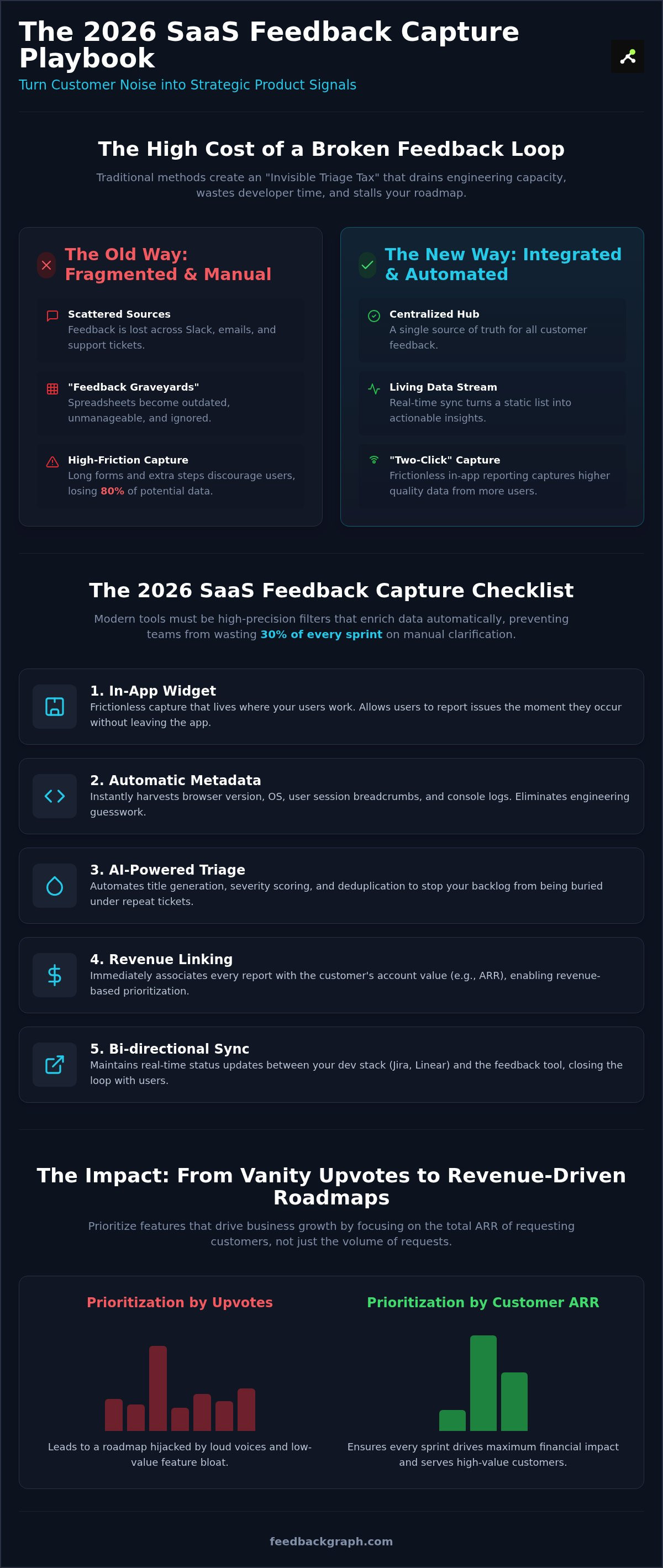
Traditional feedback systems are silent productivity killers. Most teams rely on a patchwork of Slack messages, email threads, and support tickets. This fragmentation creates an "Invisible Triage Tax" that drains your engineering capacity. Instead of writing code, your senior developers spend hours deciphering vague bug reports or hunting for missing technical context. It's a waste of high-value talent. Every minute spent asking "what page were you on?" is a minute stolen from your product roadmap. When feedback is scattered, momentum stalls and critical issues slip through the cracks.
Generic forms are particularly toxic. They provide zero technical metadata, forcing users to manually describe their environment. If a user has to explain their OS version and browser build, they'll likely skip the report entirely. This creates a data gap where only the most frustrated users speak up, leaving you blind to the needs of your quiet majority. A modern SaaS feedback capture tool must do the heavy lifting for the user. It should automatically attach session data, console logs, and breadcrumbs without the user lifting a finger. Without this context, your engineering team is just guessing.
The Problem with Manual Spreadsheets
Spreadsheets are where good ideas go to die. They typically become "feedback graveyards" within three months because they can't scale with a growing product. Version control issues lead to duplicate entries, while the lack of real-time collaboration ensures the data is always outdated. You can't run a 2026 product roadmap on a static grid. If you're still tracking feature requests in a cell, you're likely ignoring the revenue impact of those requests. Manual entry kills momentum. You should consider Replacing Manual Feedback Spreadsheets with automated systems that link directly to your development stack. This transition turns a static list into a living data stream that informs every sprint.
Identifying the Feedback Friction Point
Friction is the enemy of insight. Calculate the steps your users currently take to report a bug. If it involves navigating to a help center, logging in, and filling out five fields, you're losing 80% of your potential data. Consider the common barriers that stop users from sharing insights:
- Requirement to manually take and upload screenshots.
- Forced login to a separate feedback portal or third-party site.
- Lack of automatic URL or user session recording.
- Long forms with required fields that don't match the user's immediate problem.
There is a direct, measurable correlation between reporting friction and lost product insights. High-performing teams now treat "Two-Click" capture as the gold standard. When a user can highlight an issue directly in the UI and hit send, you get higher quality data and build immediate customer trust. Speed isn't just a feature; it's the foundation of a reliable feedback loop. Reducing friction ensures that your engineering backlog is fueled by reality, not just the loudest voices in the room.
The 2026 SaaS Feedback Capture Checklist
Your 2026 SaaS feedback capture tool must act as a high-precision filter, not just a bucket for raw text. Selecting the right platform requires moving beyond basic submission forms to a system that understands the technical and financial context of every report. If your current tool doesn't automatically enrich data, your team is likely wasting 30% of every sprint on manual clarification. A modern checklist ensures your engineering resources stay focused on high-impact development rather than administrative overhead.
- In-app widget: Frictionless capture that lives where your users work.
- Automatic Metadata: Instant harvesting of browser version, OS, and user session breadcrumbs.
- AI-Powered Triage: Automated title generation and severity scoring based on technical logs.
- Revenue Linking: Immediate association of every report with the customer's account value.
- Bi-directional Sync: Real-time status updates that move between your dev stack and the user interface.
Capture Mechanics: The In-App Advantage
Context is everything in software development. A lightweight, non-intrusive widget ensures users can report issues the moment they occur. This immediacy prevents the "memory decay" that happens when users wait to send an email later. Your capture tool should support visual feedback, allowing users to attach screenshots or short video clips with a single click. This visual layer eliminates the need for long, descriptive paragraphs that engineers often find confusing. These capabilities are essential for modern customer feedback use cases, as they bridge the gap between user frustration and technical resolution. To see how these features work in a live environment, you can book a technical walkthrough with our team.
AI Requirements: Beyond Basic Keywords
Basic keyword matching is no longer sufficient for managing a high-volume backlog. You need automated deduplication that recognizes when ten different users are describing the same root cause in ten different ways. This prevents the "10 tickets for 1 bug" syndrome that creates artificial noise in your reporting. AI should also generate concise summaries for rapid executive review, stripping away the fluff to reveal the core problem. Finally, sentiment analysis must flag high-frustration issues immediately. If a high-value account is experiencing a recurring blocker, the system should escalate that report before a human even reads it. This proactive approach transforms feedback from a passive data stream into a strategic asset for your product team.
Engineering Alignment: Integration and Workflow Sync
Most integrations fail because they only move data in one direction. When your SaaS feedback capture tool simply pushes a report into Jira or GitHub, it creates a "Fire and Forget" problem. The feedback enters a black hole where the customer and the support team lose all visibility. Engineers work on the issue, but the loop never closes. This disconnect forces support agents to manually check dev tickets, wasting hours every week on status updates. It's an inefficient process that frustrates users and slows down your development cycle.
True engineering alignment requires a bi-directional flow. When a developer moves a ticket to "In Progress" or "Resolved," that status change should immediately reflect in your feedback system. This automation keeps everyone informed without human intervention. It transforms your feedback tool from a passive intake form into an active part of your development pipeline. Effective routing also ensures the right data reaches the right team. Bugs should flow directly to GitHub or Jira for immediate triage. Feature requests should be routed to Linear or Productboard for long-term planning. This separation keeps your bug tracker clean and your roadmap focused.
The Bi-directional Sync Standard
A modern sync standard eliminates the manual "Is this fixed?" support ticket. When your dev tools and feedback platform talk to each other, status updates trigger automated customer notifications. This transparency builds massive trust. It shows users that their input has a direct impact on the product. By automating these replies, you can significantly reduce support volume and allow your team to focus on complex resolutions. For a deeper look at these technical connections, check out the Guide to Connecting Feedback to Dev Tools. Closing the loop is no longer optional; it's a core requirement for user retention.
Mapping Feedback to Engineering Workflows
Your workflow needs logic to handle high-volume data streams. You can use FeedbackGraph features to route incoming reports based on severity or product module. For example, a "Critical" bug report can trigger an urgent Slack alert, while a "Low" priority suggestion is quietly queued for the next planning session. This prevents notification fatigue. By utilizing an MCP server, you can integrate modern AI-driven management directly into your dev environment. This setup allows for:
- Automated triage rules based on technical severity scoring.
- Direct mapping of feedback to specific code repositories or modules.
- Real-time alerting that informs the team without distracting them from deep work.
This level of structural integrity ensures that every piece of feedback is treated with the appropriate urgency. It aligns your engineering team with customer needs without compromising their focus or productivity. When your tools work in harmony, you turn raw noise into a streamlined engine for product growth.
Maximising Data Quality: AI Enrichment and Deduplication
Capturing data is only half the battle. If your SaaS feedback capture tool doesn't automatically clean and contextualize incoming reports, you're just shifting the burden from the user to your engineering team. AI Enrichment solves this by automatically adding technical context, system logs, and concise summaries to raw user input. It transforms a vague "this page is slow" message into a detailed technical brief including browser version, network latency, and specific error codes. This enrichment ensures your developers have everything they need to start a fix without a single follow-up question.
Deduplication is equally critical for maintaining a functional workflow. In high-volume environments, it's common to suffer from "10 tickets for 1 bug" syndrome. AI-driven systems identify near-identical reports by analyzing both the user's description and the underlying technical metadata. These duplicates are merged into a single parent issue, preventing your backlog from becoming an unmanageable mess. This process doesn't just save time; it provides a more accurate view of an issue's reach. You can see the true number of affected users immediately, which is essential for accurate impact assessment.
Automated severity classification adds another layer of intelligence to your triage. By analyzing the technical logs, the system can distinguish between a "broken" critical path and an "inconvenient" UI glitch. When you enrich these reports with user revenue data, you gain a clear prioritization map. You aren't just identifying what's broken. You're identifying which bugs are actively threatening your highest-value accounts. This data-driven approach moves product management from guesswork to evidence-based decision making.
The Power of Automated Triage
Manual triage is a resource drain that most teams can no longer afford. AI-driven systems dramatically reduce the time spent on initial assessment. These systems generate professional, descriptive bug titles from vague or emotional user descriptions. Instead of "it's broken again," your engineers see "Login Timeout: 504 Gateway Error on /auth/session." This clarity helps your team understand the problem before they even open the ticket. You can explore specific bug tracking use cases to see how this looks in a live development environment.
Maintaining a Clean Backlog
Backlog bloat is a primary cause of product stagnation. Maintaining a clean backlog requires strict criteria for merging similar feature requests and bug reports. AI identifies patterns across hundreds of submissions, grouping them by theme and technical root cause. This allows product managers to see the "signal" within the "noise." Instead of managing a thousand disconnected requests, you manage a handful of high-impact opportunities. For a deeper dive into these strategies, refer to the 2026 AI Triage Guide. This structural integrity ensures your engineering team stays focused on building value rather than cleaning up data.
The Business Value: Revenue-Based Prioritization
Upvotes are a vanity metric. They treat every user as an equal data point, regardless of their financial contribution to your company. In a professional product environment, a feature request from a $10 per month user shouldn't carry the same weight as a critical blocker from a $10,000 per month enterprise account. If your SaaS feedback capture tool only tracks popularity, you're building a product for your loudest users rather than your most valuable ones. True impact requires a shift from counting heads to counting dollars.
Ranking feature requests and bug reports by the total ARR of the requesting customers transforms your roadmap. It allows you to quantify the "Cost of Delay" for every high-impact fix. When you can show that a specific UI friction point is affecting accounts worth $2 million in annual revenue, prioritization becomes a mathematical certainty rather than a subjective debate. This is the foundation of a profit-led product strategy. It ensures that every engineering hour spent is an investment in protecting and growing your core revenue streams.
Data-Driven Roadmap Decisions
Stakeholder meetings often devolve into a battle of opinions. Product managers frequently find themselves defending the roadmap against the loudest person in the room or the highest-paid person's intuition. You can end these conflicts by moving from "intuition" to "evidence." Using Revenue-Based Feature Ranking allows you to align your team around financial reality. When you present feedback data to executives in terms of churn risk and expansion potential, you gain immediate buy-in. It turns product management into a transparent, logical process that the entire C-suite can support.
Implementing FeedbackGraph
Transitioning to an evidence-based system doesn't require a massive structural overhaul. You can start by setting up an AI-powered capture widget that lives directly in your product UI. This ensures you're capturing high-quality data from the start. Once your SaaS feedback capture tool is live, you can connect your revenue data from your CRM or billing platform. This connection enables instant ranking of your entire backlog. You'll immediately see which "popular" requests are actually low-value noise and which "quiet" bugs are threatening your enterprise renewals. It's time to stop guessing and start building for impact.
Start your FeedbackGraph trial
Transform Feedback into a Strategic Revenue Engine
Product leaders in 2026 can't afford to treat customer input as a secondary task. Every piece of feedback is either technical debt in the making or a roadmap to higher ARR. By implementing a high-performance SaaS feedback capture tool, you move beyond the "Invisible Triage Tax" and start making evidence-based decisions. You've seen how AI-powered deduplication cleans the backlog and how bi-directional Jira and Linear sync keeps your engineering team in perfect alignment with customer needs.
The transition from "counting upvotes" to "ranking by revenue" is the final step in building a profit-led product strategy. Stop letting loud voices dictate your sprints. Instead, use automated enrichment and technical metadata to ensure your senior developers are always working on the highest-impact issues. It's time to turn your feedback loop into a competitive advantage.
You have the checklist and the strategy. Now, it's time to build a product that reflects the true value of your customers and drives measurable growth.
Frequently Asked Questions
What is a SaaS feedback capture tool?
A SaaS feedback capture tool is a specialized system designed to collect, categorize, and prioritize user input directly within a software environment. Unlike static email inboxes, these tools automate the intake of bugs and feature requests while enriching them with technical context. It serves as the primary bridge between user experience and your development roadmap, ensuring every report is actionable for your engineering team.
How does AI help in triaging customer bug reports?
AI streamlines triage by automatically generating descriptive titles, scoring severity, and summarizing complex user descriptions. By analyzing technical metadata alongside raw text, AI identifies whether a report is a critical blocker or a minor UI glitch. This automation reduces manual review time and ensures engineers receive high-quality technical briefs instead of vague or emotional complaints.
Can I sync customer feedback directly with Jira or Linear?
Yes, professional tools offer bi-directional sync with platforms like Jira, Linear, and GitHub. This integration ensures that when a developer updates a ticket status in their workspace, the change reflects immediately in the feedback system. Bi-directional flow eliminates manual data entry and keeps your support, product, and engineering teams in constant alignment without switching between different tabs.
What is the difference between feedback capture and a survey tool?
Feedback capture focuses on ongoing, contextual input during active product use, whereas survey tools typically collect retrospective data at specific intervals. Capture tools are built for high-frequency technical reporting and granular feature requests. Surveys are better suited for broad sentiment metrics like NPS or CSAT rather than the rapid, detailed iteration required for modern software development.
How do I deduplicate customer feedback automatically?
Automated deduplication uses AI to compare incoming reports against your existing backlog by analyzing technical signatures and semantic meaning. The system identifies when multiple users describe the same root cause in different ways and merges them into a single parent issue. This prevents backlog bloat and provides a clear view of an issue's true impact across your entire user base.
Why should I rank feature requests by revenue instead of upvotes?
Ranking by revenue provides a direct link between product decisions and financial growth. Upvotes are a vanity metric that can be skewed by a loud minority of low-value users. By prioritizing based on the total ARR of requesting customers, you ensure your engineering resources protect your highest-value accounts and drive maximum ROI for the business.
Is it possible to capture technical logs with an in-app feedback widget?
Yes, high-quality in-app widgets automatically harvest console logs, browser versions, OS details, and user session breadcrumbs. This technical enrichment happens the moment a user submits feedback through the SaaS feedback capture tool, providing engineers with the environment data they need to reproduce bugs. It eliminates the time-consuming back-and-forth emails usually required to gather basic technical context.
How do I close the feedback loop with my customers?
You close the loop by using automated status notifications triggered directly by your development workflow. When a linked Jira or Linear ticket moves to "Resolved," your feedback system should instantly notify the original reporters that their issue is fixed or their feature is live. This transparency builds massive user trust and proves that their input has a direct, measurable impact on the product.


