

If your current strategy simply dumps raw customer comments into Jira, you aren't saving time. You're just accelerating the rate at which your backlog becomes a graveyard of duplicate tickets and contextless noise. Automation without an intelligent triage layer is nothing more than faster backlog pollution. You likely recognize the fatigue of manual data entry and the chaos of trying to prioritize tickets that lack basic technical details. It's a friction point that slows down development and leaves customers waiting for fixes that are buried under a mountain of digital clutter.
This article demonstrates how to automate Jira issue creation from feedback by building a frictionless, AI-native pipeline. You'll learn to transform raw user input into enriched, high-priority Jira issues that your engineers can actually use. We'll cover the shift toward bi-directional sync, revenue-based ranking, and the use of the Jira Summer 2026 Delivery Agent to maintain a clean, actionable backlog. By the end, you'll have a blueprint for a hands-off workflow that drives faster response times and maximizes business value with every ticket created.
Key Takeaways
- Eliminate the "copy-paste trap" by replacing manual triage with an intelligent pipeline that preserves context and boosts engineering velocity.
- Discover how to automate Jira issue creation from feedback using AI to deduplicate reports and generate technical summaries instantly.
- Identify the critical limitations of native Jira webhooks and why an AI-powered triage layer is essential to prevent backlog pollution.
- Build a bi-directional workflow that maps customer data to Jira fields, ensuring your developers have the full technical context for every issue.
- Transition to revenue-based ranking to prioritize tickets by business impact rather than submission order, maximizing the ROI of every sprint.
The High Cost of Manual Feedback Triage in 2026
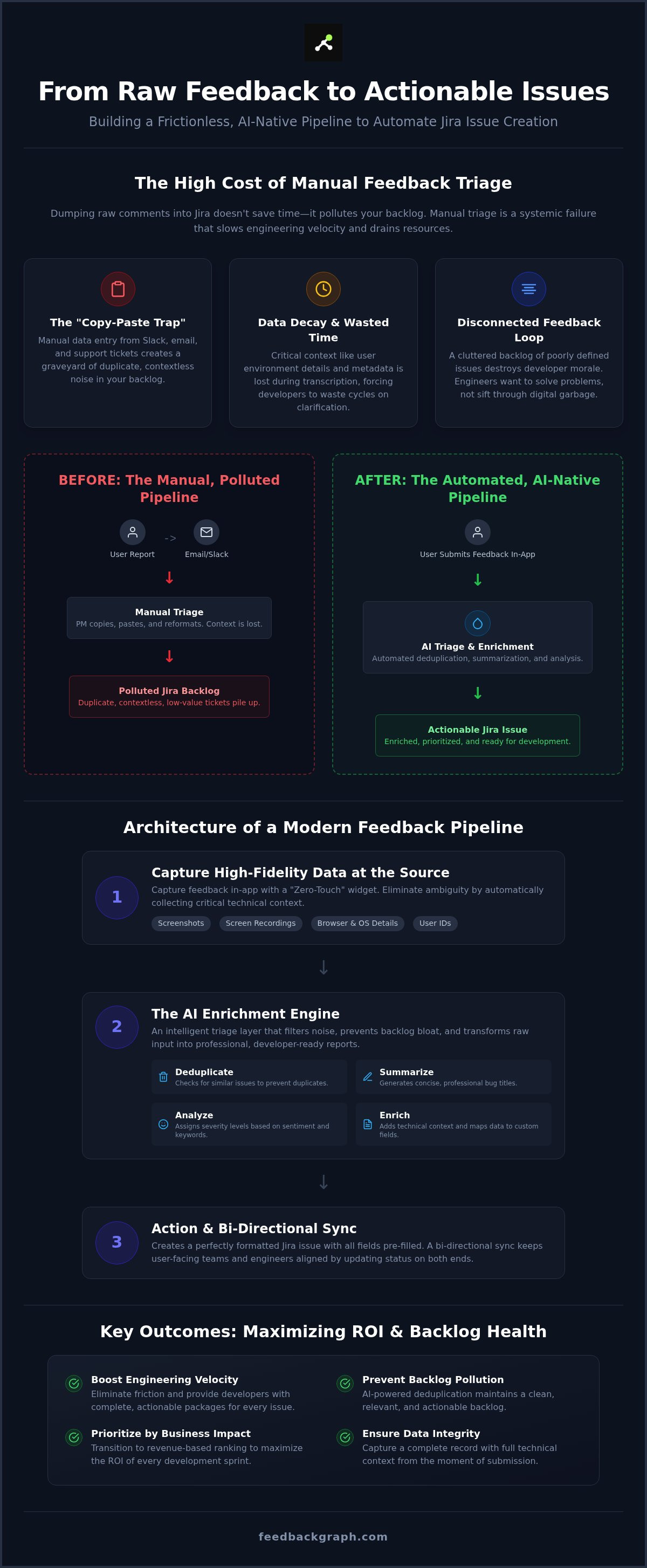
Manual triage is a productivity leak that most teams ignore until it's too late. In 2026, the volume of digital feedback has scaled beyond human capacity. When your team manually moves data from Slack, email, or support tickets into Jira (software), they fall into the "Copy-Paste Trap." This isn't just a minor annoyance. It's a systemic failure that slows engineering velocity. Every minute a product manager spends reformatting a bug report is a minute lost to strategic planning. This manual process acts as a tax on innovation, draining resources that should be focused on shipping features.
Data decay is the silent killer of resolution times. When feedback is transcribed manually, critical context vanishes. Technical metadata, user environment details, and the specific sequence of events often get left behind. This forces developers to waste cycles hunting for clarification. By the time a ticket reaches a sprint, the original user sentiment is often stripped away, leaving a dry, unhelpful summary. Forward-thinking product teams now prioritize the need to automate Jira issue creation from feedback to ensure data integrity from the moment of capture. It ensures that the engineering team receives a complete, actionable package every time.
The Disconnected Feedback Loop
A fundamental gap exists between customer-facing teams and the engineering department. Support agents see the raw pain of the user, but developers only see the sanitized, often confusing ticket. This fragmentation leads to feature bloat because teams build what's easiest to describe rather than what provides the most value. A noisy backlog cluttered with poorly defined issues doesn't just waste time; it destroys developer morale. Engineers want to solve problems, not sift through digital garbage. When you bridge this gap with automation, you align the entire organization around the customer's actual needs.
Why Traditional Jira Forms Aren't Enough
Standard portals often create more friction than they solve. Customers in 2026 expect immediate, low-effort ways to voice concerns. Forcing a user to navigate away from your app to fill out a complex, 15-field form is a recipe for abandonment. You lose valuable insights because the barrier to entry is too high. Modern bug tracking requires a two-click capture mechanism directly within the SaaS UI. This approach captures the user's thought in real-time without interrupting their workflow. Moving toward a "Zero-Touch" pipeline isn't just about efficiency. It's about respecting the customer's time and your team's focus.
The Architecture of a Modern Feedback-to-Jira Pipeline
Most automation guides focus on internal Jira triggers. They explain how to send a Slack message when a ticket moves to "In Progress." This approach ignores the most expensive part of the process: getting the data into the system in the first place. A modern pipeline flips the script. It starts where the user experiences the problem, creating a direct, high-fidelity link between the SaaS interface and the engineering backlog.
Capturing High-Fidelity Data at the Source
Visual bug reporting is the baseline for 2026 software teams. It eliminates the ambiguity of "something is broken" by providing screenshots and screen recordings immediately. See how our customer feedback widget for Jira works to bridge this gap. The widget doesn't just collect text. It automatically captures browser versions, OS details, and specific user IDs. This metadata is essential for modern debugging. It ensures your developers have the technical context they need without the typical back-and-forth emails.
The AI Enrichment Engine
Raw user input is notoriously disorganized. To successfully automate Jira issue creation from feedback, you must implement an AI triage layer. This engine acts as a digital filter. It takes a rambling user report and transforms it into a concise, professional bug title. It analyzes sentiment and keyword density to assign an accurate severity level. Perhaps most critically, the engine performs real-time deduplication. It checks your current backlog for similar issues before creating a new ticket. If a match is found, it simply enriches the existing issue with new data. This prevents the "backlog bloat" that kills team productivity.
The final stage of the architecture is the action and sync. Once the AI enriches the data, it generates the Jira issue with every custom field pre-filled. Attachments are linked automatically. However, the pipeline is only truly effective if it's bi-directional. When an engineer updates a status or leaves a public comment in Jira, the system pushes that update back to the customer. This transparency reduces support ticket volume and keeps users informed. If you want to see this workflow in action, book a technical walkthrough to see how we handle these complex integrations.
Native Jira Automation vs. AI-Powered Middleware
Jira’s native automation engine is highly effective for managing internal state changes. It excels at moving tickets between columns or notifying owners when a due date approaches. However, it’s fundamentally ill-equipped to handle the chaotic nature of external customer input. When you attempt to automate Jira issue creation from feedback using only Atlassian’s built-in webhooks, you create a direct pipeline for backlog pollution. Native rules lack the logic to interpret intent or identify redundancy. They simply execute a "Create" command every time a trigger hits. This results in a graveyard of duplicate tickets that engineers eventually learn to ignore.
FeedbackGraph acts as the intelligent bridge that native tools lack. Unlike simple connectors like Zapier or Make, which only move raw data from point A to point B, an AI-powered triage layer enriches and validates the data before it ever touches your backlog. It identifies duplicates by understanding the underlying problem, even if two users describe it using different terminology. This semantic matching is the difference between a streamlined professional workflow and a cluttered, unmanageable mess that requires hours of manual cleanup every week.
Feature Comparison: Native vs. AI-First
Standard Jira Service Management forms often require users to fill out eight or more fields. This friction leads to low-quality reports or total abandonment. In contrast, the FeedbackGraph widget captures the same technical context through a simple, two-click interface. The real divergence happens during deduplication. Native Jira automation relies on exact string matches, which rarely work for human-written feedback. Our AI triage engine uses semantic matching to group reports based on technical root causes. It reduces manual triage time by up to 80% by automatically classifying issues and assigning severity based on real-time user impact data.
Choosing the Right Tool for Your Team Size
Native automation might suffice for small internal teams with low feedback volume. If you receive fewer than five reports a week, manual cleanup is manageable. However, high-growth SaaS companies hit a tipping point quickly. Once your feedback volume scales, the "Copy-Paste Trap" mentioned earlier becomes a significant engineering bottleneck. Scaling with generic tools like Zapier becomes brittle and expensive as your logic grows more complex. For teams managing multiple products or high-traffic applications, moving to an AI-native system is a strategic necessity. Read our Best Customer-Facing Bug Tracking Systems: A 2026 Buyer’s Guide to evaluate which solution fits your current growth trajectory.
How to Set Up Automated Jira Issue Creation: A Step-by-Step Guide
Setting up a professional pipeline requires more than just a simple webhook. It demands a structured approach to ensure that the data entering Jira is clean, actionable, and prioritized. To successfully automate Jira issue creation from feedback, you must follow a methodical implementation plan that bridges the gap between your user interface and your engineering backlog. This process ensures that every ticket created provides immediate value to your development team without requiring manual intervention.
- Step 1: Connect your feedback source to your AI triage platform. Use the secure API or OAuth 2.0 to link your SaaS application or feedback widget to FeedbackGraph.
- Step 2: Define your mapping rules. Determine which feedback fields correspond to specific Jira fields, such as mapping "User Pain Level" to "Severity."
- Step 3: Configure AI enrichment settings. Set parameters for how the AI should generate technical titles, summaries, and initial classification based on user input.
- Step 4: Enable bi-directional sync. Activate the link that allows Jira status changes to push real-time updates back to the customer-facing side of the app.
- Step 5: Test the flow with a sample bug report. Submit a test entry to verify that the AI enriches the data and creates the issue in the correct Jira project.
Mapping Feedback to Jira Fields
Precision in field mapping is what separates a chaotic backlog from a streamlined professional workflow. You must align your 'Feedback Type' directly with 'Jira Issue Type' to ensure that bugs, feature requests, and UX improvements route to the correct boards. Advanced teams also map customer revenue data or Lifetime Value (LTV) to custom Jira fields. This allows for revenue-based prioritization that ensures your engineers work on the most impactful issues first. For a deeper look at how to optimize this data, read our guide on bug report enrichment with AI.
Configuring the FeedbackGraph Integration
Technical implementation begins with the FeedbackGraph Docs, where you'll find the necessary API endpoints and integration keys. Once the connection is live, you can set up sophisticated routing rules. For instance, feedback containing technical keywords like "API" or "Latency" can be routed to the Backend project, while visual feedback goes to the UX team. During this phase, you should also activate the feature to deduplicate customer bug reports. This ensures the system checks for existing issues before triggering a new creation event, keeping your backlog lean and focused.
Maximizing ROI: Revenue-Based Ranking and Backlog Health
Automation is only as valuable as the decisions it enables. If you simply automate Jira issue creation from feedback without a prioritization framework, you are merely accelerating the growth of a dysfunctional backlog. Most teams operate on a "First-In, First-Out" basis, which treats a bug report from a trial user the same as a critical issue from a high-value Enterprise account. This approach is fundamentally flawed. True efficiency requires a transition to a "Highest-Value, First-Out" model that aligns your engineering resources with your company's financial objectives.
Implementing an AI-driven triage layer does more than just move data. It actively cleans your environment. By filtering out non-actionable noise and identifying semantic duplicates, teams can reduce backlog noise by 40%. This structural integrity allows product managers to focus on high-impact tasks rather than administrative cleanup. Every ticket created is enriched with context, ensuring that the backlog remains a source of truth rather than a source of stress. It transforms Jira from a simple task list into a strategic asset.
Ranking by Revenue Impact
You can't prioritize effectively without financial context. Integrating your billing systems with your feedback pipeline allows you to attach customer Lifetime Value (LTV) data directly to every Jira issue. This visibility enables you to calculate the "Revenue at Risk" for any given bug or feature request. Instead of guessing which ticket matters most, your team can see the literal dollar amount associated with each item in the backlog. For a detailed breakdown of this strategy, refer to our guide on software for ranking feature requests by revenue.
Automating the Customer Status Update
The process doesn't end when a ticket is created. Closing the loop is the most critical step for customer retention. A bi-directional sync ensures that when an engineer moves a ticket from "In Progress" to "Done" in Jira, the system triggers an automatic update to the customer via Slack or email. This transparency builds trust and reduces the burden on your support team. Explore the various use cases for customer feedback to see how this full-cycle automation maintains a healthy relationship between your dev team and your users. By automating these touchpoints, you ensure no customer feels ignored while your developers stay focused on shipping code.
Build a High-Velocity Engineering Pipeline
Manual triage is a relic of slower development cycles. In 2026, the only way to maintain a competitive edge is to eliminate the friction between raw customer input and your engineering backlog. By moving toward an intelligent triage layer, you ensure that every ticket is enriched with high-fidelity technical data and prioritized by its actual business impact. This shift doesn't just save time; it protects your team's morale by removing the noise and digital clutter that stalls progress.
You've seen how AI-powered deduplication prevents backlog bloat and how revenue impact visualization keeps your team focused on what drives profit. It's time to automate Jira issue creation from feedback to restore strategic focus to your product managers and engineering leads. Bi-directional sync ensures that your customers are never left in the dark, closing the loop automatically as your developers ship code.
Transforming your feedback loop into a strategic asset is a methodical process with immediate rewards. Start building a cleaner, more efficient Jira environment today and watch your engineering velocity accelerate.
Frequently Asked Questions
How do I prevent duplicate Jira issues when multiple customers report the same bug?
Preventing redundancy requires AI-powered semantic deduplication rather than simple keyword matching. The system analyzes the technical root cause described in the feedback, even if users use different terminology. When it identifies a match, it enriches the existing Jira ticket with new user data instead of creating a new issue. This keeps your backlog clean and ensures engineers focus on solving the problem once rather than triaging the same bug repeatedly.
Can I automate Jira issue creation from specific feedback categories only?
Yes, you can establish granular routing rules to automate Jira issue creation from feedback based on AI classification. The triage layer identifies whether an entry is a bug, feature request, or UX improvement. You can configure the pipeline to trigger ticket creation only for specific categories, such as "Critical Bugs," while routing general suggestions to a separate product discovery board. This ensures your engineering backlog remains focused on high-priority technical tasks.
Does automating Jira issues require a developer to write code?
Modern platforms provide no-code integration environments that eliminate the need for custom development. You can map feedback fields to Jira custom fields using a visual interface. While advanced teams can leverage our API for complex enterprise workflows, most organizations can establish a high-performance, bi-directional pipeline through standard authentication. This allows product managers to maintain the system without waiting for engineering resources to build or maintain the connection.
How does AI determine the severity of a bug report automatically?
The AI engine evaluates the sentiment, technical keywords, and described impact within the user submission. It distinguishes between minor UI glitches and "blocker" issues like data loss or system crashes. By cross-referencing this analysis with the reporter's revenue data or account tier, the system assigns a severity level that accurately reflects the business risk. This objective prioritization ensures your team addresses the most damaging issues first without manual sorting.
Can I sync status changes in Jira back to the customer who provided the feedback?
Bi-directional sync is essential for closing the feedback loop effectively. When a developer updates a ticket status to "Released" or "Resolved" in Jira, the system triggers an automatic notification to the original reporter. This process reduces support ticket volume and improves customer satisfaction by providing real-time transparency. It ensures that to automate Jira issue creation from feedback is just the start of a fully automated communication cycle with your users.
What happens if the customer feedback is vague or missing details?
The triage layer mitigates vague feedback by automatically capturing technical metadata at the point of submission. This includes the user's browser, OS, and specific environment details that the user might forget to mention. If the text remains too ambiguous for a developer to act on, the system can flag the issue for internal review or prompt the user for more detail before a formal Jira issue is ever generated.
Is it possible to route feedback to different Jira projects based on the product area?
Advanced routing logic allows you to direct issues to specific Jira projects based on the detected product area. For example, feedback mentioning "API" or "Database" can be routed to the backend team, while visual reports go to the design project. This ensures that tickets land in the correct backlog immediately. It prevents the delay caused by moving issues between projects manually after they have already been created.
How do I measure the time saved by automating my feedback-to-Jira pipeline?
You can measure ROI by tracking the reduction in "Time to Triage" and the total hours reclaimed from manual data entry. Most teams see a significant drop in the number of duplicate tickets and an increase in sprint velocity. By comparing the time spent on manual categorization before and after automation, you gain a concrete metric of how much engineering and product management capacity has been restored to core development work.


