

Your engineering backlog shouldn't be a graveyard for customer ideas. If you're still manually updating ticket statuses, you're losing more than just time; you're losing user trust. Engineering teams often drown in duplicate bug reports while customers sit in silence. Implementing a robust bi-directional Jira feedback sync solves this by creating a live, automated connection between user needs and code changes.
You know transparency is the goal, but technical friction often makes it feel out of reach. This guide changes that. Master the data flow between customer insights and Jira to eliminate feedback silos and automate your engineering triage. We'll cover how to implement automated status mirroring, use AI to filter the noise, and build a direct link between dev progress and customer satisfaction.
Key Takeaways
- Stop the "data graveyard" by moving from one-way updates to a fully automated bi-directional Jira feedback sync.
- Use AI-powered triage to strip away noise, deduplicate reports, and generate structured Jira issues automatically.
- Map status triggers between your feedback portal and Jira to ensure customers see real-time progress without manual dev updates.
- Link engineering tasks to financial impact by prioritizing your backlog through revenue-based feedback ranking.
- Implement a clear workflow mapping strategy to align internal engineering progress with external customer expectations.
The Cost of One-Way Feedback: Why Simple Integrations Fail
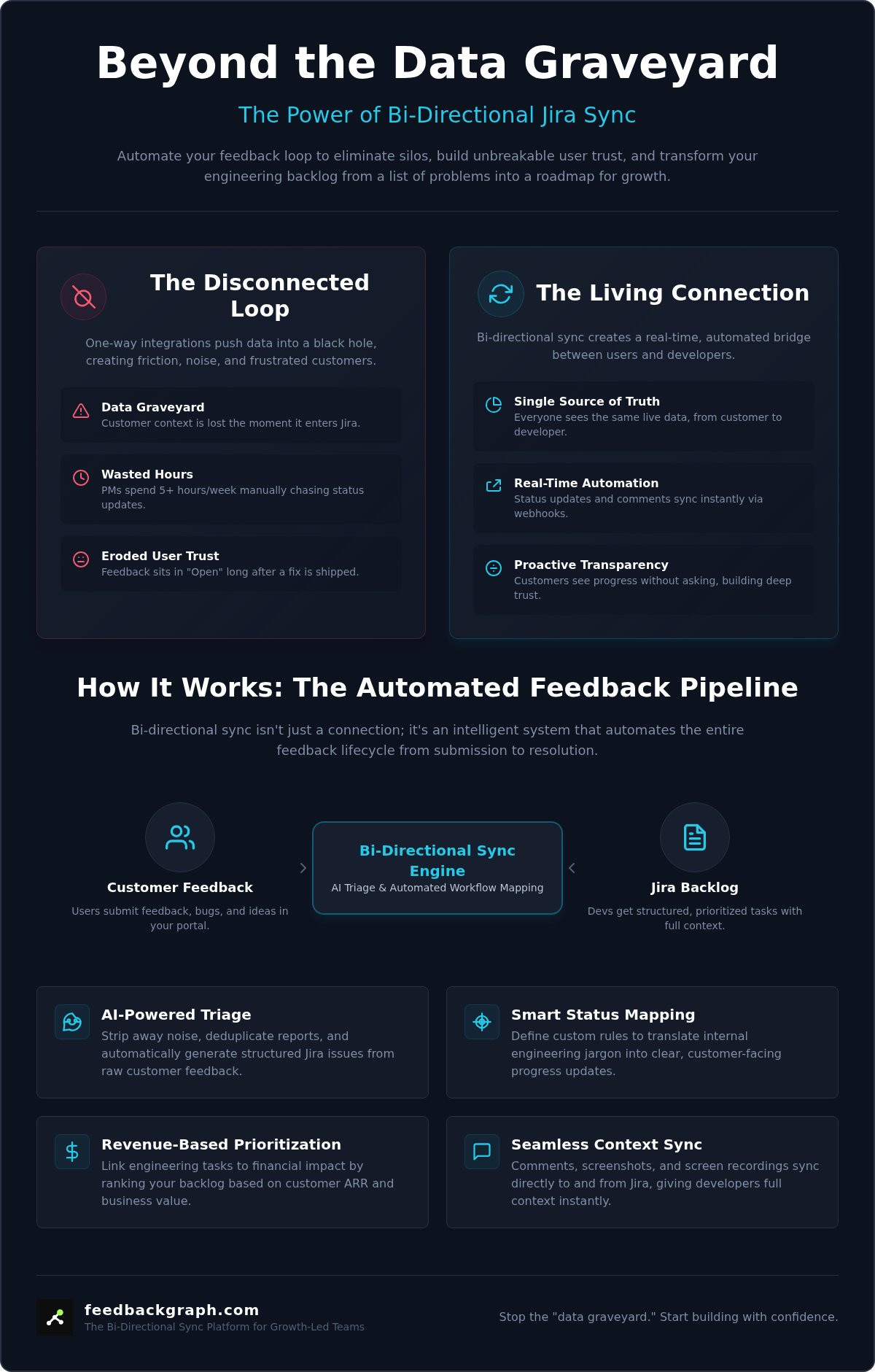
One-way integrations are a silent productivity killer. They promise automation but deliver a data graveyard where customer context goes to die. When your feedback tool only pushes data into Jira, the loop remains broken. Engineering teams receive tickets without the "why" behind them. Product managers end up wasting five or more hours every week manually chasing developers for status updates. This lack of transparency doesn't just slow you down; it makes your entire product development lifecycle opaque.
A bi-directional Jira feedback sync is the only way to maintain a single source of truth. Without it, you're forced to act as a human bridge between two disconnected systems. This manual overhead is a liability. It creates a lag between code being shipped and users being notified. Every minute spent on manual data entry is a minute lost on innovation.
The Feedback Silo Problem
Disconnected tools create friction that stalls development. Without a bi-directional Jira feedback sync, engineering efforts are often duplicated because there's no real-time visibility into existing requests. This technical debt builds up quickly. Customers also suffer a psychological blow. They see their feedback stuck in an "Open" state on a public board even after the fix is live. This erosion of trust is hard to repair. Manual triage can't scale with a growing SaaS user base. As your volume of requests increases, the silo between product and engineering becomes a wall that blocks progress.
Dead-End Backlogs and Engineering Noise
Jira becomes useless the moment it turns into a cluttered dumping ground for raw feedback. Developers need actionable tasks, not vague complaints. Fundamental File synchronization principles show that data must flow both ways to remain accurate across systems. One-way tools fail because they don't provide the revenue context developers need to prioritize work. They treat every bug report with the same weight. High-growth teams use customer feedback platforms that link directly to Jira to ensure every ticket has clear business value attached. Without this automated link, your backlog remains a list of problems rather than a roadmap for growth.
What is Bi-directional Jira Feedback Sync?
A bi-directional Jira feedback sync is a real-time data exchange protocol that bridges the gap between customer-facing feedback portals and internal engineering workflows. It ensures that when a developer moves a ticket to "Done" in Jira, the customer is immediately notified of the resolution in their portal. This is not a simple one-way push. It is a continuous, automated loop where data flows freely in both directions, maintaining a single source of truth for every stakeholder involved. By automating this exchange, you eliminate the need for manual status checks and status-update emails.
The Mechanics of Real-Time Sync
Webhooks serve as the primary triggers for this movement. When an event occurs in Jira, such as a status change or a new comment, a webhook sends a payload to your feedback tool to mirror that action instantly. This process relies on sophisticated data synchronization models to ensure that information remains consistent across different database structures. API mapping manages the heavy lifting by translating Jira’s complex field schemas into readable formats for your support and product teams. Bi-directional sync is a state-sharing protocol that maintains consistency between distinct operational environments. This architectural approach eliminates the data latency that usually plagues manual updates.
Status Mapping vs. Field Mirroring
Simple field mirroring merely copies text from one box to another. True logic-based status mapping is far more powerful. It allows you to define specific triggers, such as mapping a Jira "In Progress" status to a customer-facing "Under Review" tag. This ensures that internal engineering jargon never confuses your users. Comment mirroring is equally critical. It allows developers to ask clarifying questions within Jira that appear directly to the customer, while the customer’s response flows back into the dev ticket. Visual evidence, such as screenshots and screen recordings, also syncs seamlessly. This ensures developers have the exact context they need without leaving their primary workspace.
Building this level of connectivity manually is a significant resource drain for most teams. Leveraging pre-built bi-directional integrations is the fastest route to operational efficiency. If you want to see how these automated loops look in practice, you can book a live walkthrough to explore the setup and see the data flow in real-time.
AI-Enriched Triage: The Filter Jira Deserves
Raw feedback is often an incoherent mess of screenshots and "it's broken" messages. Pushing this unrefined data directly into your engineering workspace is a recipe for chaos. Developers shouldn't have to play detective to figure out what a user actually needs. AI enrichment solves this by acting as a sophisticated noise filter. It transforms vague reports into structured, high-quality Jira issues before the bi-directional Jira feedback sync even triggers. This ensures that every ticket landing in the backlog is actionable, categorized, and ready for development.
Triage is no longer a manual chore. Modern systems use AI to classify severity, letting the machine determine what truly deserves an "Urgent" tag based on the technical context and frequency of the report. This proactive approach prevents critical bugs from being buried under minor feature requests. It allows your team to maintain a high standard of backlog hygiene without the administrative overhead.
Automated Deduplication and Noise Reduction
Backlog bloat is the primary enemy of engineering velocity. When dozens of different users report the same login error, your engineers shouldn't see dozens of different Jira tickets. AI identifies near-duplicate reports by analyzing intent and technical patterns, grouping the customer voice into a single source of truth. It links multiple feedback items to a single Jira parent issue automatically. This intelligent grouping substantially reduces backlog noise, allowing teams to focus on solving root causes rather than managing redundant data entries. By merging these insights, you provide developers with a broader range of evidence for a single issue.
AI Title and Summary Generation
Clarity starts with a well-defined title. AI converts a user's "It doesn't work" into a professional technical summary like "API Timeout on Login Endpoint (v2.1)." This level of precision accelerates the debugging process and improves team morale. High-quality data directly impacts engineering velocity by removing the need for constant back-and-forth clarification between product and dev teams. You can see how FeedbackGraph handles AI bug triage to refine raw data into structured issues. By the time the bi-directional Jira feedback sync moves the data, it's already in the format your developers expect. This structural integrity ensures that your Jira environment remains a workspace for building, not a dumping ground for noise.
Implementation Framework: Setting Up Your Sync
Setting up a bi-directional Jira feedback sync requires a methodical approach to ensure data integrity across your stack. You aren't just connecting two apps; you're aligning two distinct operational philosophies. Product teams prioritize user sentiment, while engineering teams prioritize sprint velocity. A successful implementation bridges these worlds without creating friction. Follow this five-step framework to establish a reliable, automated loop.
- Step 1: Audit your existing Jira workflow. Identify the specific status triggers that move a ticket from triage to completion. Review your integration documentation to ensure your custom fields are ready for mapping.
- Step 2: Map customer-facing "In Review" to Jira "Backlog". This creates immediate visibility for the user without cluttering the active sprint. It signals that the request is being considered.
- Step 3: Configure notification rules. Prevent Slack alert fatigue by filtering which updates trigger a notification. Only sync high-priority status changes or direct developer comments.
- Step 4: Test the loop with a dummy ticket. Manually move a test issue through your Jira pipeline. Verify that every transition mirrors correctly in the customer portal.
- Step 5: Roll out with clear communication. Train your team on the new workflow. Ensure everyone knows that a comment in Jira might be visible to the customer.
Mapping Statuses for Clarity
Clarity is the primary goal of any bi-directional Jira feedback sync. You must define which Jira states trigger "Planned" versus "In Progress" updates for the user. For example, moving a ticket to a "Sprint" column should automatically update the customer portal to "Planned." Handling the "Won't Do" status is the most sensitive part of the process. Instead of a cold rejection, automate a "Not at this time" notification that provides context. This maintains customer trust even when you can't fulfill a specific request. Automated "Shipped" notifications should only fire when a ticket reaches your final "Done" or "Released" state to avoid premature announcements.
Security and Permissions
Security is not an afterthought in modern integrations. Your setup must follow the principle of least privilege. Restrict who has the authority to push raw feedback into Jira to prevent backlog pollution. Managing edit rights ensures that only authorized personnel can modify synchronized fields. In 2026, SOC2-compliant data handling is a mandatory standard for any tool managing customer insights and engineering data. This level of structural integrity protects your intellectual property while maintaining transparency with your users.
FeedbackGraph: Bi-directional Sync for Growth-Led Teams
FeedbackGraph transforms your bi-directional Jira feedback sync from a simple data pipeline into a strategic growth engine. Most tools stop at moving text from point A to point B. We go further by injecting revenue intelligence into every engineering ticket. This ensures that your product roadmap isn't just a list of the loudest voices; it's a calculated plan for financial impact. By combining frictionless capture with automated engineering alignment, you turn customer insights into tangible business value.
Efficiency starts at the point of entry. You can capture high-quality data with our two-click feedback widget, which gathers context without interrupting the user experience. Once captured, our AI triage takes over. It enriches every Jira ticket with severity levels and technical summaries, ensuring your developers have exactly what they need to start working immediately. This structural integrity is what separates high-performing teams from those drowning in unorganized noise.
Revenue-Based Prioritization in Jira
Engineering leads often struggle to identify which bug fixes or features move the needle. FeedbackGraph solves this by linking Jira issues directly to the total ARR impact of the reporting customers. When a developer opens a ticket, they see the financial weight of the problem. This transparency helps teams prioritize the most valuable fixes first. It's a pragmatic approach to resource allocation that aligns engineering output with company goals. You can learn more about revenue-based ranking to see how profit-first teams manage their backlogs in 2026.
Closing the Loop Automatically
Product managers shouldn't spend their days acting as status-update bots. FeedbackGraph eliminates the "PM Middleman" by ensuring status updates flow back to customers automatically. When a ticket moves to "Done" in Jira, the loop closes instantly in the customer portal. This automation builds a transparent, high-trust relationship with your users without any manual intervention. It allows your PMs to focus on strategy while the system handles the communication. To see how to configure these triggers, get started with our Jira integration docs. Closing the loop is the final, essential step in a truly bi-directional Jira feedback sync strategy.
Master Your Feedback Loop and Drive Product Growth
Transitioning to a bi-directional Jira feedback sync isn't just a technical upgrade; it's a strategic shift toward transparency. You've seen how manual updates create silos and erode customer trust. By automating the data flow, you ensure that engineering progress is immediately visible to the people who matter most. It turns your backlog into a dynamic communication tool rather than a static list of problems.
High-performing teams leverage AI-powered triage and deduplication to keep their backlogs clean and actionable. They use revenue-based feature ranking to prioritize fixes that actually impact the bottom line. This real-time bi-directional status sync closes the loop without requiring manual updates from your product managers. It's time to stop acting as a human bridge between your tools. Let automation handle the logistics so your team can focus on building what's next. You'll save hours of administrative work while building a more loyal user base through radical transparency.
Frequently Asked Questions
How does bi-directional sync prevent duplicate Jira tickets?
The system prevents duplicates by using an AI-powered deduplication engine to scan incoming feedback against your existing Jira issues. When a user submits a report that matches an open ticket, the platform automatically links the new insight to the original issue instead of creating a new one. This keeps your engineering backlog clean and ensures developers see the full scope of a bug without wading through redundant data entries.
Can I map custom Jira statuses to my feedback board?
You can map any custom Jira status to your external feedback board to maintain workflow consistency across teams. This allows you to translate internal engineering states, like "In QA" or "Staging," into user-friendly terms like "Testing" or "Planned." Flexible mapping ensures that your customers receive accurate updates without needing to understand your internal agile terminology. It's a pragmatic way to align external expectations with actual development progress.
Does syncing customer feedback to Jira slow down my dev team?
Implementing a bi-directional Jira feedback sync actually increases engineering velocity by providing immediate technical context. Developers no longer waste time chasing product managers for clarification or screenshots. Because the data flows automatically, engineers receive enriched tickets with all the necessary metadata attached. This reduces the friction of manual triage and allows the team to stay focused on shipping code rather than managing data entry.
What happens to the feedback when a Jira issue is deleted?
When a Jira issue is deleted, the linked feedback remains in your portal but its status synchronization is detached. You can configure the system to either keep the last known status or revert the feedback to an "Open" state for re-triage. This safeguard ensures that customer data is never lost due to internal backlog cleaning. It maintains a permanent record of user needs while allowing you to manage your Jira workspace freely.
Can I sync comments from Jira back to the customer?
Comment mirroring is a core feature of a robust bi-directional Jira feedback sync. You can choose to sync specific developer comments back to the customer portal to ask for more information or provide updates. This creates a direct, automated communication channel that eliminates the need for a middleman. By tagging comments as "Public" within Jira, you control exactly what the user sees while maintaining internal privacy for technical discussions.
Is bi-directional sync secure for enterprise engineering teams?
Enterprise-grade security is built into the sync architecture through SOC2 compliance and OAuth 2.0 authentication. The integration follows the principle of least privilege, meaning you control exactly which Jira projects and fields the sync can access. Data is encrypted in transit and at rest, ensuring that your intellectual property and customer information remain protected. This structural integrity makes it a reliable choice for teams operating in highly regulated environments.
How does AI help in the Jira sync process?
AI serves as an intelligent filter that enriches raw data before it hits your backlog. It automatically generates technical titles, classifies issue severity, and summarizes long user reports into actionable engineering tasks. This automation ensures that your Jira environment stays organized and high-quality. By handling the initial triage, AI allows your team to skip the manual sorting phase and move straight into the development and resolution stages.
What is the ROI of implementing bi-directional Jira sync?
The ROI of bi-directional sync is measured in hundreds of hours saved on manual status updates and triage. By closing the loop with customers automatically, you reduce churn and increase user satisfaction. Teams typically see a noticeable reduction in support volume because users can track their own requests in real-time. This efficiency allows you to reallocate your product and engineering resources toward high-value features that drive revenue growth.


