

Your Linear backlog shouldn't be a dumping ground for every vague bug report and duplicate feature request. Most high-growth teams struggle because their engineers spend more time clarifying tickets than writing code. It's a friction point that stalls momentum and kills engineering velocity. Implementing a robust customer feedback integration for Linear is the only way to protect your developers' focus while staying responsive to user needs. You're likely tired of seeing high-value requests get lost in a sea of low-signal noise.
We're here to fix that. You've probably realized that manual triage is a losing battle in 2026. This guide provides a blueprint for bridging the gap between customer success and engineering execution. You'll learn how to use AI-powered tools to deduplicate reports, rank issues by revenue impact, and automate status updates back to your users. We're moving beyond simple ticket creation to an intelligent system where every Linear issue is backed by clear data and strategic value. It's time to turn your backlog into a high-signal engine for growth and stop wasting technical talent on administrative overhead.
Key Takeaways
- Implement a robust customer feedback integration for Linear to shield your engineering team from vague tickets and duplicate bug reports.
- Use AI-powered triage to automatically generate technical summaries and perform semantic deduplication before feedback reaches your development backlog.
- Prioritize your product roadmap with precision by ranking issues based on account size and subscription revenue rather than the loudest voice.
- Close the communication loop by establishing a bi-directional sync that triggers automatic customer updates whenever a Linear issue is resolved or closed.
Why Linear Needs a Dedicated Customer Feedback Integration
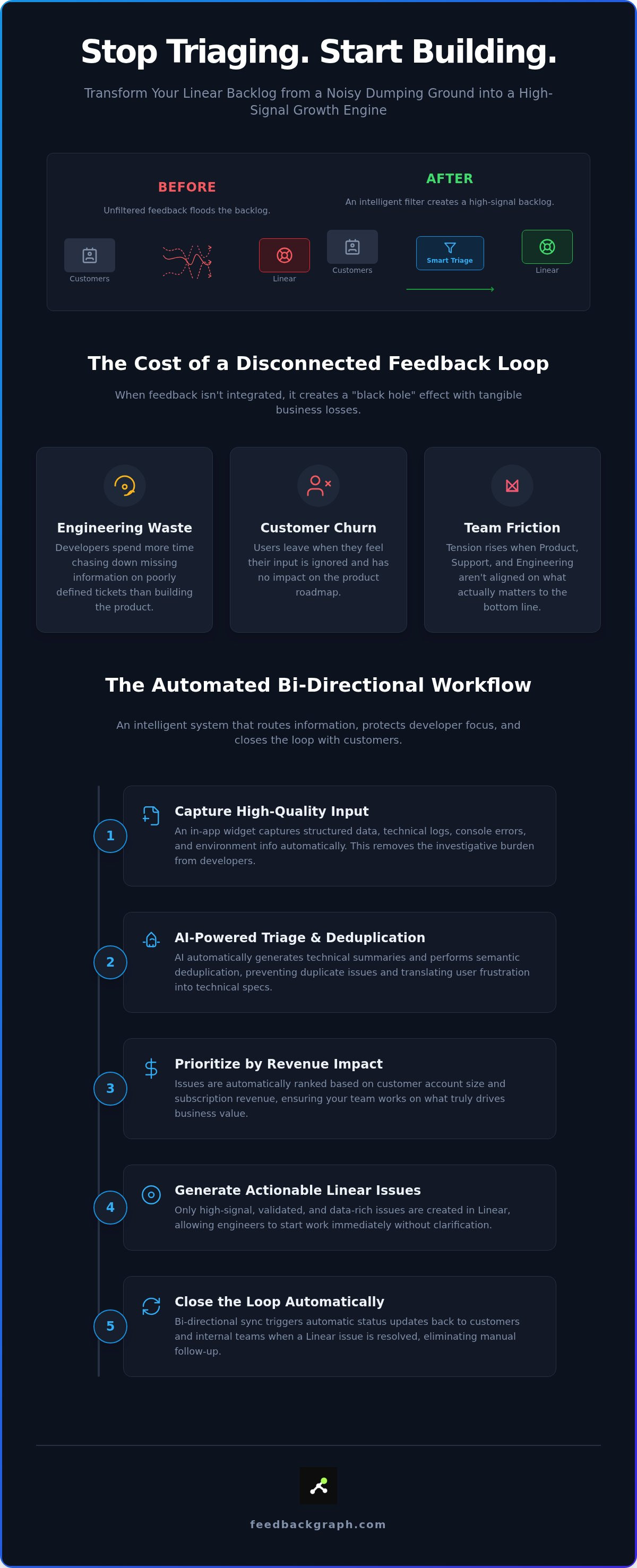
Linear is a world-class issue tracking system designed for execution. It thrives when tasks are clear, scoped, and technical. But it fails when used as a raw intake valve for every customer complaint. When you allow unfiltered feedback to flood your dev workspace, you create "Backlog Bloat." This noise forces engineers to act as investigators rather than builders. A dedicated customer feedback integration for Linear acts as a necessary filter. It ensures that only high-signal, actionable items reach your sprint.
Relying on manual copy-pasting from support tools is a growth bottleneck. It's slow. It's prone to error. Crucial context gets lost in translation. Without an automated bridge, your engineering team loses hours every week just trying to understand what a customer actually reported. This friction isn't just an administrative chore; it's a direct tax on your product velocity. You need an intelligent system that routes information without human intervention and keeps your workspace clean.
The Difference Between Building and Triaging
Raw feedback is often emotional and descriptive. Developers, however, require structured data like environment logs, browser versions, and clear reproduction steps. A triage layer protects engineering focus by translating user frustration into technical specifications. By using a tool specifically designed for customer feedback, you validate every request before it consumes a developer's attention. Structured data is the backbone of a functional bug tracking workflow. Without it, engineers spend a significant portion of their time just asking for clarification. This separation of concerns allows your team to maintain a high-velocity build cycle without the distraction of vague bug reports.
The Cost of a Disconnected Feedback Loop
A disconnected loop creates a "black hole" effect. Customers submit requests and hear nothing back. Internally, support teams grow frustrated when they can't track the progress of a critical bug. This lack of visibility leads to tangible business losses:
- Engineering waste: Developers chasing down missing information on poorly defined tickets.
- Customer churn: Users leave when they feel their input has no impact on the product roadmap.
- Team friction: Tension rises when Product and Engineering aren't aligned on what actually matters to the bottom line.
Integrating your workflow solves these issues. It ensures that every customer voice is heard and every developer hour is spent on high-impact work. Establishing a robust customer feedback integration for Linear isn't just about convenience; it's about structural integrity. It turns a fragmented process into a streamlined machine that drives revenue and user satisfaction simultaneously.
How to Set Up a Bi-directional Linear Feedback Workflow
Setting up a professional customer feedback integration for Linear requires more than a simple webhook. It's about building a secure, automated pipeline that respects your engineering team's focus. First, install an in-app capture widget to gather structured data directly from your users. Second, authenticate your integration via OAuth. This ensures a secure data flow and allows for granular permission management across your workspace. You're not just moving text; you're building a bridge between user frustration and technical resolution.
Once authenticated, you must map your feedback categories. Divide incoming reports into Bugs, Features, or Improvements and route them to specific Linear teams. The final step is enabling bi-directional synchronization. This ensures that when a developer moves a ticket to "Done" in Linear, the status update flows back to the customer automatically. It eliminates manual follow-ups and keeps your roadmap transparent without extra effort.
Configuring Your Feedback Capture Widget
High-quality engineering output starts with high-quality input. A specialized customer feedback widget allows you to capture technical logs, console errors, and environment data automatically. This removes the investigative burden from your developers. Given the importance of customer feedback in modern SaaS growth, the reporting process must be frictionless. A two-click reporting flow increases submission volume while ensuring the data is structured. Customize your widget fields to mandate specific information, like account IDs or version numbers, to ensure engineers have everything they need to start work immediately.
Mapping Data Fields to Linear Issues
Data mapping is where the integration becomes truly "intelligent." You can sync titles, descriptions, and file attachments directly into Linear tickets. Use automated triggers to route high-severity reports to an urgent triage cycle. For instance, a "Critical Bug" tag in your feedback tool can automatically create a high-priority issue in the Core Engineering team's backlog. This level of automation removes the manual overhead of sorting through a raw inbox. It ensures that the right squad sees the right issue at the right time. If you want to see this synchronization in action, you can book a technical demo to explore the full bi-directional workflow.
By mapping these fields correctly, you maintain a clean Linear workspace. You avoid the "Backlog Bloat" mentioned earlier by ensuring every ticket has the necessary context before it ever reaches a developer's queue. This structured approach turns raw user input into a streamlined execution engine.
Using AI to Triage and Deduplicate Feedback Before It Hits Linear
Establishing a customer feedback integration for Linear is only the first step. The real challenge is managing the volume. Without a triage layer, your developers will spend their mornings wading through a swamp of duplicate tickets and poorly worded bug reports. AI serves as a high-speed filter. It analyzes, cleans, and organizes data before it ever touches your production backlog. This ensures your workspace remains a focused environment for execution rather than a chaotic inbox for raw requests. You don't want your engineers acting as manual data entry clerks.
The Power of AI Bug Triage
An AI bug reporting tool acts as a technical translator. It takes emotional user input and extracts the core functional failure. By generating structured summaries and clear reproduction steps, it reduces the time engineers spend on manual triage by up to 80%. This process ensures that every ticket meets your team's "Definition of Ready." You stop wasting time on tickets that lack console logs or environment details. By prioritizing feedback that removes actual usage barriers, you align engineering effort with product stability. The AI also performs automated severity classification. It identifies "blocker" or "critical" status based on technical indicators, moving high-impact fixes to the top of the list instantly.
Eliminating Backlog Noise Through Deduplication
Semantic deduplication prevents the "10 tickets for 1 bug" problem. Traditional keyword matching often fails when users describe issues differently. AI understands the intent. It identifies near-duplicate feature requests and bug reports across different customer segments. The system then consolidates these into a single "parent" issue in Linear. This keeps the engineering view streamlined while preserving the connection to every individual reporter. When the developer closes that single Linear ticket, every linked customer receives a status update. It's a high-efficiency way to manage volume without losing individual customer context. You maintain a clean workspace while keeping everyone in the loop.
Enrichment happens in the background. The integration captures technical metadata like account size, subscription tier, and technical logs without burdening the user. This creates a high-signal environment where developers have everything they need to start working immediately. You aren't just bridging a gap; you're building an intelligent pipeline that turns noise into progress. This structural integrity is what separates a basic sync from a professional grade workflow.
Prioritizing Linear Issues by Revenue Impact
Stop listening to the loudest user and start looking at the bottom line. A professional customer feedback integration for Linear provides the financial visibility needed to make hard engineering decisions. You can't justify a three-week dev cycle based on a handful of free-tier requests. You need objective data to prove that your roadmap is driving growth. By connecting your feedback loop to your financial data, you move from subjective guessing to data-driven execution. It's about ensuring every ticket in your backlog earns its place by contributing to the company's financial health.
Quantifying the Value of Feature Requests
Every feature request in your backlog has a hidden price tag. When you prioritize product backlog by revenue, you align your technical resources with your core business goals. This approach identifies high-value gaps that are currently blocking major enterprise sales deals. Instead of wondering what to build next, you see exactly which features are requested by your top-tier accounts. This creates a profit-led roadmap that stakeholders can understand and support. It turns vague suggestions into clear business opportunities, allowing you to focus on the work that secures renewals and expansions.
Ranking Bugs by Revenue Impact
Not all bugs are created equal. A minor UI glitch affecting five enterprise customers often outranks a functional bug affecting fifty free users. This isn't elitism; it's strategic resource allocation. By integrating CRM data directly into your triage dashboard, you see the financial weight of every Linear ticket. You can visualize the "Revenue at Risk" for every open issue in real-time. This data allows you to automate the "Impact vs. Effort" matrix with real-world financial figures rather than subjective scores. You stop chasing ghosts and start fixing the issues that actually threaten your ARR.
This level of visibility transforms internal meetings. Support, Product, and Engineering can finally speak the same language: the language of revenue. You stop arguing over opinions and start executing on value. A robust customer feedback integration for Linear ensures that every developer hour is an investment. It provides the evidence needed to say "no" to low-impact requests and "yes" to the work that matters most. By leveraging advanced integration features, you turn your issue tracker into a strategic asset that drives the company forward.
Scaling Your Workflow with FeedbackGraph and Linear
Scaling a SaaS product in 2026 requires an infrastructure that handles growth without increasing manual overhead. A professional customer feedback integration for Linear must do more than just move data; it must orchestrate it. FeedbackGraph provides a unified dashboard where you can view customer context and development progress in a single pane of glass. This visibility ensures that product managers and engineers aren't working in silos. By implementing MCP servers for product management, you can automate cross-tool workflows that were previously manual chores.
Custom routing rules allow you to direct data with surgical precision. You can automatically send technical bug reports to Sentry and Linear while routing feature requests to Productboard for long-term discovery. This ensures that your customer feedback integration for Linear remains a high-signal channel. You aren't just dumping feedback into one bucket; you're building a smart distribution system that respects the specific workflows of every team in your organization. It's about maintaining structural integrity as your user base expands.
Closing the Loop Automatically
The most critical failure in most feedback systems is the "silent resolution." A developer fixes a bug, but the customer who reported it never finds out. Real scaling requires you to connect customer feedback to dev tools using bi-directional synchronization. When a Linear issue is marked as "Done" or "Canceled," FeedbackGraph triggers an automatic notification to the original reporter. This proactive transparency reduces support ticket volume and builds immense user trust. It turns your development cycle into a visible commitment to your customers, ensuring they feel heard without requiring a manual update from your support team.
Getting Started with FeedbackGraph
Deploying a sophisticated feedback ecosystem doesn't require a months-long implementation project. You can set up your first capture widget and integrate it with your workspace in under five minutes. The process is designed for speed: authenticate your Linear account, configure your auto-sync rules, and invite your team. Once active, you can immediately start triaging incoming feedback by revenue impact, ensuring your squad stays focused on high-value execution from day one. Efficiency isn't just a goal; it's a structural requirement for modern software teams that value rapid iteration.
Start your free trial of FeedbackGraph
Transform Your Linear Backlog Into a Strategic Engine
Protecting engineering velocity requires more than just a capable issue tracker; it requires an intelligent filter that guards your team's focus. You've seen how a professional customer feedback integration for Linear eliminates backlog noise through AI-powered triage and semantic deduplication. This system ensures that every ticket is technical, actionable, and ready for development. By ranking requests based on verified revenue impact, you align your technical resources with high-value business objectives. Automated bi-directional sync finally closes the loop with your users, removing the manual burden of status updates from your support team.
You're ready to move beyond subjective prioritization and build a roadmap rooted in objective data. FeedbackGraph provides the essential bridge between user requests and engineering execution, supporting bi-directional sync with Linear, Jira, and GitHub. It's time to stop managing noise and start driving progress. Building a high-signal product roadmap has never been more accessible.
Frequently Asked Questions
How do I sync customer feedback to Linear issues?
You can sync feedback by installing a capture widget and authenticating your workspace via OAuth. This creates a secure pipeline where structured data flows directly into your issues. By mapping specific categories like "Bug" or "Feature" to your engineering teams, you ensure every report lands in the right squad's queue. This automation replaces manual copying and pasting, allowing for a seamless customer feedback integration for Linear that respects your team's existing workflow.
Can I automatically update customers when a Linear issue is resolved?
Yes, bi-directional synchronization makes this possible. When a developer marks a ticket as resolved in Linear, the system automatically triggers a notification to the original reporter. This eliminates the need for support teams to track down individual users manually. It provides real-time transparency, ensuring customers feel heard the moment a fix is deployed. This automated "loop closing" is essential for maintaining high user satisfaction without adding administrative overhead to your success team.
Does a Linear integration help with bug deduplication?
Advanced integrations provide semantic deduplication by using AI to analyze the intent behind a user's report. If five users report the same glitch using different language, the system consolidates them into one parent issue in Linear. This prevents your backlog from becoming a repetitive list of identical problems. It keeps your workspace organized while still tracking the total impact of the bug. You maintain a clean environment without losing the context of individual affected users.
How can I see the revenue impact of my Linear backlog?
You can visualize revenue impact by connecting your feedback tool to your CRM or subscription database. This allows the system to aggregate the annual recurring revenue associated with every account requesting a specific change. In your triage dashboard, you'll see a "Revenue at Risk" metric for each bug. This data-driven approach helps you justify engineering trade-offs to stakeholders by showing exactly how much money is tied to a specific ticket in your backlog.
What is the best way to manage feature requests in Linear?
The most effective method is to use a dedicated triage layer as a buffer. You shouldn't let every raw request become a Linear issue immediately. Instead, validate the request, deduplicate it, and rank it by revenue impact first. Once a feature request reaches a specific threshold of business value, move it into the active backlog. This protects your developers from low-signal noise and ensures they only work on high-impact features that drive growth.
Does FeedbackGraph support bi-directional sync with Linear?
FeedbackGraph offers a robust customer feedback integration for Linear that supports full bi-directional sync. This means status changes, technical logs, and comments flow in both directions between the platforms. When an engineer updates a ticket in Linear, those changes are reflected in FeedbackGraph instantly. This ensures that your product and support teams always have the most current information without needing to switch between different tools or manually sync data points.
Can I use AI to summarize customer feedback before it goes to Linear?
AI Bug Triage is designed specifically for this purpose. It takes unfiltered user input and converts it into clean, technical specifications for your developers. The AI generates concise titles, summaries, and reproduction steps automatically. This process ensures that every ticket meets a "Definition of Ready" before it ever reaches an engineer. It significantly reduces the time spent on manual review, allowing your development team to focus entirely on building and fixing the product.


