

Why are your senior engineers still spending four hours every week playing detective with vague "it's broken" tickets? Finding the right customer feedback widget for Jira is no longer about simple data entry; it's about stopping the flood of duplicates and low-quality reports that clutter your backlog. Most teams treat their issue tracker like a digital junk drawer, filled with requests that lack technical context or business value. You know the frustration of a manual triage process that stalls momentum and leaves high-value users feeling ignored.
This 2026 guide shows you how to implement an AI-powered triage layer that automatically enriches reports with severity levels and ranks tickets by revenue impact. We'll explore how modern widgets deduplicate entries and use bi-directional sync to keep customers informed without manual intervention. You'll learn how to transform messy user feedback into clean, prioritized Jira issues that drive growth and eliminate engineering friction. It's time to move beyond passive collection and start using an intelligent assistant that turns raw data into a roadmap for success.
Key Takeaways
- Stop wasting engineering hours on manual triage by replacing the abandoned native Jira Issue Collector with an AI-first capture system.
- Learn how the right customer feedback widget for Jira uses automated deduplication to keep your backlog clean and free of redundant reports.
- Leverage AI to instantly enrich every user report with accurate technical titles, summaries, and severity classifications.
- Shift from gut-feel prioritization to data-driven roadmaps by ranking every feedback ticket based on its total revenue impact.
- Close the loop with users automatically using bi-directional sync that updates ticket status in real-time as your team works in Jira.
Why the Native Jira Issue Collector Fails Modern SaaS Teams
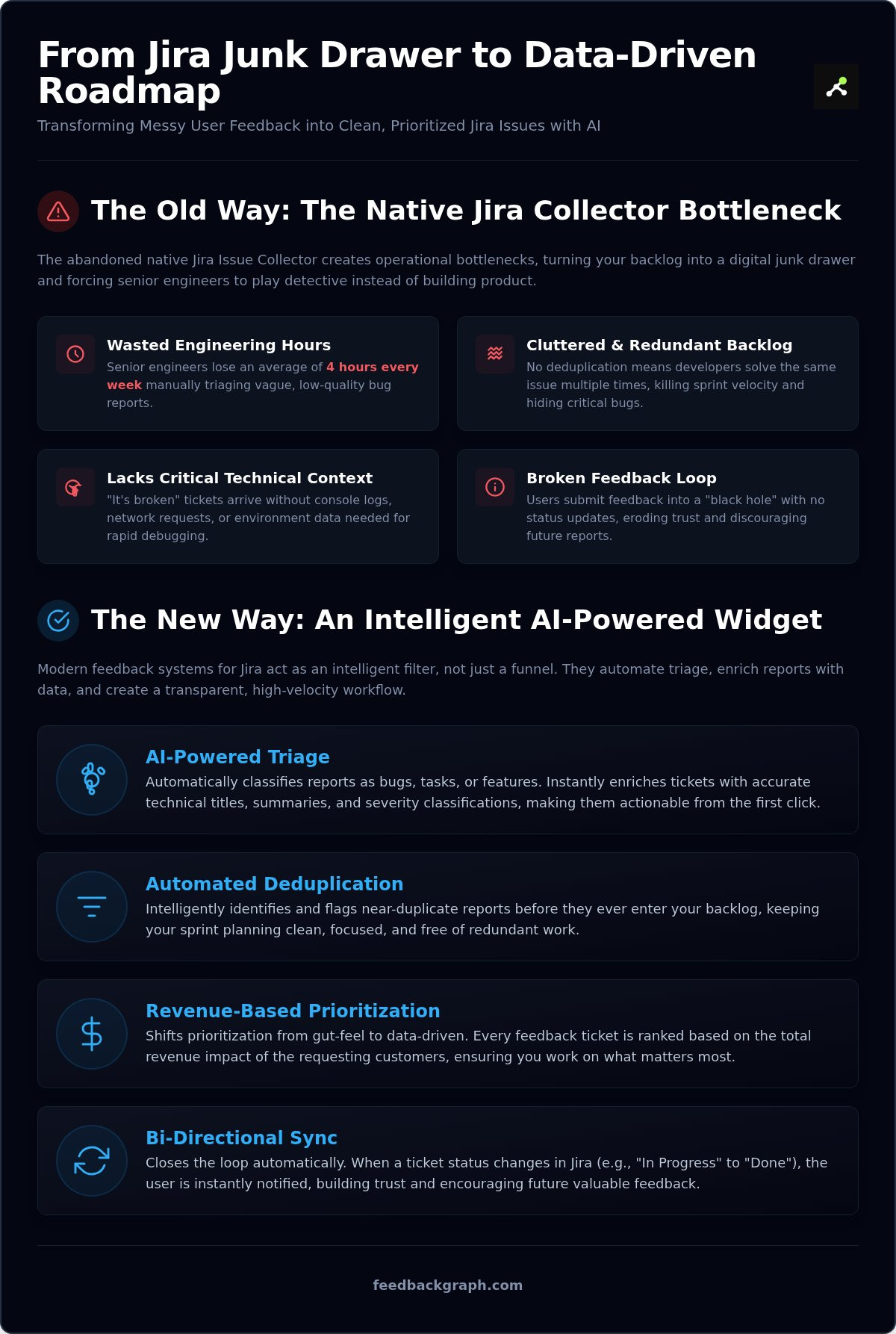
The native Jira Issue Collector is a legacy tool that no longer meets the standards of high-velocity development. As of August 2026, Atlassian has effectively abandoned this feature. It remains unmaintained, lacks support for team-managed projects, and fails to provide the rich technical data necessary for rapid debugging. When you rely on a basic customer feedback widget for Jira, you aren't just collecting data; you're creating a massive operational bottleneck. These primitive tools dump raw, unstructured text directly into your backlog, forcing senior developers to act as expensive data cleaners rather than innovators.
Modern Enterprise Feedback Management (EFM) systems require high-fidelity data to be effective. The native collector ignores console logs, network requests, and environment metadata. Without these details, every "it's broken" report becomes a time-consuming investigation. This lack of structure turns your Jira instance into a digital junk drawer, where critical bugs are buried under a mountain of vague, low-value tickets. It provides no mechanism for deduplication, meaning your team often solves the same issue multiple times without even realizing it.
The Engineering Backlog Noise Problem
Unfiltered feedback is a liability. Every low-quality ticket that enters your system drags down sprint velocity. Senior engineers often lose hours every week manually triaging reports, identifying duplicates, and asking users for basic technical details. This manual overhead carries a high hidden cost that compounds over time. When your backlog is cluttered with redundant issues, your team loses visibility into the bugs that actually impact revenue. A sophisticated customer feedback widget for Jira must act as a filter, not just a funnel. It should ensure that every issue reaching your developers is enriched, unique, and actionable from the first click. For more on optimizing this workflow, see how we handle automated bug tracking.
The Broken Feedback Loop for Customers
Communication is a two-way street. The native collector offers no bi-directional sync. Users submit a report and then hear nothing for weeks. This "black hole" experience erodes trust and discourages future engagement. Users stop providing valuable insights when they feel their contributions are ignored. Real-time status updates are essential for modern SaaS retention. By integrating a widget that syncs status changes directly from Jira back to the user, you build long-term loyalty. This transparency proves your team is active and responsive. It transforms a frustrating bug encounter into a positive brand interaction, ensuring your most engaged users remain part of your development journey.
Key Selection Criteria for a Jira Feedback Widget in 2026
Selecting a customer feedback widget for Jira is a strategic decision that directly impacts your engineering velocity. In 2026, a "good" widget does more than just pass text from a user to a developer. It must act as an intelligent gatekeeper. Most legacy tools simply forward data, creating a one-way dump that leads to fragmented communication and bloated backlogs. To maintain a high-performing development cycle, your selection must prioritize automation over simple connectivity.
Modern product teams now require five non-negotiable features in their feedback stack:
- AI-Powered Triage: Immediate classification of reports into bugs, tasks, or feature requests.
- Bi-directional Sync: A live bridge where status updates in Jira automatically reflect in the user-facing widget.
- Technical Metadata Capture: Automatic logging of console errors, network requests, and environment details.
- Revenue-Based Ranking: Attaching a dollar value to every ticket based on the requesting customer's account size.
- Automated Deduplication: Identifying near-duplicate reports before they enter your sprint planning.
Simple "Forward to Jira" tools are obsolete. They create a "black hole" where feedback disappears, leaving users frustrated and developers overwhelmed. True bi-directional sync ensures that when a developer moves a ticket to "Done" in Jira, the user receives an instant notification. This transparency builds the trust necessary for long-term SaaS retention.
Seamless In-App Capture and UX
Friction is the primary enemy of high-quality feedback. If a user has to leave your application to report an issue, they won't do it. Your widget must live exactly where the friction occurs. We follow the "two-click rule": a user should be able to initiate a report and submit visual evidence in two clicks or less. Support for visual annotations and screen recordings is essential. These tools allow users to show, not just tell, what is broken. This immediate clarity eliminates the back-and-forth emails that stall progress. Capture the evidence at the source to keep your developers focused on the fix.
Deep Jira Integration and Workflow Routing
A sophisticated customer feedback widget for Jira must respect your existing project architecture. It should support intelligent routing, sending UI bugs to the frontend team and API issues to the backend project automatically. Map your custom fields directly from the widget to your specific Jira issue types to ensure data integrity. By streamlining your bug reporting workflow, you remove the manual steps that slow down your release cycle. High-fidelity integrations ensure that every ticket arrives with the exact labels, components, and priorities your team expects. If you want to see how these automated workflows can transform your backlog, you can schedule a walkthrough with our team.
The AI Advantage: Automated Triage and Deduplication
Syncing data into Jira is only half the battle. The real bottleneck occurs after the data arrives, where teams often find themselves buried in a triage nightmare of unstructured reports. A standard customer feedback widget for Jira serves as a simple funnel, but without an intelligent layer, it merely moves the mess from the user’s screen to your engineering backlog. AI-first widgets solve this by acting as a sophisticated filter that processes, enriches, and organizes data in real-time.
This intelligent layer moves beyond basic automation. While legacy systems rely on rigid "if-this-then-that" rules, modern AI understands the nuance of human language. It interprets the intent behind a user's report, ensuring that the information reaching your developers is already structured and actionable. This transition from passive collection to active processing is what allows high-performing teams to scale their feedback loops without increasing their headcount.
AI-Powered Bug Report Enrichment
Most users lack the technical vocabulary to describe software failures accurately. They submit vague complaints like "it's not working" that require extensive manual follow-up. AI enrichment transforms these low-fidelity reports into high-fidelity Jira issues. By using an AI bug reporting tool, the system automatically generates technical titles and summaries that highlight the root cause. It doesn't just summarize; it classifies. AI analyzes user sentiment and technical context to assign severity levels instantly. It can distinguish a non-critical UI alignment issue from a catastrophic checkout failure without human intervention. This shift reduces the "Time to Triage" from several hours per week to mere milliseconds, allowing your team to maintain momentum.
Eliminating Redundancy with Intelligent Deduplication
Backlog bloat is frequently caused by duplicate reports that use slightly different wording. Traditional automation rules are too rigid to catch these, as they rely on exact keyword matches. Intelligent deduplication uses semantic understanding to recognize when multiple users are describing the same underlying problem. When the customer feedback widget for Jira identifies a near-duplicate, it merges the new report into an existing issue rather than creating a new one. This grouping provides a clear view of the bug's impact, showing exactly how many users are affected by a single flaw. By preventing redundant tickets from entering your workflow, you keep your roadmap clean and your engineering team focused on unique, high-value tasks. This level of structural integrity is what separates 2026 AI-powered systems from legacy integrations. For a deeper look at how this logic works, explore our automated triage features.
Revenue-Based Prioritization: Turning Feedback into Profit
Product managers often struggle to justify the roadmap. Without financial context, every request looks the same. A standard customer feedback widget for Jira treats a free user's bug report the same as a report from your biggest enterprise account. This lack of visibility leads to misallocated resources and missed growth opportunities. By attaching a dollar value to every Jira ticket, you move from guesswork to strategic execution. You stop guessing which features might move the needle and start working on the ones that actually secure your bottom line.
Integrating your feedback system with CRM data creates a 360-degree view of your backlog. You can instantly see the total contract value associated with any specific issue. This financial layer allows you to rank requests based on the actual revenue at risk. It's not just about fixing bugs; it's about protecting your revenue. You gain the ability to tell stakeholders exactly why a specific feature is at the top of the sprint based on the hard data it represents. This evidence-based approach transforms the product team from a cost center into a clear driver of growth.
Quantifying the Impact of Every Bug
Identifying which defects affect your highest-paying accounts is critical for retention. Churn often happens when high-value users feel their needs are ignored or their technical issues are deprioritized. When you use ranking feature requests by revenue, you ensure that your engineering team tackles the most impactful problems first. This approach prioritizes fixes that prevent churn in key segments, turning your support queue into a profit-preservation engine. It removes the ambiguity from your triage process and replaces it with clear, logical prioritization that everyone on the team can understand.
Data-Driven Roadmaps Over Intuition
Stakeholders often push for features based on gut feel or the most recent sales call. You can stop these subjective debates by presenting hard financial data. Use the data captured by your customer feedback widget for Jira to build profit-led roadmaps that align with business goals. Tools like FeedbackGraph allow you to visualize revenue-impact directly, making it easy to show why certain tasks are prioritized over others. This transparency builds confidence with leadership and ensures your team is always working on what matters most. You aren't just managing a backlog; you're managing a portfolio of business investments.
Implementing FeedbackGraph for Jira: A 2026 Setup Guide
Deploying a modern customer feedback widget for Jira should not require a sprint's worth of engineering resources. Legacy integrations often fail because they demand complex API configurations and custom middleware. FeedbackGraph simplifies this by acting as a native AI triage layer that connects to your Jira instance in minutes. This rapid deployment allows your team to start capturing high-fidelity data without disrupting your current release cycle. You move from installation to automated issue generation almost instantly.
The first step involves a direct OAuth connection to your Jira Cloud project. Once linked, you can map the widget's input fields to your specific Jira issue types and custom components. This ensures that every report arrives with the correct labels and technical context. You can customize the widget's UI to match your SaaS brand identity, maintaining a seamless experience for your users. For detailed technical requirements, you can review our integration documentation. Setting up bi-directional sync is the final piece of the core configuration. This ensures that when your developers update a status in Jira, the widget reflects that change to the user automatically.
Configuring Your AI Triage Dashboard
The true power of your customer feedback widget for Jira lies in its triage logic. Within the FeedbackGraph dashboard, you define the thresholds for automatic ticket creation. You might choose to have critical bugs bypass human review while feature requests are held for PM approval. Training the AI on your specific product terminology is essential. By providing context on your unique features and jargon, the AI generates more accurate technical summaries. You can also extend your workflow by integrating with Slack or Linear. These multi-tool connections ensure that your team receives real-time alerts in the environments where they already work, further reducing the friction of response.
Measuring Success and Engineering Velocity
Implementation is only successful if it produces measurable results. You should track the immediate reduction in manual triage time for your senior engineers. Most teams see a significant drop in the hours spent on backlog grooming and duplicate identification. Monitor your "Close-the-Loop" time to see how much faster you are responding to user reports. This metric is a direct indicator of customer satisfaction and retention. By automating the capture and classification process, you free your team to focus on shipping high-impact code. Ready to transform your feedback loop? Start your free trial of FeedbackGraph today and eliminate the noise in your Jira backlog.
Build a Profit-Led Roadmap with AI-First Feedback
High-velocity software teams cannot afford to let their engineering backlogs become digital junk drawers. Legacy tools and abandoned native collectors create operational friction that stalls development and frustrates your most valuable users. By implementing a modern customer feedback widget for Jira, you replace manual guesswork with an intelligent triage layer that understands the technical and financial context of every report. This transition isn't just about collecting data; it's about protecting your engineering velocity and ensuring every sprint delivers maximum business value.
The shift to an AI-first workflow means your senior engineers reclaim hours of productive time every week. Automated deduplication ensures your roadmap stays clean, while revenue-based ranking provides the evidence needed to justify every roadmap decision to stakeholders. With bi-directional sync across Jira, Linear, and GitHub, you close the loop with users automatically and build lasting trust through radical transparency. It's time to stop managing noise and start driving growth through data-driven precision. Take full control of your product development cycle and start turning raw user insights into high-value Jira issues today.
Your team deserves a backlog that reflects your strategic priorities, not just the loudest voices. Start building for impact now.
Frequently Asked Questions
How does a customer feedback widget for Jira improve engineering speed?
It eliminates manual triage by capturing high-fidelity technical data automatically. Instead of senior developers chasing vague reports, the widget provides console logs, environment metadata, and AI-enriched summaries. This structure allows engineers to reproduce bugs instantly. By filtering out noise and duplicates before they reach the backlog, your team maintains a consistent sprint velocity and focuses on high-impact code rather than manual data cleanup.
Can the AI widget automatically close duplicate Jira tickets?
Yes, the AI triage layer identifies near-duplicate reports by analyzing the semantic meaning of user submissions. When a duplicate is detected, the system can automatically merge it into an existing issue or link it as a related ticket. This prevents backlog bloat and provides product managers with a clear view of how many users are affected by a single flaw, ensuring resources are allocated to unique problems.
Does the Jira feedback widget work with both Cloud and Data Center versions?
Modern 2026 widgets prioritize Jira Cloud integration due to its advanced API capabilities. Most AI-first solutions focus on Cloud to leverage real-time data flow and bi-directional syncing. If your team uses Data Center, you should verify if the specific tool supports version 11.3.10 or later. However, most innovation in AI-powered triage is currently concentrated on the Jira Cloud ecosystem to ensure maximum performance and automation.
How do I sync Jira status updates back to the customer automatically?
You achieve this through bi-directional integration. When a developer moves a ticket from "In Progress" to "Done" in Jira, the customer feedback widget for Jira detects the status change and triggers an automated notification to the original reporter. This closed-loop communication keeps users informed without manual intervention from your support or product teams, significantly improving customer trust and reducing inbound status inquiries.
Is it possible to rank Jira issues by the revenue of the reporter?
Yes, this is a core feature of revenue-based feedback ranking. The widget integrates with your CRM to pull account value data at the moment feedback is submitted. Every Jira ticket is then assigned a dollar value based on the contract size of the requesting customer. This allows product managers to sort their backlog by financial impact, ensuring that bugs affecting high-value accounts are prioritized over low-impact requests.
What technical metadata is captured by the Jira feedback widget?
The widget captures a comprehensive suite of technical context to eliminate the "it's broken" ambiguity. This includes:
- Console logs and JavaScript errors
- Network request headers and response codes
- Browser version, OS, and screen resolution
- Current URL and user navigation path
Can I customize the look and feel of the feedback widget for my SaaS?
Modern widgets offer full CSS customization and branding controls to ensure a seamless user experience. You can adjust colors, fonts, button styles, and trigger positions to match your product's design system. This prevents the widget from feeling like a third-party intrusion. Maintaining brand consistency is vital for user trust, ensuring that the customer feedback widget for Jira feels like a native part of your application.
How does AI enrichment improve the quality of bug reports in Jira?
AI enrichment acts as a translator between non-technical users and your engineering team. It takes raw user input and automatically generates professional titles, concise summaries, and severity classifications. By analyzing the sentiment and technical context, the AI can distinguish a critical system failure from a minor UI glitch. This ensures that every ticket in your backlog is structured, readable, and ready for immediate technical review.


