

By the end of 2026, AI is projected to handle 95% of all customer interactions, yet many engineering teams remain trapped in a manual triage loop. Your developers shouldn't waste time decoding vague reports or clearing duplicate tickets from a noisy backlog. To maintain high velocity, you must connect customer feedback to dev tools using an automated, intelligent pipeline. This transition ensures your team focuses on the specific fixes that protect your bottom line and drive growth.
You already know that the "different languages" spoken by Customer Success and Engineering create friction and delay critical releases. This guide promises to show you how to bridge that gap by syncing the customer voice directly into your development workflow. We will preview the technical frameworks for bi-directional sync, automated bug reporting, and revenue-based ranking. You are about to move beyond simple integrations and start building a roadmap driven by hard data and financial impact.
Key Takeaways
- Eliminate manual triage by bridging the gap between customer success and engineering workflows to prevent data decay and developer burnout.
- Learn how to connect customer feedback to dev tools using bi-directional sync that automatically updates customers when tickets are resolved.
- Leverage AI-powered triage to classify bug severity and deduplicate reports, ensuring your engineering backlog stays focused on unique issues.
- Shift your roadmap prioritization toward revenue-based ranking by linking feature requests directly to account value and subscription tiers.
- Deploy a streamlined feedback stack with an in-app capture widget and authenticated integrations for tools like Jira, Linear, and GitHub.
The Feedback-to-Dev Gap: Why Manual Triage is Failing in 2026
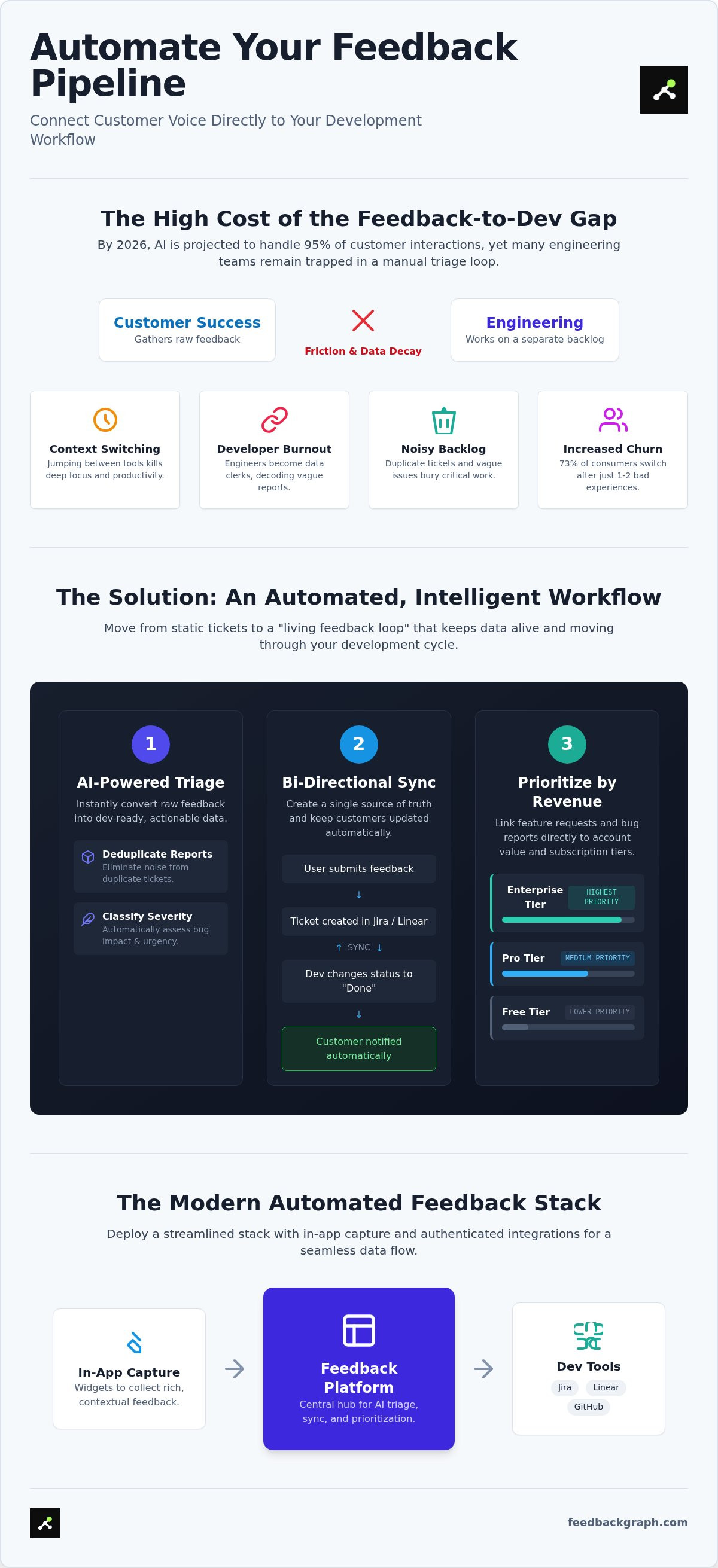
The Feedback Gap isn't just a minor operational hurdle. It's a structural failure that occurs when customer success platforms and engineering backlogs exist in separate silos. This friction creates a vacuum where data decay is inevitable. When you fail to connect customer feedback to dev tools through automation, you force your engineers to act as data entry clerks. The result is a "noisy" backlog where duplicate reports and vague descriptions bury the critical issues that actually drive churn. In an era where 73% of consumers will switch to a competitor after just one or two bad experiences, you can't afford a disconnected workflow.
Engineering burnout often stems from this lack of clarity. Developers want to build, not spend hours decoding what a user meant in a Slack message. A Unified Dev Workflow solves this by treating the customer voice as a first-class data citizen. This approach moves beyond simple ticketing. It integrates raw sentiment directly into the technical environment, ensuring that every bug report is actionable from the moment it arrives.
The Hidden Cost of Disconnected Systems
Context switching is a productivity killer. When developers jump between email, support desks, and Jira, they lose the deep focus required for complex coding. Manual reporting scales poorly as your SaaS user base expands. A report that lacks essential metadata, such as browser versions or specific user IDs, triggers a frustrating back-and-forth between teams. This delay isn't just annoying; it's expensive. By the time a developer has enough information to start a fix, the data is often stale. Without a system to connect customer feedback to dev tools, your team spends more time investigating the "what" than solving the "how."
Moving from Static Tickets to Living Feedback
The industry is moving away from static, one-way bug tickets. Modern SaaS product feedback systems are evolving to be AI-first, turning raw user input into dynamic data streams. This shift relies on the principles of Enterprise Feedback Management to ensure that every piece of data is captured and utilized effectively.
A living feedback loop provides bi-directional visibility across the entire organization. When a developer moves a ticket to "In Progress," the customer success team sees it immediately. When the fix is deployed, the customer is notified automatically. This transparency builds trust and eliminates the manual follow-up tasks that clutter your project management tools. You don't just need a place to store feedback; you need a mechanism that keeps it alive and moving through your dev cycle.
The Mechanics of Bi-directional Dev Tool Integration
Real-time data flow relies on robust APIs and webhooks. When a user submits a report via a widget, the system triggers an API call that transmits the data to your dev environment. This isn't just a blind data dump. Modern systems use AI to enrich the data, automatically generating concise titles and technical summaries from raw user sentiment. This ensures that when you connect customer feedback to dev tools, the resulting tickets are structured and immediately actionable. It removes the need for manual interpretation and lets engineers start solving problems right away.
Bi-directional sync is the automated alignment of ticket status and customer notification. When a developer closes a Jira issue, a webhook fires back to the feedback platform. This triggers an automated message to the original reporter. This loop eliminates manual status updates and keeps the customer informed without human intervention. Integrating these streams into your product lifecycle management ensures that every fix contributes to a continuous improvement cycle. This transparency builds user trust while reducing the administrative load on your support staff.
Syncing with Jira and Linear
Efficiency depends on accurate mapping. You must map feedback categories directly to Jira issue types like Bug, Task, or Story. If a user reports a UI glitch, the system should categorize it as a Bug automatically. State mapping is equally critical. Ensuring that "In Progress" in Linear reflects correctly on the customer-facing dashboard prevents confusion. This level of synchronization turns your dev tool into a single source of truth for both internal teams and external users. If you're ready to automate this flow, you can book a technical walkthrough to see it in action.
Leveraging MCP Servers for AI Agents
In 2026, the Model Context Protocol (MCP) is the standard for connecting AI agents to technical environments. An MCP server for product management allows AI agents to query live feedback data directly. This gives coding agents access to real-world issue reproduction steps and user logs. We're seeing a shift toward "agentic" workflows where AI doesn't just write code; it verifies its own fixes against the original customer report. Giving AI agents direct access to the feedback stream reduces the QA burden and accelerates the path from bug discovery to deployment.
AI-Powered Triage: Converting Raw Feedback into Dev-Ready Data
Raw feedback is often chaotic. Users report issues with varying levels of clarity, which makes manual sorting a significant bottleneck for growing teams. AI-powered triage eliminates this friction by converting unstructured sentiment into structured, dev-ready data. The system automatically classifies bug severity by cross-referencing user impact with technical metadata captured at the point of submission. It doesn't just pass information along; it analyzes it. This intelligent layer ensures that when you connect customer feedback to dev tools, your engineering team receives high-quality, prioritized tickets that require zero manual intervention.
Beyond simple classification, the system handles the administrative heavy lifting that usually falls on product managers. It generates consistent, searchable titles and technical summaries for every ticket, ensuring your backlog remains professional and organized. It also manages automated routing. Based on the specific content of an issue, the AI directs the ticket to the correct GitHub repository or Slack channel. This creates a direct, automated path from the customer's problem to the developer's solution, cutting out the middleman and accelerating your response time. This capability is essential for teams that want to connect customer feedback to dev tools while maintaining a high release cadence.
Eliminating the Duplicate Nightmare
Backlog bloat is the enemy of engineering velocity. Traditional tools rely on basic keyword matching, which often fails to catch duplicates written in different styles or languages. Modern AI analyzes semantic meaning to identify near-duplicate reports instantly. It groups related feedback under a single master ticket, providing developers with a comprehensive view of the problem without the clutter of repetitive entries. This allows you to reduce engineering backlog noise and maintain a tight focus during sprint planning. You stop chasing ghosts and start shipping updates that actually move the needle.
Enriching Reports with Technical Context
A bug report is useless if a developer can't see what actually happened on the user's screen. The triage process automatically attaches session data, console logs, and environment metadata to every synced issue. This contextual enrichment transforms a vague complaint into a reproducible technical task. It significantly reduces the frequency of "Cannot Reproduce" labels, which are usually just a symptom of poor data capture. Understanding the ROI of automated bug severity classification is simple: you spend less time on low-impact glitches and more time on the issues that threaten your stability. It's a pragmatic shift from reactive patching to strategic, evidence-based development.
Prioritizing the Roadmap: Ranking Feature Requests by Revenue
Traditional roadmapping is often a game of internal politics and subjective opinions. In 2026, high-velocity teams have replaced the "loudest voice" method with cold, hard financial data. When you connect customer feedback to dev tools, you gain the ability to weigh every ticket against its actual dollar value. This isn't about ignoring smaller users; it's about understanding the specific account value at risk when a critical bug persists or a requested feature remains unbuilt. You stop guessing which tasks matter and start executing on the ones that move the needle for your bottom line.
Visualizing "Revenue at Risk" directly within your Jira or Linear dashboard changes the conversation during sprint planning. Instead of debating the technical "interest" of a bug, engineers see exactly which fixes protect high-value subscription tiers. Research indicates that over half of consumers will switch to a competitor after just one bad experience. By linking feedback to account value, you ensure that your most important clients receive the stability they pay for. This transparency allows technical leads to justify resource allocation to stakeholders with confidence. It transforms the engineering department from a cost center into a strategic driver of retention and growth.
Quantifying Customer Voice
Automation is the only way to scale this level of precision. By ranking feature requests by revenue, the system automatically pulls data from your CRM to tag feedback with live account metrics. High-value enterprise accounts can be mapped directly to priority dev lanes, ensuring their needs never get lost in a sea of lower-tier requests. This data-driven approach ensures that every hour of developer time is spent on high-impact work. Revenue-based ranking turns the engineering backlog into a profit-driven roadmap.
Strategic Alignment Between Product and Engineering
Sprint planning sessions are notorious for the "Intuition vs. Data" debate. Revenue metrics end this conflict by providing a single source of truth that both product managers and developers respect. When you connect customer feedback to dev tools and integrate these metrics into your customer feedback to GitHub issues workflows, you align the entire organization around business outcomes. Executive leadership no longer sees a list of technical tasks; they see a strategic plan to maximize the lifetime value of every customer. This alignment builds trust and accelerates the delivery of features that customers are actually willing to pay for.
Implementation: Setting Up Your Automated Feedback Stack
Building a resilient feedback pipeline requires more than just installing a plugin. It demands a structured approach to data flow. To connect customer feedback to dev tools effectively, you must first deploy the FeedbackGraph capture widget within your SaaS application. This "Z-click" tool ensures frictionless reporting for users while capturing high-quality technical data. Once the widget is live, the focus shifts to authentication. You need to authorize bi-directional integrations with your primary environment, whether that is Jira, Linear, or GitHub. This connection is the backbone of your unified feedback loop, turning raw user input into structured engineering tasks.
Configuration is where you define the intelligence of the system. You must set up specific AI triage rules to handle auto-assignment and severity mapping. These rules analyze incoming data to determine which team should handle the issue and how urgently it needs to be addressed. After the technical setup, invite your team members to a centralized dashboard. This visibility ensures that everyone, from developers to product managers, can monitor the status of every report. Finally, review your revenue-based prioritization settings. Iterating on these rules ensures your roadmap stays aligned with the accounts that drive your growth.
Configuring the Bi-directional Sync
Connecting your Jira projects to FeedbackGraph categories is a straightforward process. You start by mapping your existing issue types, such as Bugs or Stories, to the specific types of feedback your users submit. For high-severity issues identified by AI, configure Slack notifications to ensure immediate visibility for your on-call engineers. Testing the sync is a critical final step. Submit a report through the widget and verify that a corresponding dev ticket is created in under 60 seconds. This rapid data transfer confirms that your pipeline is ready for production and capable of handling high volumes of user data without delay.
Best Practices for Ongoing Management
Automation is not a "set it and forget it" solution. You should regularly audit AI triage accuracy to fine-tune your automation rules. This ensures that the system continues to classify severity and revenue impact correctly as your product evolves. Don't limit the system to external users. Encouraging internal feedback through the same channels can significantly improve the relationship between your dev and product teams. For a comprehensive look at how to optimize these workflows, explore the full list of FeedbackGraph Features. Maintaining a clean, data-driven backlog requires constant vigilance, but the result is a significantly faster development cycle and a more stable product.
Accelerate Your Development Cycle with Intelligence
Modern software development moves too fast for manual data entry and subjective prioritization. Integrating customer sentiment directly into your technical workflow is now a requirement for high-growth SaaS teams that value speed and precision. You've seen how AI-powered triage and bi-directional sync eliminate the friction that causes data decay and developer burnout. By moving beyond static tickets, you ensure that every bug report is enriched with technical context and prioritized by its actual impact on your bottom line. This approach allows you to connect customer feedback to dev tools while maintaining a lean, focused backlog.
FeedbackGraph helps teams globally eliminate 90% of manual bug triage time with robust, bi-directional sync for Jira, Linear, and GitHub. It's time to stop guessing which fixes matter and start shipping with evidence-based confidence. You can reclaim your engineering velocity and build a product roadmap that is fundamentally aligned with your highest-value accounts. Take the first step toward a unified, automated development environment today.
Your team deserves a workflow that works as hard as they do. Start building with total clarity.
Frequently Asked Questions
How do I connect customer feedback to Jira automatically?
You can automate this process by using an integration platform that triggers Jira issue creation via webhooks or native APIs upon feedback submission. FeedbackGraph simplifies this by mapping user input categories to Jira issue types like "Bug" or "Task." This connection ensures that raw data flows into your engineering workflow without manual triage. Automated systems also capture technical metadata like browser versions and session logs to provide developers with immediate context for every ticket.
What is bi-directional sync in bug reporting software?
Bi-directional sync is a real-time alignment where status changes in a dev tool automatically update the feedback platform and vice versa. When an engineer moves a Jira ticket to "Resolved," the system triggers an automated notification to the customer who reported the issue. This creates a closed-loop communication channel that eliminates manual follow-ups. It ensures that both the customer success team and the engineering team always see the same live project status.
Can I sync customer feedback with Linear and GitHub simultaneously?
Yes, you can authenticate multiple integrations to route feedback to different repositories or projects based on the issue content. This allows your team to connect customer feedback to dev tools across different stacks, such as sending front-end bugs to Linear and back-end infrastructure issues to GitHub. Advanced platforms use AI to analyze the report and automatically determine the correct destination, ensuring that data reaches the right engineering squad instantly without manual sorting.
How does AI help in triaging developer tickets?
AI automates the classification of bug severity and the generation of technical summaries from unstructured user comments. It analyzes the semantic meaning of the feedback to determine if an issue is a critical blocker or a minor UI glitch. By processing this data before it reaches your backlog, AI ensures that your developers spend their time on high-impact fixes rather than manual data cleaning. It transforms raw sentiment into structured, actionable engineering tickets with zero human intervention.
Is it possible to rank my product backlog based on customer revenue?
Modern platforms allow you to link feedback directly to account value and subscription tiers from your CRM. This revenue-based ranking ensures that fixes for your highest-paying enterprise clients receive top priority in the sprint. Instead of relying on subjective opinions, you can use financial data to justify resource allocation to stakeholders. This approach turns your engineering backlog into a strategic tool for protecting revenue and reducing churn in competitive markets where customer experience is a differentiator.
What is an MCP server and how does it relate to dev tools?
An MCP (Model Context Protocol) server provides a standardized way for AI agents to access your feedback data and development environment safely. It acts as a bridge that allows coding agents to query live user reports and reproduction steps directly. This technology enables agentic workflows where AI can verify its own bug fixes against real-world customer data. It's a critical component for teams moving toward fully automated, AI-driven product management and faster development cycles.
Does connecting feedback to dev tools increase security risks?
Security is maintained through granular API permissions and data-masking protocols that prevent PII from entering your development environment. Modern integration platforms use OAuth authentication to ensure that only authorized data flows between your feedback widget and dev tools. By automating the transfer, you actually reduce the risk of human error and unauthorized data access that often occurs when team members share sensitive user logs via insecure Slack channels or email threads during manual triage.
How do I reduce duplicate bug reports in my engineering backlog?
Deploying an AI-powered deduplication engine is the most effective way to connect customer feedback to dev tools without creating backlog bloat. Unlike basic keyword matching, AI uses semantic analysis to identify if two reports describe the same underlying technical issue even if the wording differs. The system automatically merges these duplicates into a single master ticket, providing engineers with a comprehensive view of the problem while keeping the project management board clean and focused for the team.


