

A vague bug report is a silent revenue killer in your SaaS pipeline. You've likely felt the frustration of an engineering team stalled by a ticket that simply says "Export is broken." It's a waste of high-value talent when developers spend hours manually reproducing bugs based on memory. Implementing visual bug reporting for SaaS shouldn't just be about capturing a screenshot; it should be about capturing the solution.
We agree that the current back-and-forth between support and engineering is an operational bottleneck you can't afford in 2026. This article promises to show you how to transform that friction into a streamlined, automated workflow. You'll learn how to leverage deep technical context and revenue-based ranking to prioritize the fixes that actually impact your bottom line. We'll explore the shift from simple screen captures to AI-driven triage that automates severity levels, identifies duplicate noise, and ensures your engineering team focuses on high-value execution rather than detective work.
Key Takeaways
- Shift from static screenshots to high-context evidence packages that bridge the gap between vague user reports and engineering execution.
- Implement visual bug reporting for SaaS to capture technical logs and behavioral data automatically, ending the cycle of manual reproduction.
- Quantify the financial stakes of every ticket by ranking bugs based on their specific revenue impact and churn risk.
- Streamline your development pipeline using AI-driven triage to deduplicate noise and sync issues directly with tools like Jira, Linear, or GitHub.
- Deploy a friction-free, two-click widget that empowers users to report issues without interrupting their workflow or leaving your application.
Why Traditional Bug Reporting Fails Modern SaaS Teams
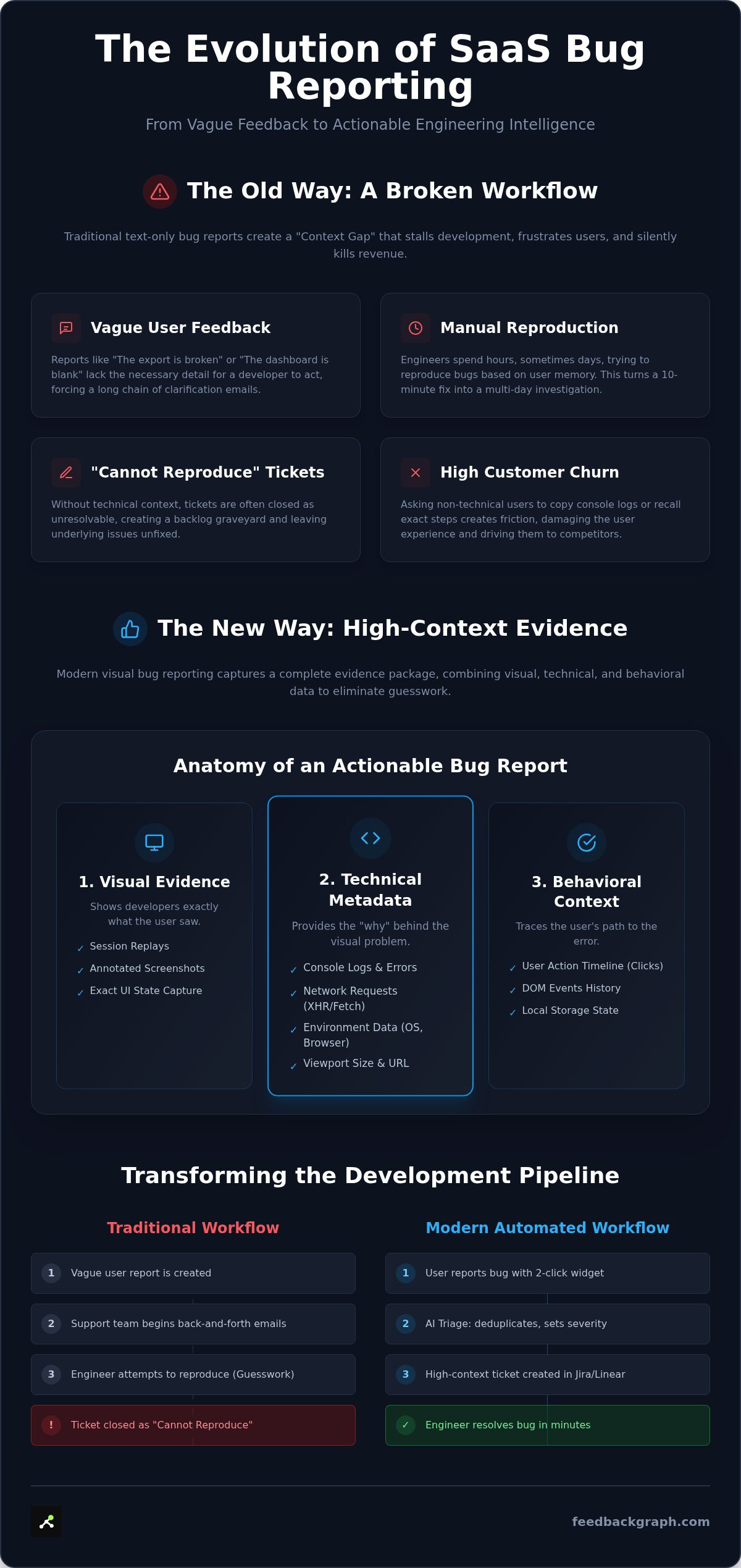
The gap between a user discovering a bug and a developer fixing it is where SaaS revenue leaks. In 2026, the standard for visual bug reporting for SaaS has shifted from simple screen captures to comprehensive evidence packages. A screenshot only shows the "what," but it ignores the "why" and "how." Traditional reporting relies on user memory, which is the most volatile variable in the debugging equation. When a user tries to recall the exact sequence of clicks after the fact, they often omit the critical technical triggers that a developer needs.
The "Context Gap" is the primary reason engineering backlogs are filled with duplicate noise and unresolvable issues. If a developer can't see the state of the application at the exact moment of failure, they are forced to guess. This leads to hours of wasted effort trying to recreate an environment that might only exist for a specific subset of users. It turns a ten-minute fix into a two-day investigation. Without automated data capture, you are essentially asking your engineers to be detectives rather than builders.
A legacy bug tracking system often becomes a graveyard of "Cannot Reproduce" tickets because they lack technical depth. When tickets lack structure, they require manual triage, which consumes a significant portion of a product manager's week. That is time that should be spent on strategy, not deciphering poorly written emails. This inefficiency doesn't just slow down releases; it actively creates friction that drives customers toward competitors who offer a more stable experience.
The Breakdown of Text-Only Feedback
"The dashboard is blank" is arguably the most expensive sentence in software development. Without visual context, this vague feedback forces a high-paid engineer to stop building features and start a long chain of clarification emails. This back-and-forth creates massive backlog bloat and kills team morale. Users feel the friction too; asking a non-technical customer to open a console and copy-paste logs is a recipe for churn. It's a lose-lose scenario that treats developer time as an infinite resource.
The Complexity of the Modern SaaS Environment
The 2010-era approach of asking for "browser and OS" no longer suffices. Modern apps are a web of microservices, complex feature flags, and granular permission sets. A bug might only trigger for a user with specific rights on a specific Chromium version with three specific browser extensions active. Environment data like screen size, network latency, and local storage state are now non-negotiable for reproduction in modern bug tracking workflows.
Modern teams now rely on session replays as the definitive source of truth. By capturing the exact DOM state and network requests leading up to an error, you eliminate the guesswork. This transition from manual reporting to automated, high-context capture is the only way to scale a SaaS product without scaling your engineering debt. In an era of rapid iteration, you need evidence, not anecdotes, to maintain a competitive edge.
The Anatomy of a High-Context Visual Bug Report
Effective visual bug reporting for SaaS requires more than a simple pixel capture. A modern report functions as a three-layered evidence package. The first layer is Visual, showing the exact UI state. The second is Technical, containing the underlying environment data. The third is Behavioral, tracing the user's path leading to the error. When these layers combine, they eliminate the need for manual reproduction entirely. Developers no longer ask "What happened?" because the report provides the answer in a structured format.
AI-powered enrichment takes this raw data and turns it into actionable engineering intelligence. Instead of a generic ticket, the system generates precise titles and summaries based on the detected errors. If a user reports a "broken button," the AI identifies it as a 403 Forbidden error on a specific API endpoint. This immediate clarity allows teams to bypass the initial investigation phase. You can book a demo to see how this automated context transforms your triage workflow.
Technical Metadata: The Developer's Best Friend
Essential metadata is the backbone of a high-quality report. Every ticket must include the URL, user agent, viewport size, and OS version. Capturing console logs is critical; it removes the need to send "inspect element" instructions to non-technical users. When a developer opens a report, they should see a timeline of network requests. Identifying a failed fetch or a slow response time becomes a matter of seconds rather than a session of trial and error. This visibility ensures that the features you build remain stable across all user environments.
AI Enrichment and Automated Triage
The real challenge in 2026 isn't just seeing bugs; it's managing the volume. AI enrichment classifies severity by analyzing both technical errors and user sentiment. A crash on the checkout page is automatically ranked higher than a CSS misalignment on a settings tab. This intelligent sorting prevents critical issues from being buried in the noise of minor UI tweaks.
Deduplication is where AI provides the most significant efficiency gain. The system analyzes incoming reports to identify "near-duplicates" by comparing stack traces and visual patterns. Instead of five separate tickets for the same broken export, your team receives one consolidated report with five linked user sessions. This prevents engineering backlogs from bloating with redundant noise. AI-generated summaries then ensure that when these reports sync to Jira or Linear, they are instantly scannable for the whole team.
Beyond Pixels: Quantifying the Revenue Impact of Visual Bugs
SaaS leaders often treat every bug as a technical failure. This is a strategic mistake. Not all bugs carry the same weight. A minor alignment issue on a settings page doesn't warrant the same urgency as a broken checkout flow for a high-value enterprise client. In 2026, visual bug reporting for SaaS must evolve beyond simple aesthetics. It is no longer sufficient to just show a developer what is broken. You must show them why it matters to the company's financial health.
Revenue-based ranking is the definitive prioritization framework for modern teams. It moves the conversation from "Who reported this?" to "What is the total ARR at risk?". When you connect visual evidence to account value, you transform the engineering roadmap into a profit-protection tool. This shift eliminates the "loudest voice" bias, where the most vocal user dictates the schedule. Instead, your team focuses on the highest value fixes that directly prevent churn and protect expansion opportunities.
Mapping Feedback to the Bottom Line
Calculating the revenue at risk requires more than a gut feeling. It involves integrating your bug reporting platform with CRM data to see the financial profile of the reporting user. If an enterprise account paying ₹10,00,000 per year encounters a blocker, the system should automatically flag it as a critical priority. This level of visibility ensures that your most valuable customers receive the fastest resolutions. For a deeper look at this methodology, explore our Revenue-Based Feature Ranking: 2026 Profit-First Guide. Mapping technical errors to specific revenue tiers allows you to justify engineering spend with hard data.
Data-Driven Roadmaps vs. Intuition
Intuition is a poor substitute for evidence-based backlog management. Product managers often struggle to get executive buy-in for bug fixes because they lack a clear link to business outcomes. Visual context combined with revenue data changes that dynamic. When you present a recording of a broken feature alongside a report showing it affects accounts worth millions of rupees, the decision becomes obvious. This transparency builds trust across departments and ensures that resources are never wasted on low-impact UI tweaks.
Moving away from "gut feeling" triage requires a robust infrastructure. Integrating these insights into your broader SaaS Product Feedback Systems creates a unified source of truth. It allows your engineering team to act with confidence, knowing that every ticket they close is moving the needle for the business. This approach doesn't just fix software; it optimizes the entire product lifecycle for maximum financial return.
Building an Automated Workflow: From Widget to Production
Setting up a workflow that actually scales requires moving beyond the "inbox" mentality. You need a pipeline that handles the transition from user discovery to production fix without manual intervention. Automation is the only way to maintain quality as your user base grows. A streamlined visual bug reporting for SaaS workflow ensures that every ticket is actionable, enriched, and properly prioritized before it ever hits a developer's desk.
The process begins with friction-free capture and ends with a closed feedback loop. By automating the triage and routing phases, you eliminate the "middleman" costs of product management. This allows your team to focus on execution rather than data entry or clarification emails. Moving from a raw report to a resolved ticket should be a predictable, technical sequence.
Seamless In-App Capture
Redirecting users to a separate portal or email client is the fastest way to lose critical feedback. High-performing teams deploy a two-click widget directly within their product environment. This ensures that reporting happens at the exact moment of friction. By capturing the report in-app, you preserve the technical state of the session. Using FeedbackGraph features, you can collect high-fidelity data including console logs and network requests without adding friction to the user experience. This "two-click" approach maximizes feedback volume while ensuring the data is structured for engineering needs.
Bi-directional Sync: Keeping Teams Aligned
Once captured, the AI triage engine enriches the raw report and identifies duplicates. This is where automation replaces the traditional triage meeting. The system then initiates a bi-directional sync with your existing dev tools. Whether your team uses Jira, Linear, or GitHub, the data flow remains constant. A status change in your project management tool triggers an immediate update in the reporting platform. This keeps every stakeholder aligned without a single manual Slack message or status update email.
Real-time tracking is non-negotiable for 2026 software teams. Status updates in Jira should automatically reflect back to the customer. This transparency reduces support ticket volume and builds user trust. When a developer moves a ticket to "Resolved," the system closes the loop by notifying the reporter. These FeedbackGraph use cases demonstrate how to eliminate the communication gap between engineering and the customer. Slack and Microsoft Teams integrations further accelerate this by pushing critical alerts to the right channels instantly.
The final stage is the automated status update. Closing the feedback loop is often the most neglected part of the software lifecycle. Automated emails or in-app notifications ensure the customer knows their voice was heard. This visibility turns a negative experience into a positive touchpoint. It proves your team is responsive, methodical, and committed to technical excellence.
FeedbackGraph: The AI-First Approach to Visual Bug Management
FeedbackGraph represents the next evolution in visual bug reporting for SaaS. It isn't just a tool for capturing screenshots; it's a strategic engine that aligns engineering output with business objectives. By moving the heavy lifting from humans to AI, the platform ensures that every reported issue is rich with technical context and ranked by its financial significance. This approach transforms a chaotic inbox into a prioritized execution list that protects your bottom line.
The AI triage engine works silently in the background to eliminate the noise that typically plagues engineering teams. It handles the deduplication and categorization that would otherwise require hours of manual review. For teams operating in modern, AI-augmented development environments, the inclusion of an MCP server provides a seamless way to integrate feedback data directly into their existing workflows. This bridge between visual evidence and revenue ranking ensures that your roadmap is always optimized for growth rather than just maintenance.
The 2026 Standard for Engineering Efficiency
The traditional "triage meeting" is an expensive relic of the past. FeedbackGraph replaces these manual sessions with automated logic that enriches and routes tickets instantly. When a bug is captured, the system automatically generates a technical summary and syncs it across your stack. This bi-directional sync ensures that support, product, and engineering teams always share a single source of truth. Transparency isn't just a goal; it's a functional requirement for speed. You can Book a Demo and See the AI Triage in Action to understand how these layers of automation reclaim your team's time.
Turning Feedback Into Growth
In the competitive SaaS landscape of 2026, bug reporting is no longer a defensive play. It is a proactive strategy for protecting your ARR. Every unaddressed blocker for a high-value account is a potential churn event. By using a platform that ranks feedback by revenue impact, you ensure that your most critical assets are always protected. This isn't just about fixing errors; it's about maintaining the trust of customers who pay millions of rupees for a reliable experience.
The transition to a frictionless, AI-first feedback loop is the fastest way to improve your product's structural integrity. Don't let vague reports and manual triage slow down your innovation cycle. Experience the difference of a workflow designed for high-velocity teams. Get Started with FeedbackGraph and turn your user feedback into a measurable driver of growth.
Scaling Engineering Impact Through Intelligent Triage
Engineering teams in 2026 can't afford to waste cycles on unverified, low-impact tickets. Moving from basic screen captures to a high-context evidence package is the only way to maintain velocity as your product scales. By implementing visual bug reporting for SaaS, you replace the "Context Gap" with automated technical data and AI-powered deduplication. This ensures your developers spend their time building features rather than playing detective.
The real competitive advantage lies in revenue-based prioritization. When you sync your bug reporting directly with Jira or Linear, you create a bi-directional flow that protects your most valuable accounts. You aren't just fixing software; you're securing your company's financial future. It's time to bridge the gap between user feedback and engineering execution with a system built for speed and precision.
Take control of your engineering roadmap and turn every bug report into a measurable business outcome. Your team deserves a workflow that values their time as much as you value your revenue.
Frequently Asked Questions
How does visual bug reporting work for SaaS applications?
Visual bug reporting for SaaS works by embedding a two-click widget directly into your application to capture the user's screen state along with deep technical metadata. When a user reports an issue, the system automatically collects console logs, network requests, and environment details like OS or browser version. This creates a complete evidence package. Instead of manual descriptions, developers receive a structured report that allows them to reproduce the bug instantly without any back-and-forth communication.
Can I integrate visual bug reports directly into Jira or Linear?
Yes, you can integrate these reports directly into your existing project management stack. FeedbackGraph supports native integrations with Jira, Linear, and GitHub to ensure that every ticket enters your engineering workflow automatically. This eliminates manual data entry for product managers. Once integrated, the technical data captured by the widget is mapped to specific fields in your dev tools, providing engineers with all the context they need to start fixing issues immediately.
What is the difference between a screenshot and a contextual bug report?
A screenshot is a static image that only shows a visual symptom. In contrast, a contextual bug report is a dynamic data set that includes the underlying technical state of the application. It captures the DOM structure, network activity, and console errors happening at the exact moment of failure. While a screenshot forces a developer to guess the cause, a contextual report provides the evidence needed to identify the specific API failure or logic error.
How does AI help in triaging software bugs?
AI automates the most tedious parts of the triage process by analyzing the technical data within each report. It automatically generates precise titles, categorizes severity based on error logs, and writes concise summaries for your engineering team. Additionally, AI-driven triage identifies near-duplicate reports by comparing stack traces and visual patterns. This prevents your backlog from bloating with redundant noise and ensures that unique, high-priority issues get immediate attention from your developers.
Is visual bug reporting safe for sensitive user data?
Modern platforms prioritize security by allowing you to mask or redact sensitive information before it reaches your engineering team. You can configure the widget to ignore specific PII fields or UI elements containing private data. All data is typically encrypted in transit and at rest. It is essential to choose a provider that complies with industry standards and offers granular controls over what technical data is captured, ensuring you meet your organization's privacy requirements.
How much time can engineering teams save with automated bug triage?
Engineering teams can save significant hours every week by eliminating the manual reproduction and clarification cycle. Automated triage removes the need for recurring triage meetings where teams argue over priority or decipher vague reports. By providing instant technical context and deduplicating noise, developers can focus entirely on high-value execution. This efficiency allows SaaS companies to maintain a faster release cadence and reduce the total cost of ownership for their software maintenance.
Does FeedbackGraph support bi-directional status syncing?
FeedbackGraph provides full bi-directional sync with tools like Jira, Linear, and GitHub. When a developer moves a ticket to Done or Resolved in their project management tool, the status is automatically updated within the FeedbackGraph dashboard. This triggers an automated notification to the original reporter, closing the feedback loop without manual effort. This transparency keeps your support and product teams aligned with engineering progress in real-time, reducing internal status requests.
What is revenue-based feedback ranking?
Revenue-based feedback ranking is a prioritization framework that connects bug reports to the financial value of the reporting account. By integrating with your CRM, the system identifies the ARR associated with each ticket. This allows you to rank issues based on the total revenue at risk rather than just technical severity. It ensures that your engineering resources are always focused on protecting your most valuable customers and preventing churn in high-worth enterprise segments.


