

Most software leaders evaluate feedback tools by how many tickets they collect, but raw ticket volume is the wrong metric. Evaluating bug reporting widget pricing comes down to triage hours eliminated, not how many unverified submissions hit your backlog. If you have watched your software bills climb simply because non-technical team members needed viewer access, or paid premium rates for basic widgets that lack technical telemetry, you aren't alone. Unpredictable seat licenses and surprise volume caps penalize expanding teams while still leaving engineers stuck with manual backlog grooming.
This 2026 buyer's guide explains how modern pricing structures operate, exposing hidden contract limits before you commit your engineering budget. You will learn how to calculate true return on investment by developer hours saved, bypass predatory licensing tiers, and choose an automated capture workflow tailored to your stack. Here is how to evaluate the market and secure a predictable, high-value solution for your organization.
Key Takeaways
- Understand how modern bug reporting widget pricing structures operate across seat licenses, submission volume caps, and session recording tiers.
- Uncover hidden contract traps and quantify the true cost of developer triage overhead before committing to multi-year software agreements.
- Differentiate targeted, developer-centric capture tools from bloated help desk suites to avoid paying for expensive feature shelfware.
- Calculate procurement return on investment by measuring engineering hours reclaimed and prioritizing defects using customer account value.
- Evaluate vendors against critical operational benchmarks, including bi-directional tracker sync, front-end performance overhead, and enterprise data compliance.
The Core Mechanics of Bug Reporting Widget Pricing Models
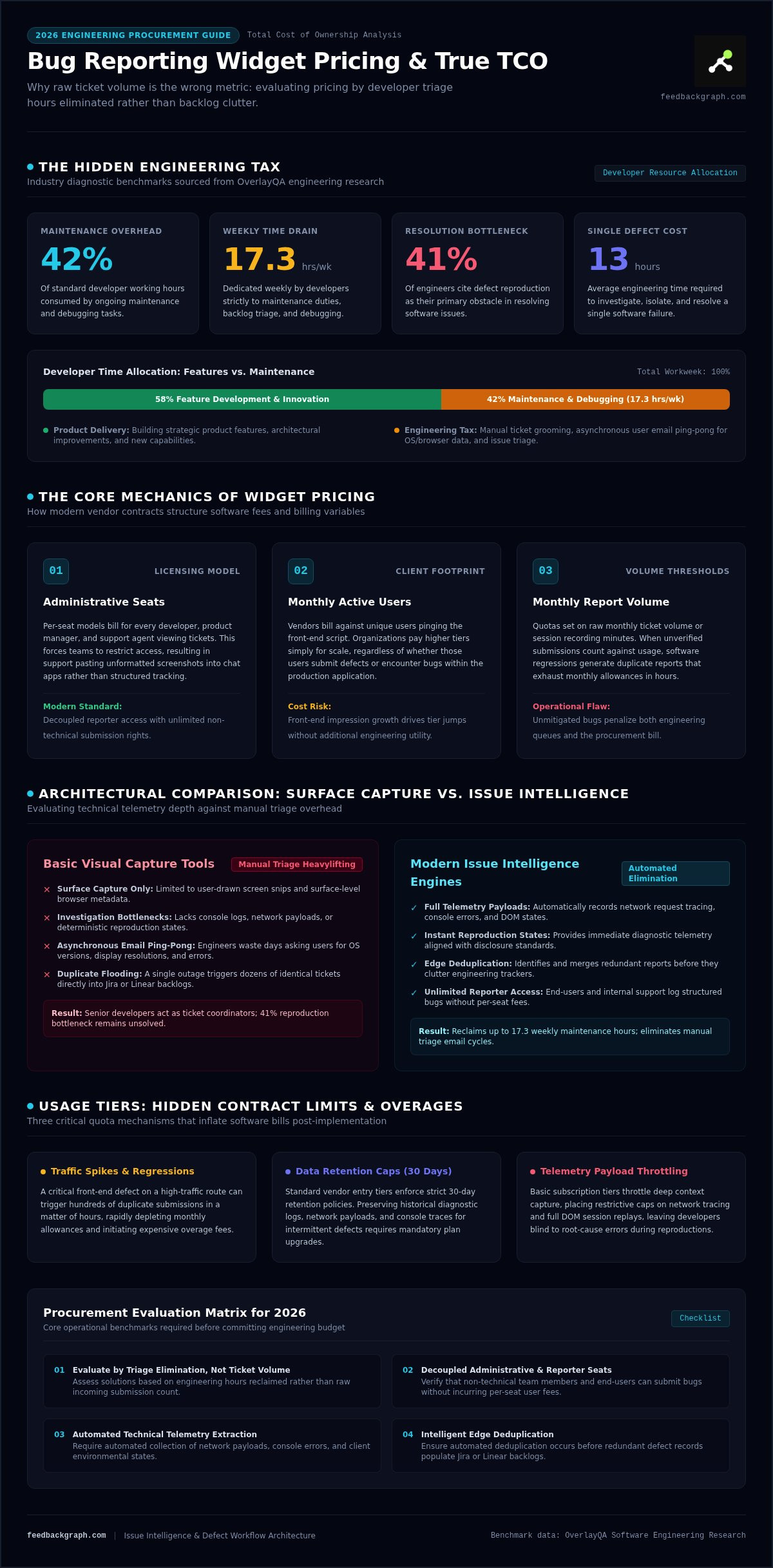
Evaluating bug reporting widget pricing requires looking past introductory tier labels. Vendors typically structure plans around three core architectural levers: administrative seats, monthly active users pinging the client script, and monthly report volume. Basic front-end visual capture tools merely record screen snips and surface-level browser metadata. In contrast, issue intelligence engines extract network payloads, console logs, and reproduction states while executing automated deduplication before tickets hit your tracker. When integrating with a modern bug-tracking system, the distinction between surface-level capture and intelligent processing dictates your long-term software overhead.
Per-Seat vs. Unlimited Reporter Pricing Structures
Legacy tools bill per seat, charging for every developer, product manager, and support agent who views an issue. This licensing framework creates friction across cross-functional organizations. Teams often restrict widget access to curb seat expansion, forcing customer support representatives to paste screenshots into internal chat channels instead of logging structured tickets. Forward-thinking pricing models flip this dynamic by decoupling reporter access from administrative seats. They permit unlimited team members and end-users to submit telemetry-rich bugs into centralized bug-tracking workflows without incurring incremental user penalties.
Usage Tiers: Volume Caps, Event Limits, and Overages
Usage thresholds introduce another layer of budget volatility. Vendors frequently gate plans by monthly submission counts, session recording minutes, or client-side script impressions. A sudden software regression can trigger hundreds of duplicate reports, consuming your monthly allowance in hours.
Watch for these common usage drivers when evaluating pricing bands:
- Traffic Spikes: Viral front-end defects rapidly burning through monthly submission quotas.
- Data Retention Caps: Mandatory plan upgrades required to preserve diagnostic logs and console errors beyond standard 30-day windows.
- Telemetry Payload Limits: Caps on network request tracing and full DOM session replays that throttle technical context capture.
When bug reporting widget pricing ties directly to unmanaged submission volume rather than verified issues, an operational defect penalizes both your engineering pipeline and your software budget.
Evaluating Total Cost of Ownership: Hidden Fees and Triage Overhead
Sticker prices obscure real operational expenses. When organizations assess bug reporting widget pricing, they usually focus on baseline subscription fees while ignoring the payroll drained by manual ticket grooming. OverlayQA research shows that developers spend approximately 17.3 hours per week on maintenance tasks, including debugging, which accounts for roughly 42% of their working hours. When an in-app widget merely passes raw user submissions to your tracker, engineers end up acting as manual triage coordinators rather than shipping features. Review our guide to modern bug reporting software to see how modern architectures eliminate this diagnostic overhead.
The Hidden Engineering Tax of Incomplete Bug Reports
OverlayQA data indicates that engineers spend an average of 13 hours to resolve a single software failure, with 41% citing issue reproduction as their primary bottleneck. Incomplete reports generate days of asynchronous email ping-pong. Engineers repeatedly ask users for screen resolutions, OS details, and network error codes. Automated widgets solve this by instantly appending client environment context, network traces, and console logs. Adhering to structured capture protocols aligned with federal vulnerability disclosure guidelines eliminates investigative guesswork, turning days of back-and-forth messaging into actionable, immediate reproduction states.
Backlog Duplication Costs and Triage Clutter
A single production incident frequently produces dozens of separate customer complaints. Without intelligent deduplication at the edge, every report lands as an individual issue ticket in Jira or Linear. Sifting through duplicate issues consumes hours of senior developer time, fragmenting attention across identical problems.
Manual review introduces clear points of operational failure:
- Backlog Fragmentation: Split comment threads that obscure the true frequency and urgency of severe errors.
- Wasted Sprint Velocity: Multiple developers unknowingly picking up tickets tied to the exact same root cause.
- Homegrown Form Sprawl: Internal forms requiring endless custom maintenance, schema updates, and security patching.
Modern issue engines use automated AI bug triage to detect semantic similarities instantly. They link duplicate submissions directly to parent issues before clutter enters production queues. If you want to eliminate grooming friction and streamline issue capture across your stack, you can book a live demonstration to explore automated triage in action.
Standalone Widgets vs. All-in-One Customer Support Platforms
Software vendors frequently bundle bug capture widgets into massive customer support suites. This bundling strategy distorts bug reporting widget pricing by tethering technical issue reporting to sprawling platforms loaded with live chat, shared mailboxes, and knowledge bases. If your engineering organization already maintains dedicated customer communication channels, these surplus features become expensive shelfware. Investigating dedicated AI bug reporting tools offers a more targeted approach, capturing rich diagnostic telemetry without forcing your team to subsidize an unneeded customer support suite.
When All-in-One Suites Create Unnecessary Expense
Monolithic help desks bill across rigid seat tiers designed for full-time support agents. When engineering leaders adopt these suites just to collect user bugs, they run into punitive software math. Companies must pay enterprise agent rates for developers who simply want to inspect network payloads or error logs. This pricing mismatch leads to predictable operational friction:
- Redundant Tool Overlap: Paying twice for customer conversation tracking while trying to deploy a simple front-end reporting trigger.
- Context Switching: Forcing technical teams to navigate clunky service portals instead of triaging issues within familiar sprint workflows.
- Vendor Entanglement: Getting locked into proprietary ticket management systems that restrict how data moves between engineering and product teams.
The Developer-First Alternative: Deep Bi-directional Sync
Targeted developer-first capture engines bypass the overhead of enterprise support suites. Instead of forcing teams into separate platforms, best-of-breed architectures sync telemetry directly into existing issue trackers. Exploring methods for connecting dev tools to feedback reveals how targeted data pipelines keep sprint planning predictable without adding extra software baggage.
Modern platforms use bi-directional integrations across tools like Jira, Linear, GitHub, and Slack to keep engineering and customer-facing teams in sync. When an engineer resolves a bug in their native tracker, the status synchronizes back automatically. Teams reviewing implementation paths can review FeedbackGraph use case documentation to see how automated tracking eliminates manual ticket grooming while keeping operational spending lean.
Building the Business Case: Calculating Bug Widget ROI by Revenue Impact
Procuring an engineering tool requires proving measurable commercial return. Software leaders often struggle to justify bug reporting widget pricing to financial stakeholders because they frame value around soft metrics like subjective customer satisfaction or submission volume. Real economic impact stems from two quantifiable drivers: reclaimed engineering capacity and churn prevention. By applying the frameworks outlined in our guide to revenue-based feature ranking, product leaders can tie software expenditure directly to protected recurring revenue.
Measuring Engineering Hours Saved Through AI Triage
OverlayQA research shows that teams using structured bug reporting tools resolve issues 40% to 60% faster than teams relying on ad-hoc chat screenshots. Automated intake that parses stack traces, assigns technical severity, and drafts reproduction steps eliminates hours of manual backlog grooming each sprint.
You can calculate triage return with a simple model:
- Weekly Hours Saved: Calculate hours reclaimed from manual ticket grooming and back-and-forth user clarification.
- Blended Engineering Cost: Multiply reclaimed hours by developer hourly compensation.
- Net Workflow Value: Subtract annual software subscription costs from gross engineering savings to verify positive cash flow.
Quantifying Churn Prevention and Account Expansion
Traditional bug intake treats every submission identically. A minor cosmetic bug submitted by a free user receives the same initial weight as a critical payment blocker reported by an enterprise client. This squeaky-wheel approach exposes companies to substantial contract cancellation risks.
Mapping bug tickets directly to account contract values transforms prioritization. High-value customers stay retained when their blockers receive immediate attention. Research from US Tech Automations reveals that SaaS companies delivering transparent usage and ROI reporting see a median 12-point improvement in net revenue retention within two quarters. Connecting bug reporting to account revenue secures rapid executive approval by actively defending enterprise renewals.
Buyer's Checklist: Selecting the Best Bug Reporting Widget in 2026
Navigating bug reporting widget pricing requires looking beyond sticker rates to demand technical rigor. Low subscription fees mean nothing if a client script degrades web performance or breaches data security standards. Modern procurement requires evaluating runtime performance, automated telemetry, data privacy protocols, and AI-native integrations before committing your budget.
Technical Capabilities and Frictionless Capture Criteria
Client-side widgets must capture deep technical context without dragging down front-end response times. Bulky script bundles compromise web vitals and degrade the end-user experience. High-performing tools load asynchronously, delivering a two-click capture flow that packages console errors, network activity, and DOM events without adding UI lag. Review the technical pipeline in the FeedbackGraph product features documentation to see how automated telemetry extraction simplifies debugging without slowing down host applications.
Confirm that prospective vendors satisfy these technical and regulatory baselines:
- Minimal Runtime Footprint: Zero measurable main-thread blocking or asset bloat across your application.
- Enterprise Security: Verified SOC 2 Type II compliance, strict GDPR terms, and robust data encryption at rest and in transit.
- AI Interoperability: Compatibility with advanced standards like Model Context Protocol (MCP) servers, enabling autonomous agents to safely access diagnostic bug data.
Workflow Integration and Automation Standards
A reporting tool fails if it traps issues in a disconnected silo. Your chosen platform must feature native bi-directional synchronization with issue trackers like Jira, Linear, and GitHub, accompanied by real-time team alerts in Slack. When an engineer changes a ticket status or marks an issue resolved, the widget platform should update the original submitter automatically. This loop removes manual support follow-ups, safeguards engineering focus, and keeps customers informed as fixes ship.
Balancing predictable bug reporting widget pricing against automated diagnostic value ensures you get the highest return from your engineering stack. Validate your team's specific workflow requirements and book an interactive platform demo today to explore end-to-end bug capture in action.
Align Widget Procurement with Long-Term Engineering Value
Selecting the right bug reporting platform comes down to developer efficiency rather than raw feature counts. Evaluating bug reporting widget pricing requires looking past introductory sticker rates to weigh automated issue intelligence against manual backlog maintenance. Solutions featuring a two-click feedback capture widget immediately generate issue titles, technical severity, and reproduction context. When automated deduplication and bi-directional sync across Linear, Jira, and GitHub filter the noise, sprint boards remain clean and focused. Incorporating revenue-based feedback ranking guarantees that your engineers resolve high-value customer blockers first, directly protecting recurring contract revenue.
Reclaiming engineering hours starts with eliminating diagnostic clutter. Equip your product team with transparent, high-context capture and turn incoming bug reports into a predictable operational advantage today.
Frequently Asked Questions
How much does a bug reporting widget typically cost for a growing SaaS team?
Bug reporting widget pricing varies based on whether platforms charge per administrative seat, tracked end users, or monthly report volume. Entry-level tiers typically cover basic visual capture for small engineering teams, while enterprise tiers scale with automated triage, custom data retention, and advanced integrations. Rather than focusing purely on monthly subscription rates, growing teams should evaluate total contract expenses against the engineering hours saved by eliminating manual ticket grooming.
What is the difference between user-based and seat-based bug widget pricing?
Seat-based pricing bills your company for each internal team member who views, edits, or triages submitted tickets. User-based or traffic-based pricing, by contrast, scales according to how many external visitors or monthly active users load the client-side widget. Seat licenses can penalize cross-functional organizations as support, product, and engineering expand. The most cost-effective platforms permit unlimited submitters and charge only for core operational administrators.
Can a bug reporting widget help reduce software development and triage costs?
Yes, an intelligent widget directly cuts engineering costs by automating technical diagnostics and issue recreation. Basic user submissions usually arrive with missing stack traces, missing browser metadata, and vague reproduction steps, forcing developers to waste sprint hours on manual investigation. Widgets that automatically attach console logs, network payloads, and device profiles turn lengthy back-and-forth threads into instant reproduction states, protecting sprint velocity and developer payroll.
Are there hidden fees associated with session replays or high ticket volumes?
Yes, many vendors introduce secondary usage caps on session replay storage, data retention windows, and sudden spikes in submission volume. High user activity or sudden software regressions can quickly exhaust monthly allowances, triggering steep overage penalties or throttling capture functionality. Before signing a contract, examine whether network logging, video replays, and long-term diagnostic storage require costly plan upgrades or metered add-on fees.
Do bug reporting widgets require paid seats for end users submitting issues?
Modern bug reporting widgets do not require paid seats for end users or guest submitters. Effective architectures let customers, internal staff, and external QA testers report defects directly through a lightweight form without personal user accounts. Tools requiring paid licenses for issue reporters create operational bottlenecks and inflate your total software expenses. Look for models that grant open access to submitters while restricting charges to core administrative dashboards.
How do modern AI triage features change the ROI of bug reporting widgets?
Modern AI triage transforms widgets from passive form collectors into proactive issue intelligence engines. Automated algorithms generate descriptive ticket titles, estimate severity, link console errors, and eliminate duplicate reports before tickets enter developer sprint queues. This automated grooming dramatically shifts bug reporting widget pricing calculations, as the software pays for itself by reclaiming hundreds of senior engineering triage hours each quarter.
What technical integrations should be included in a standard widget subscription plan?
A standard subscription should feature native bi-directional synchronization with core trackers like Jira, Linear, and GitHub, alongside instant notification pipelines in Slack. Bi-directional sync ensures status updates in engineering backlogs automatically reflect back to customer-facing teams. Modern workflows also benefit from Model Context Protocol (MCP) server support, allowing autonomous AI tools to safely parse issue context and accelerate bug remediation.


