

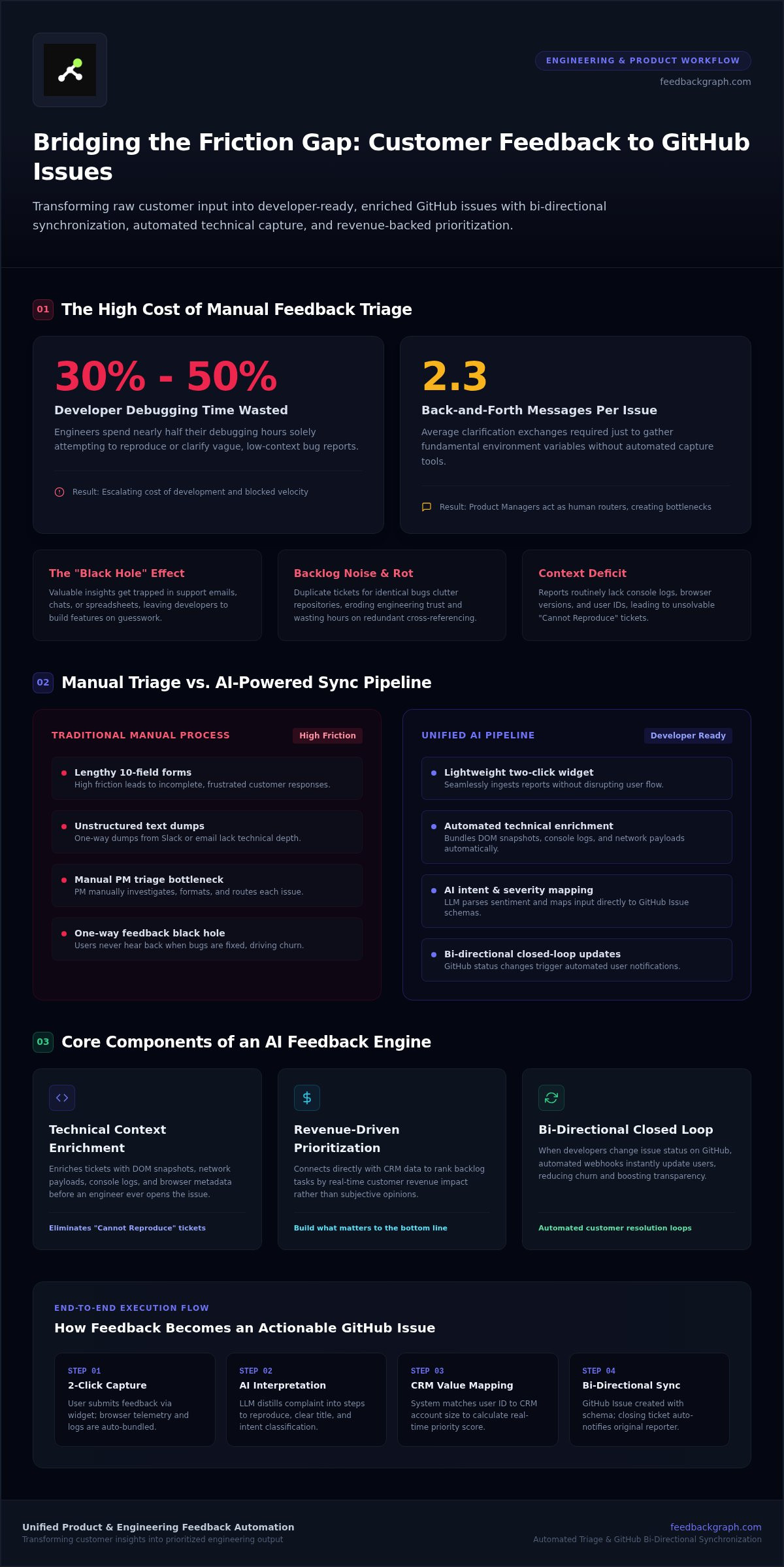
Developers spend between 30% and 50% of their total debugging time just trying to reproduce or clarify ambiguous bug reports. When you attempt to sync customer feedback to GitHub issues manually, you aren't just moving data; you're often importing chaos. Your engineering backlog quickly becomes a graveyard of duplicate tickets and low-quality reports that lack the technical context needed to actually ship a fix. You already know the frustration of staring at a "Cannot Reproduce" ticket while high-value customers wait for a resolution. It's a broken system that wastes hours of expensive engineering time on triage rather than coding.
This 2026 guide changes that dynamic by showing you how to bridge the gap between customer requests and engineering workflows using AI-powered automation and bi-directional sync. You'll learn to transform a messy inbox into a clean, AI-enriched GitHub backlog that prioritizes tasks based on real-time revenue impact. We will cover the specific technical steps to automate status updates for your users and ensure every feature request is backed by hard data. This approach allows your team to stop guessing and start building what matters most for your bottom line.
Key Takeaways
- Eliminate the manual triage tax by learning how to sync customer feedback to GitHub issues using AI-powered automation.
- Bridge the technical context gap by automatically enriching user reports with DOM snapshots and console logs before they reach your developers.
- Transition from opinion-based roadmaps to data-driven prioritization by connecting your CRM data directly to your engineering backlog.
- Establish a closed-loop system where GitHub status changes automatically notify customers, reducing churn and increasing transparency.
- Deploy a lightweight, two-click capture widget to ensure high-quality data ingestion without disrupting the user experience.
The Friction Between Customer Voice and GitHub Workflows
Most engineering teams suffer from the "Black Hole" effect. Valuable insights enter the company through support tickets, emails, or fragmented spreadsheets, but they never reach the repository. This fragmentation fundamentally breaks the Voice of the Customer methodology, leaving developers to build features based on guesswork rather than user evidence. When you try to sync customer feedback to GitHub issues using "dumb" integrations like Slack-to-GitHub, you often end up with an unmanageable pile of unstructured text. These one-way dumps lack the technical depth required for execution, creating more work for the team instead of less.
Manual triage is a significant financial drain on high-growth teams. Industry data shows that developers spend between 30% and 50% of their total debugging time just attempting to reproduce or clarify ambiguous reports. Teams without structured capture tools average 2.3 back-and-forth messages per issue just to gather basic environment data. This inefficiency stalls progress and inflates the total cost of development. A Unified Feedback Pipeline aligns Product and Engineering by ensuring every ticket is structured, enriched, and actionable from the moment it's captured.
The Silent Killer: Engineering Backlog Noise
Duplicate tickets are the primary source of backlog rot. When multiple users report the same visual bug, a manual system often creates a new entry for every instance. This forces developers to waste hours on redundant investigations and cross-referencing. Beyond the time loss, a cluttered issue tracker has a severe psychological impact. Engineers lose trust in the backlog when it's full of low-fidelity noise. Without automated enrichment, manual entries frequently miss critical technical context like browser versions, console logs, or user IDs. This leaves engineers blind, forcing them to hunt for data instead of writing code.
Why Traditional Triage Fails at Scale
Relying on a single Product Manager to act as a human router creates a permanent bottleneck. As user volume grows, the triage queue expands, leading to slower response times and increased customer churn. Manual systems simply cannot scale with a modern SaaS product. If your team is struggling to keep up with incoming reports, check these 5 Signs Your Feedback Capture Process Is Failing. Moving to an AI-first pipeline is the only way to maintain velocity while keeping your engineering team focused on high-impact work.
How AI Automates the Feedback-to-GitHub Pipeline
AI Feedback Triage is the automated process of enriching and routing user data to ensure engineering teams receive actionable tickets. Unlike standard webhooks that simply dump text into a repository, an AI-first pipeline interprets the intent behind every message. It maps raw user input to a structured GitHub Issue schema, ensuring that every ticket follows your team's specific documentation standards. This automation transforms vague complaints into clear, descriptive issue titles and assigns severity levels based on real-time sentiment analysis and user metadata.
Recent HBR research on GenAI customer feedback pipelines highlights that generative AI helps companies synthesize feedback into actionable insights at scale. By analyzing the tone and technical signals within a report, the system can automatically flag a critical API failure for immediate attention while routing a minor UI suggestion to the feature backlog. This ensures that the most urgent bugs are prioritized without human intervention.
Capturing High-Fidelity Data with a Two-Click Widget
Friction is the enemy of high-quality data. Most users won't fill out a ten-field support form, which leads to incomplete reports that lack technical context. A two-click widget solves this by capturing feedback instantly while automatically bundling technical logs, network payloads, and environment metadata in the background. This ensures that every time you sync customer feedback to GitHub issues, the resulting ticket contains everything an engineer needs to start working. You can see how our customer feedback widget simplifies this process for both users and developers.
AI Enrichment: Turning Noise into Actionable Tickets
AI enrichment is the process of adding developer-ready data to raw user reports. Large Language Models (LLMs) are exceptionally good at distilling long, frustrated customer rants into a concise "Steps to Reproduce" section. This eliminates the need for manual interpretation and reduces the back-and-forth between teams.
Beyond summarization, AI enables automated labeling. It scans the content to tag GitHub issues by component, such as UI, Backend, or API, ensuring the right team sees the ticket immediately. If you want to see how these automated workflows can clean your backlog, you might want to book a technical walkthrough of the platform. This structured approach ensures that your engineering resources are always directed toward the most critical tasks without the overhead of manual triage.
Strategic Prioritization: Ranking GitHub Issues by Revenue Impact
The "Loudest Voice" fallacy is a persistent trap in product management. It occurs when a team prioritizes features or fixes based on the most vocal user rather than the most valuable one. This reactive approach leads to a fragmented roadmap and wasted engineering cycles. To build a high-performing product, you must transition to a system that prioritizes turning customer feedback into revenue signals. When you sync customer feedback to GitHub issues, you gain a transparent view of the financial stakes behind every line of code. By connecting your CRM data directly to your repository, you can visualize the exact dollar value of a specific bug or feature request in real time.
This data-driven visibility ensures that your engineering resources are always allocated to the highest-impact tasks. For example, a bug affecting three enterprise clients with a combined contract value of ₹15,00,000 should naturally supersede a minor UI tweak requested by a single trial user. This connection ensures that every time you sync customer feedback to GitHub issues, the resulting ticket is weighted by its impact on your bottom line. The result is a roadmap built on financial reality rather than internal bias or anecdotal evidence.
Data Over Intuition: The Profit-First Roadmap
High-growth engineering teams often find that 20% of reported bugs impact 80% of their Annual Recurring Revenue (ARR). Identifying this critical 20% requires more than just intuition; it requires integrated data. FeedbackGraph automates this by aggregating revenue data from multiple users who report the same issue. This allows Product Managers to justify sprint priorities to stakeholders using hard financial data. You can explore how revenue-based feature ranking transforms the way teams decide what to build next.
Deduplication: The Key to a Clean Backlog
Backlog rot often stems from "feature inflation," where dozens of reports for the same problem appear as separate, unrelated tasks. FeedbackGraph solves this by using vector embeddings to identify near-duplicate reports semantically. Instead of creating ten different tickets for a single login failure, the system merges them into one parent GitHub issue. Each new report is appended as a "vote" that increases the issue's priority and revenue weight. This clean structure significantly improves engineering focus and sprint planning velocity by eliminating the need to investigate redundant tickets.
Step-by-Step: Implementing Bi-directional GitHub Sync
Building a professional pipeline to sync customer feedback to GitHub issues requires a methodical approach. You aren't just connecting two APIs; you're building a communication bridge that must remain stable under load. Follow these five phases to establish a reliable, AI-driven workflow.
- Phase 1: Widget Installation. Embed the FeedbackGraph capture widget on your SaaS platform. This lightweight script, under 40 KB, handles technical data collection without impacting page load speeds.
- Phase 2: Repository Mapping. Connect the GitHub App to your organization. Using a GitHub App is the 2026 standard for security, as it scales to 15,000 requests per hour for enterprise accounts, far exceeding the limits of individual access tokens.
- Phase 3: AI Logic Configuration. Define your triage rules. Set thresholds for AI to assign labels, determine severity, and route tickets to specific repositories based on user sentiment and technical signals.
- Phase 4: Bi-directional Triggers. Enable status synchronization. Configure the system so that actions in GitHub, such as moving a card to "In Progress," reflect immediately in your feedback portal.
- Phase 5: End-to-End Testing. Submit a test report. Verify that the technical logs reach GitHub and that closing the issue triggers a notification to the user.
Mapping Feedback Fields to GitHub Metadata
Effective synchronization requires mapping specific user data to GitHub metadata to keep your backlog organized. You can sync custom fields, such as revenue impact or user tier, directly to GitHub labels. For example, if a bug affects a client with a ₹5,00,000 ARR, the system can automatically flag it as a priority. AI also predicts severity to assign issues to specific milestones or sprints. Technical attachments like console logs and DOM snapshots appear directly in the GitHub thread, giving engineers immediate context without leaving their workflow.
Closing the Loop: Automated Status Updates
The final step is closing the feedback loop to eliminate the "Black Hole" effect. When a developer merges a pull request and closes a GitHub issue, the system triggers a "Fixed" notification to the original reporter. This automated update significantly reduces support ticket volume and improves customer satisfaction. It ensures your users stay informed without requiring manual follow-ups from your product team. To optimize this further, see How to Automate Bug Triage with AI Without Friction.
Optimizing Your Workflow with FeedbackGraph
FeedbackGraph fundamentally redefines the relationship between product managers and engineering teams. It replaces the friction of manual triage with an intelligent, automated bridge. By choosing to sync customer feedback to GitHub issues through an AI-first pipeline, you ensure every developer has the technical context needed to ship high-quality code. This isn't just about data flow. It's about building a culture of transparency and operational excellence. It works.
The "Two-Click" capture system is central to this shift. When users can report issues in seconds without leaving your application, participation increases. High-fidelity data capture ensures your engineering team receives technical logs and environment metadata by default. This reduces the frustration of vague reports and directly improves user retention. Customers feel valued when their feedback results in visible progress, especially when bi-directional sync keeps them updated on every merge.
Advanced teams leverage the MCP Server to integrate FeedbackGraph into their AI-driven project management workflows. This allows for deeper automation, where AI agents query feedback data to provide logic for roadmap decisions. A bi-directional sync is the essential foundation for any customer-centric development team. It values speed and evidence over guesswork.
Beyond GitHub: Unified Workflows with Linear and Jira
Many high-growth organizations operate in multi-tool environments. Your developers might prefer GitHub, while your product managers rely on Jira or Linear for high-level planning. FeedbackGraph acts as the single source of truth, synchronizing customer insights across all platforms. This ensures that regardless of the tool, every team member sees the same revenue-weighted priorities. You can explore these integration use cases to see how a unified workflow prevents data silos. It keeps your entire organization focused on the same strategic outcomes.
The Future of AI-Driven Product Management
The shift from reactive bug fixing to proactive revenue growth is the ultimate goal of a modern tech stack. In 2026, FeedbackGraph serves as an intelligent assistant that analyzes feedback for strategic opportunities. Instead of drowning in unstructured text, you can focus on features that drive the highest ARR, such as high-value requests from clients with a ₹25,00,000 contract value. This transition allows your team to move with purposeful momentum. It turns every customer interaction into a building block for product success.
Building a High-Velocity, Revenue-Driven Engineering Culture
Transitioning to an AI-first workflow isn't just about saving time; it's about strategic alignment. By choosing to sync customer feedback to GitHub issues, you eliminate 90% of the manual triage burden that stalls high-growth teams. This shift allows your developers to focus on shipping code rather than hunting for technical context in fragmented support tickets. A unified pipeline transforms raw user data into structured, actionable engineering tasks immediately.
Modern product management requires data over intuition. Connecting every ticket to its specific revenue impact ensures that your sprint priorities are grounded in financial reality. With bi-directional sync across GitHub, Linear, and Jira, you maintain a single source of truth that keeps both customers and stakeholders informed automatically. This closed-loop system provides the foundation for a scalable, customer-centric development organization.
Stop letting valuable insights disappear into a backlog graveyard. Start building a product that reflects the voice of your most valuable users and accelerates your growth today.
Frequently Asked Questions
How does FeedbackGraph identify duplicate customer reports?
FeedbackGraph identifies duplicate reports by using AI-powered semantic deduplication. Instead of relying on simple keyword matching, the system uses vector embeddings to understand the underlying intent of a user's message. If a new submission describes an existing issue, the platform merges it into a single parent ticket. This prevents backlog bloat and ensures that developers don't waste time investigating the same bug across multiple separate GitHub issues.
Can I sync feedback to multiple GitHub repositories at once?
You can sync customer feedback to GitHub issues across multiple repositories by setting up automated routing rules. The AI analyzes the content of the feedback to determine which component it belongs to, such as the frontend or backend. Based on these tags, the system automatically creates the issue in the correct repository. This ensures that the right engineering team sees the feedback immediately without manual intervention from a product manager.
Does the GitHub sync work bi-directionally for status updates?
Yes, the platform supports full bi-directional status syncing between your feedback portal and GitHub. When a developer moves an issue to "In Progress" or "Closed" within GitHub, the change reflects automatically for the customer. This closed-loop system reduces support volume by keeping users informed without manual follow-ups. It ensures that your engineering workflow and customer communication stay perfectly aligned throughout the entire development lifecycle.
Is it possible to rank GitHub issues by customer revenue?
Ranking GitHub issues by customer revenue is a core feature of the FeedbackGraph platform. By connecting your CRM data, the system calculates the total financial impact of every bug or feature request. This allows you to prioritize tasks based on hard data, such as an issue affecting ₹10,00,000 in Annual Recurring Revenue. It moves your team away from the "loudest voice" fallacy and toward a roadmap that drives real business value.
What technical data is captured automatically with the bug report?
The two-click widget automatically captures high-fidelity technical data to eliminate the need for back-and-forth messages. Every report includes console logs, network payloads, DOM snapshots, and browser environment metadata. This technical context is attached directly to the GitHub issue, giving developers everything they need to reproduce the bug instantly. By providing this level of detail, you can reduce reproduction time by up to 60% compared to manual reporting methods.
How does the AI generate summaries for developers?
The AI generates developer-ready summaries by processing raw user text through advanced Large Language Models. It distills long, often frustrated customer descriptions into concise "Steps to Reproduce" and "Expected vs. Actual Result" sections. This transformation ensures that engineers don't have to interpret vague language. The resulting GitHub issues are structured, clear, and actionable, which significantly speeds up the initial triage and investigation phases for your development team.
Can I use FeedbackGraph with GitHub Enterprise?
FeedbackGraph is fully compatible with GitHub Enterprise Cloud and Team accounts. The integration uses the official GitHub App architecture, which is designed to handle high-volume synchronization and enterprise-grade security requirements. This setup provides dynamic rate limiting that scales up to 15,000 requests per hour for enterprise organizations. It ensures that even large teams with thousands of incoming feedback points can maintain a stable, high-performance link between their customers and their codebase.
What happens if a user submits a report that is not a bug?
If a user submits a report that isn't a bug, the AI bug triage system identifies the intent and labels it accordingly. Feature requests, general questions, or praise are automatically tagged and can be routed to different workflows or repositories. This keeps your engineering backlog clean and focused strictly on technical fixes. You can configure specific rules to ensure that only verified bugs reach your primary development repo while feature ideas are stored for product planning.


