

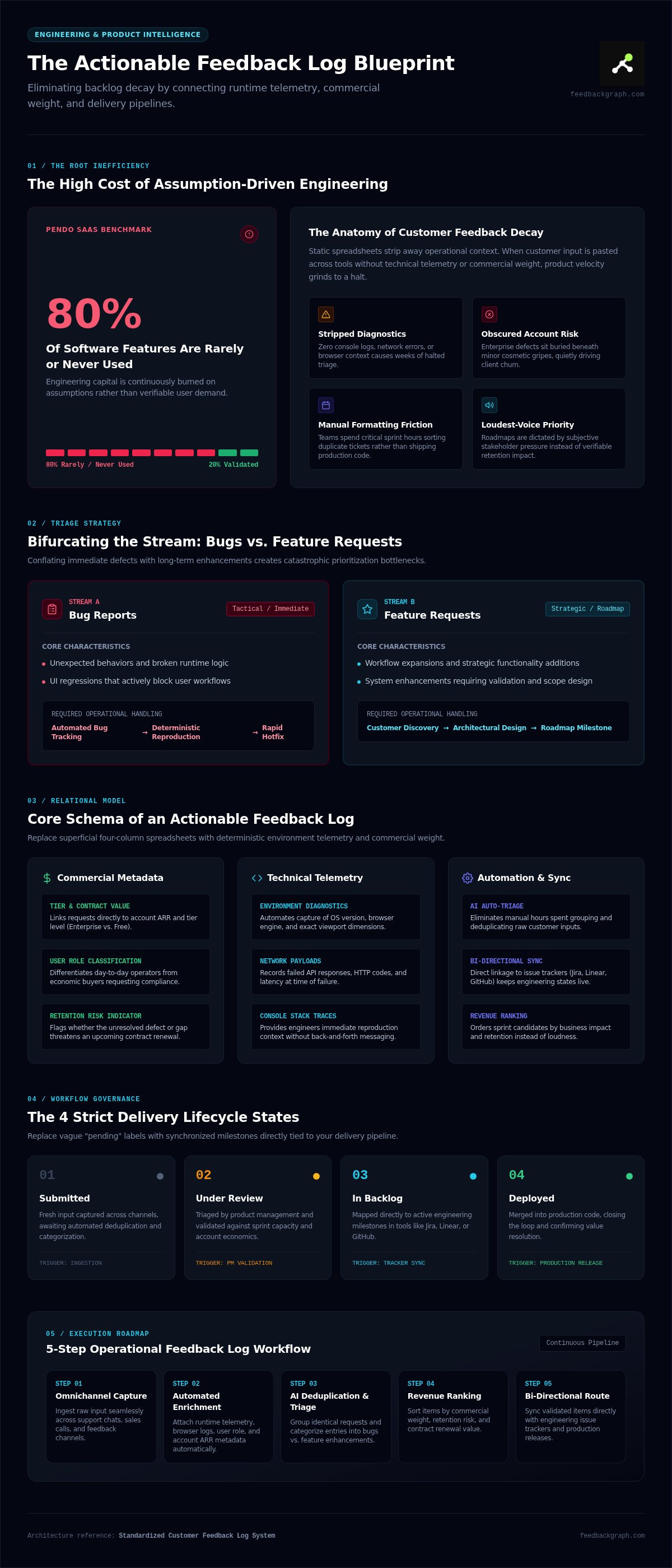
According to Pendo's SaaS benchmarks, 80% of software features are rarely or never used, burning massive engineering capital on assumptions rather than validated demand. If your team gathers input across customer support chats, sales calls, and fragmented spreadsheets, you already feel the friction. Without a standardized feedback log, engineers waste critical sprint hours triaging vague bug descriptions and duplicate tickets, while roadmap decisions get dictated by the loudest accounts rather than verifiable data.
You shouldn't have to copy-paste conversation snippets between tools or guess whether an incoming request impacts your bottom line. This comprehensive guide reveals how to build, structure, and automate an actionable feedback log that bridges the gap between raw customer input and technical execution. We examine core architectural foundations, ready-to-use templates, and automated triage workflows that connect user requests directly to business impact, turning operational chaos into predictable product velocity.
Key Takeaways
- Understand why flat spreadsheets quickly fail under scale, turning product backlogs into unmanageable graveyards.
- Master the foundational architecture required to build an actionable feedback log that captures technical runtime metadata and account value.
- Learn how automated AI triage and bi-directional tracker sync eliminate hours of manual ticket sorting.
- Execute a five-step operational workflow to capture, enrich, and route incoming requests frictionlessly.
- Rank roadmap items using customer revenue and retention impact rather than subjective stakeholder pressure.
What Is a Feedback Log and Why Do Static Spreadsheets Fail?
A feedback log is a centralized, structured system built to capture, categorize, and prioritize qualitative and quantitative user inputs. Early-stage product teams often start by dumping user complaints into Google Sheets or Notion tables. It seems simple at first, but static spreadsheets inevitably turn into unmanaged backlog graveyards within a few sprints.
Flat tables fail because they cannot capture dynamic technical context. When a customer submits "the export button isn't working," a spreadsheet records only that vague phrase. It strips out critical metadata such as browser versions, console errors, viewport sizes, and network logs. Without integration into development tools, your team spends hours manually formatting rows rather than shipping code. To maintain engineering velocity, software companies must abandon passive recordkeeping and adopt modern customer feedback workflows that turn unstructured comments into actionable product intelligence.
The Mechanics of Customer Feedback Decay
Feedback decays quickly when it lacks automated diagnostic context. When customer support manually copy-pastes conversational snippets into rows, critical technical details vanish. Weeks later, an engineer opens the ticket and finds zero reproduction steps, halting progress immediately. Worse, unorganized sheets obscure account risk. A critical defect reported by an enterprise client can sit buried beneath dozens of low-priority cosmetic gripes, quietly driving churn while developers burn sprint cycles on low-impact work.
Core Inputs: Bug Reports vs. Feature Requests
Fast-moving product organizations deliberately split incoming inputs into two fundamental streams: immediate software defects and strategic product enhancements. Conflating the two creates severe triage bottlenecks.
- Bug Reports: Unexpected behaviors, broken runtime logic, or UI regressions that block core workflows. These demand rapid reproduction, automated bug tracking, and quick hotfixes.
- Feature Requests: Strategic additions, workflow expansions, or design modifications that require discovery, architectural design, and roadmap validation.
If your feedback log mixes both categories into a single, flat list, prioritization breaks down. Sprints get bogged down by subjective debates, engineers lose clarity on urgent fixes, and strategic releases stall under operational noise.
Essential Architecture: What to Include in a Modern Feedback Log Template
Most basic templates fail because they rely on manual entry across four cosmetic columns: date, requester, notes, and priority. This shallow schema guarantees abandonment. A high-velocity engineering squad needs an automated feedback log designed as a technical relational model. Every entry must pair qualitative user sentiment with deterministic environment telemetry and account economics.
Customer and Commercial Metadata Fields
Treating every user comment equally leads to misallocated engineering cycles. Your schema must record commercial weight at ingestion:
- Customer Tier and Contract Value: Link requests to account ARR or subscription tiers (e.g., Enterprise vs. Free).
- User Role: Distinguish between day-to-day operators hitting interface friction and economic buyers requesting compliance integrations.
- Retention Risk: Tag whether an unresolved item threatens an upcoming renewal. Account value should directly determine triage severity.
Technical Diagnostics and Reproduction Fields
Manual bug reporting wastes developer hours when engineers must repeatedly ask users for basic system details. A modern template automates the ingestion of operating system versions, browser engines, viewport dimensions, network payloads, and console stack traces. Implementing standardized use-cases for bug tracking ensures engineers receive reproducible diagnostic context instantly without back-and-forth messaging.
Workflow and Status Tracking Architecture
A feedback log must synchronize directly with your active delivery pipeline. Replace generic "pending" labels with four strict lifecycle states:
- Submitted: Fresh input captured and awaiting automated deduplication and categorization.
- Under Review: Triaged by product management and validated against sprint capacity.
- In Backlog: Mapped to an active engineering milestone in Jira, Linear, or GitHub.
- Deployed: Merged into production, automatically triggering closed-loop alerts to the original reporters.
Rigorous review cadences prevent items from sitting as orphaned backlog records. If you want to streamline this entire schema without maintaining fragile custom tables, you can book a live demo to explore automated ingestion architectures.
Manual Sheets vs. Automated Feedback Systems: A Direct Comparison
Relying on manual spreadsheets creates an illusion of organization. In reality, maintaining a manual feedback log consumes valuable engineering bandwidth while failing to deliver actionable clarity. According to studies by the Product-Led Alliance, 93% of product teams still rely on manual or semi-manual feedback triage. The operational contrast between manual spreadsheets and automated systems is stark:
- Capture Friction: Manual workflows require users or support agents to write out detailed forms or send emails. Automated workflows use a two-click widget directly inside the web application.
- Triage Overhead: Spreadsheets demand manual copy-pasting, tagging, and cross-referencing. Automated platforms instantly extract diagnostic data, assign severity levels, and generate structured issue titles.
- Sync Capabilities: Spreadsheets isolate product inputs from developer backlogs. Modern engines maintain real-time, bi-directional synchronization with Jira, Linear, and GitHub.
- Visibility: Static rows obscure duplicate submissions and enterprise revenue weight. Automated logs cluster identical issues semantically and rank items by account contract value.
The Operational Cost of Manual Data Triage
Manual triage consumes compounding hours. Support agents spend roughly five to ten minutes per ticket reformatting customer comments, chasing users for screenshots, and pasting entries into isolated tables. When engineers receive these incomplete tickets, they burn additional sprint hours attempting to reproduce poorly described defects. The hidden labor cost of running manual spreadsheets outpaces the investment in automated infrastructure within just a few months.
Deduplication: Semantic AI vs. Manual Spot-Checks
Keyword spot-checks fail at scale. One customer might report "checkout fails on payment submission," while another writes "Stripe modal throws a 400 error." A manual search treats these as two separate feature gaps or unrelated bugs. This fragments user interest tallies across dozens of disconnected rows.
Automated platforms use AI triage to parse input semantics rather than exact keyword matches. The system recognizes that both inputs point to the identical checkout gateway failure, groups them under a single parent issue, and aggregates their voting weight. Exploring dedicated automated triage features demonstrates how machine learning replaces subjective human sorting with instant, programmatic clarity, keeping your delivery squads focused on writing high-value code.
How to Implement an Actionable Feedback Log Workflow in 5 Steps
Building an efficient product pipeline requires moving from passive storage to an active, automated pipeline. A high-performing feedback log operates on five sequential phases that transform raw user inputs into completed production releases:
- Deploy In-App Capture: Intercept user insights directly at the point of experience without pulling users away from their workflow.
- Automate Triage and Categorization: Parse text semantics, assign technical severity, and eliminate duplicates automatically.
- Score by Commercial Value: Weight backlog urgency against account ARR and retention risk rather than raw comment counts.
- Route to Engineering Backlogs: Push structured, enriched issues directly into developer trackers with diagnostic data intact.
- Close the Feedback Loop: Trigger automatic alerts to customer reporters the moment engineers deploy code to production.
Capturing Context Without User Disruption
Lengthy intake forms kill user engagement. When users encounter interface friction, forcing them through ten mandatory form fields causes immediate abandonment. Using an embedded, two-click capture widget gathers feedback alongside runtime stack traces without interrupting the user journey. Reviewing how it works helps teams establish frictionless collection channels that capture essential diagnostic details immediately.
Enrichment and Bi-directional Synchronization
Captured feedback shouldn't languish in a secondary silo. Automated pipelines extract payload errors, cluster related items, and sync tickets straight into Jira, Linear, or GitHub. When a developer marks a ticket as resolved, bi-directional webhooks instantly update your internal feedback log and alert affected accounts. Discover how to connect customer feedback to dev tools to eliminate manual status checking between support and engineering teams completely.
Transforming Your Feedback Log into a Revenue-Driven Engine
A typical product board ranks initiatives by upvote volume. This democratic approach damages software margins. When ten users on a free tier request an export feature, their aggregate votes outweigh a single request from an enterprise account paying ₹5,00,000 annually. Transforming your feedback log into a revenue engine means substituting democratic upvotes with fiscal reality. Connecting intake pipelines to CRM data allows product managers to defend roadmap trade-offs using audited contract numbers instead of subjective internal opinions.
Ranking Feature Requests by Commercial Value
According to Pendo's benchmark analysis, only 12% of product teams connect feedback tools directly to commercial revenue data. That leaves 88% of teams planning roadmaps without visibility into contract size or churn risk. Tying entries to account ARR uncovers patterns that simple vote counts obscure:
- Contraction Exposure: Multiple mid-market accounts requesting a specific webhook fix might represent ₹25,00,000 in upcoming renewal risk.
- Expansion Pipeline: Unblocking a single enterprise integration request can instantly accelerate high-tier deal closures.
- True Opportunity Cost: High-effort requests originating solely from low-margin accounts can be deprioritized objectively.
Implementing targeted strategies for revenue-based feature ranking prevents loud, non-paying users from hijacking precious engineering sprints.
AI-Native Triage and the Modern Toolchain
Modern product operations move past basic table formulas by adopting agentic workflows. Instead of manually parsing thousands of submitted lines, engineering leaders run AI agents over aggregated inputs to spot recurring user pain points instantly. Through Model Context Protocol (MCP) server architectures, AI tools query your feedback log directly within internal engineering interfaces. The system correlates runtime crash diagnostics with high-value account tiers, calculating exact revenue risk for unresolved issues in real time.
Connecting your intake stream to intelligent processing transforms passive feedback into a deterministic prioritization pipeline. If you want to see how automated categorization, revenue weighting, and bi-directional tracker sync work in practice, book a live architecture walkthrough to streamline your product operations.
Scale Your Engineering Velocity with Automated Feedback Intelligence
Static spreadsheets quickly turn customer insights into abandoned backlog graveyards. Upgrading to a modern, automated feedback log transforms operational chaos into predictable product execution. Instead of losing vital reproduction context in support channels, a two-click in-app widget captures full technical diagnostics directly at the source. Automated AI title generation, severity categorization, and deduplication eliminate hours of manual spreadsheet upkeep.
Native bi-directional sync with Linear, Jira, and GitHub ensures that prioritized issues move straight into active sprint boards without friction. By tying user requests directly to customer account value, you stop guessing what to build and start deploying high-impact software that protects enterprise revenue.
Stop letting critical customer insights get lost in ticket silos. Build with structural clarity, align your team around validated data, and turn everyday user feedback into your strongest product advantage.
Frequently Asked Questions
What is the difference between a bug log and a feedback log?
A bug log tracks unintended software defects, broken logic, and runtime errors that require rapid technical remediation. In contrast, a comprehensive feedback log acts as a broader repository containing both code defects and strategic user input, including feature requests and UX improvements. While bug logs focus strictly on issue reproducibility and developer hotfixes, feedback logs incorporate commercial dimensions like account tier and revenue risk to direct overall product strategy.
How do you structure a customer feedback log in a spreadsheet?
Structure your feedback log using relational columns rather than freeform text blocks. At minimum, include columns for submission timestamp, reporter email, company name, account tier, request category, issue summary, and workflow status. Add calculated fields for priority scoring based on account contract value. While simple, spreadsheet structures require strict governance to avoid duplicate entries and quickly break down as submission volume crosses fifty rows per month.
Why do manual feedback logs fail as a software team scales?
Manual logs fail because human copy-pasting strips away vital diagnostic metadata and cannot handle high submission volumes. Teams spend hours copying text across Slack, Zendesk, and forms, leading to data decay and duplicate records. Without automated semantic clustering, engineers waste sprint cycles triaging vague reports. More critically, static sheets sever the connection between user sentiment and commercial CRM metrics, blinding leadership to high-tier churn risks.
What metadata should always be captured in a product feedback entry?
Every feedback entry must capture customer context, operational impact, and technical runtime metadata. Essential fields include the user's role, account subscription tier, and annual contract value. For software defects, capture browser engine, operating system version, device viewport specifications, and console error traces automatically. Capturing these diagnostics at intake eliminates back-and-forth messaging between support agents and engineers, ensuring developers can reproduce issues immediately without manual investigation.
How do you prioritize feedback entries based on revenue?
Prioritize entries by multiplying request frequency by the aggregate Annual Recurring Revenue (ARR) of the requesting accounts. Instead of relying on raw upvotes from free users, connect your log to billing data to evaluate total contracted value at risk. An issue reported by three enterprise accounts representing ₹15,00,000 in ARR should always outrank a cosmetic request favored by dozens of non-paying accounts.
Can a feedback system integrate directly with Jira, Linear, and GitHub?
Yes, modern platforms use bi-directional webhooks and native API integrations to sync directly with Jira, Linear, and GitHub. When customer feedback is validated, the system automatically formats technical logs and generates prioritized developer tickets. Status updates flow in reverse: when an engineer merges a pull request or marks a ticket resolved in Linear, the customer-facing records update in real time without manual syncing.
What is the best way to close the feedback loop with users?
The best way to close the loop is through automated status-triggered notifications. When engineering marks an issue resolved in their developer tracking tool, your system should immediately trigger a personalized email or in-app message to every customer who requested that fix. This automated communication confirms that customer input directly shapes the product, driving higher user engagement and lifting net retention across your core accounts.


