

The cheapest feedback tool can become the costliest choice if its limits force an upgrade or its workflow leaves developers chasing missing context. That’s why marker.io pricing deserves a closer look than the headline plan price. Marker.io offers Starter, Team, Agency, and custom-priced Business plans, with different user, project, and page-view limits. Jira integration is listed on Team, so the entry tier may not cover every team’s workflow.
It’s reasonable to want a clear answer on what you’ll pay and what you’ll get. Before comparing costs, check Marker.io’s official pricing page for the current amount in INR, billing frequency, trial terms, and plan limits. Then assess whether its website feedback and technical reporting features match your team’s workflow, or whether another tool better fits your feedback process. This guide explains what to verify, how to compare tools by workflow coverage rather than feature counts, and when FeedbackGraph may suit teams focused on capturing, enriching, and prioritising customer feedback.
Key Takeaways
- Use the Marker.io pricing comparison to identify which plan details to confirm before you commit.
- Map who submits feedback, what technical or business context your team needs, and where each report should go.
- Check whether a platform connects feedback to your issue tracker and keeps reporters informed as work progresses.
- Evaluate tools in a practical order: define users, map the workflow, confirm limits, test the fit, then review what your team actually uses.
- Consider whether AI triage, duplicate detection, and revenue-based prioritisation better match your product team’s feedback goals.
What Marker.io pricing buyers should clarify before comparing tools
A feature list can show what a feedback platform does, but it cannot tell you whether a subscription fits your team. Current prices and some plan limits are not listed here, so confirm those details on Marker.io’s official pricing page before making a decision. Product descriptions can help you identify what to investigate, while price, billing, and tier availability need direct confirmation.
Assess value across five workflow stages: capture feedback, collect enough context to act on it, route it to the right tool or owner, support team collaboration, and report progress or outcomes. A bug tracking system helps organise and manage reported issues. The feedback tool’s value also depends on how effectively information reaches that system and gets back to the people who raised it.
What does Marker.io pricing need to include?
Start with Marker.io’s official pricing page. Record the current plan names and billing cadence, then note included seats and usage limits. Check whether visual feedback, session replay, analytics, and integrations vary by tier. Don’t assume a feature shown on a product page is available on every plan. Confirm trial duration, payment requirements, and cancellation terms before including them in your cost comparison.
For a clear comparison, separate what is explicitly included, what has a stated limit, and what remains unclear. If the page does not disclose a limit or term, mark it as something to confirm with Marker.io rather than assuming it is unlimited or included.
Why the headline subscription amount is not the whole decision
The subscription is only one part of the operating cost. Consider the time your team spends asking for screenshots, reproducing reported issues, and transferring details into development tools. A lower-priced plan may still create friction if it lacks the context or integrations your team needs.
Check who needs access, too. Client access, stakeholder collaboration, and reporting matter only if they support your workflow. A team handling internal bug reports may prioritise technical context and issue routing. A product team collecting customer requests may need a reliable way to capture, triage, and track feedback. The SaaS product feedback system guide offers broader context for evaluating that workflow. Compare tools by what they help your team complete, not by the length of their feature lists.
Marker.io plans and features: verify what each subscription tier covers
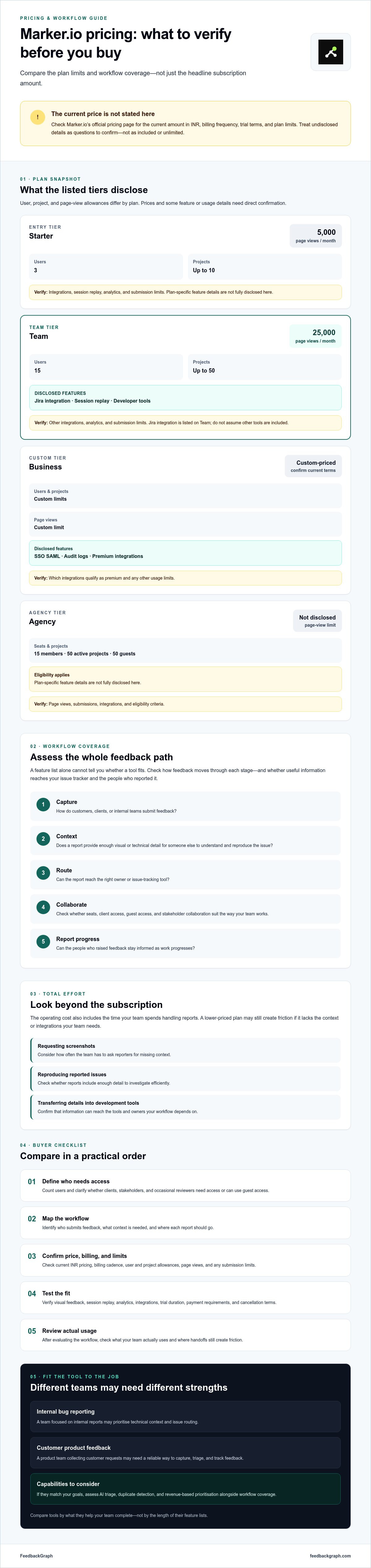
Plan names alone don’t show whether a subscription covers your workflow. Marker.io’s plan information lists user, project, and page-view limits, along with selected features, but does not specify every capability. The table separates stated plan details from items to confirm on the official pricing page before buying. For purchases in India, check the amount shown in INR and the applicable billing terms directly rather than relying on an estimated currency conversion.
| Plan | Seats and projects | Usage limits | Disclosed features | Still verify |
|---|---|---|---|---|
| Starter | 3 users, up to 10 projects | 5,000 page views per month | Plan-specific feature details are not fully disclosed here | Integrations, session replay, analytics, submission limits |
| Team | 15 users, up to 50 projects | 25,000 page views per month | Jira integration, session replay, developer tools | Other integrations, analytics, submission limits |
| Business | Custom user and project limits | Custom page-view limits | SSO SAML, audit logs, premium integrations | Which integrations qualify as premium and any other usage limits |
| Agency | 15 members, 50 active projects, 50 guests; eligibility applies | Not disclosed here | Plan-specific feature details are not fully disclosed | Page views, submissions, integrations, and eligibility criteria |
Which Marker.io features should buyers compare across plans?
Start with annotations and screenshot context. Can a reviewer show exactly where an issue appears and provide enough detail for someone else to reproduce it? Then check session replay, analytics, and collaboration access. Confirm whether clients, occasional reviewers, and internal team members count toward the seat limit or can use guest access. Jira integration is listed on Team, but don’t assume other project-management tools or integrations are available on every tier.
These differences affect handoffs. A report needs to reach the right development tool with useful context and fit into the team’s existing process. This bug reporting workflow guidance can help you assess which report details reduce back-and-forth.
How to read trial terms and plan limits
Marker.io’s product information displays a 15-day trial and says there is no permanent free plan. Confirm trial access, payment details, and conversion or cancellation terms directly with Marker.io before starting. During an evaluation, test what happens when you reach a seat, project, or page-view cap. Solo teams may value a smaller seat allowance, agencies should check guest access and active-project limits, and larger product groups may need custom limits or security controls.
Use a trial to test real handoffs, not just the interface. Teams comparing feedback capture and triage workflows can also review FeedbackGraph’s feedback workflow features as part of their evaluation.
Marker.io pricing vs alternatives: compare the workflow, not just features
A useful comparison follows a report from submission to resolution: who sends it, what context the tool captures, where the issue goes, and whether status updates return to the reporter. This makes the value behind marker.io pricing easier to assess without assuming a longer feature list means a better fit.
| Tool | Who submits feedback | Context captured | Routing and status |
|---|---|---|---|
| Marker.io | Website reviewers and team members; confirm intended access and guest limits | Website feedback; session replay and developer tools are listed for Team | Jira integration is listed for Team; verify other integrations and status-sync behaviour |
| Feedbucket | Agency clients and teams, based on its positioning | Feedback workflow details and technical context require confirmation | Designed to work with existing project-management tools; verify integrations and status return |
| ReviseFlow | Website feedback submitters; confirm roles and access | Its offer describes feedback capture, scanning, and technical context | Verify destinations, integration availability, and whether issue status syncs back |
| FeedbackGraph | Customers submitting bug reports or feature requests through a two-click widget | AI-generated titles, severity, and summaries; near-duplicate detection | Connects with Jira, Linear, GitHub, and Slack; issue status can sync back to reporters |
Does Marker.io fit a website QA and agency review workflow?
For website reviews, test whether visual annotations make it easy to point out a defect, whether session replay helps explain the issue, and whether clients and internal reviewers can participate without exceeding access limits. Check how approval steps and QA reporting fit your process, too. Session replay and developer tools are listed on Team, but don’t assume every review or reporting capability is included at each tier.
That workflow differs from managing ongoing SaaS feedback. A design review may centre on a page or visual change. Product feedback management may need to connect reports to customer context, prioritise requests, and communicate progress. For related engineering considerations, see this guide to visual bug reporting tools.
When should SaaS teams compare feedback triage alternatives?
Look beyond capture if your team spends time rewriting reports, judging severity, sorting duplicates, or deciding which request has the greatest business impact. FeedbackGraph’s AI triage generates report titles, severity, and summaries, identifies near-duplicates, and offers revenue-based feedback ranking. If Jira, Linear, GitHub, or Slack already anchors your workflow, check that a tool connects to the right destination and returns useful status updates. Review FeedbackGraph feature details to assess its stated capabilities.
Don’t label any option cheapest or best without current, comparable plan data. Verify pricing, feature access, usage limits, integrations, and status-sync behaviour against your own workflow before deciding.
How to decide whether Marker.io pricing fits your team
A subscription fits when it supports the work your team actually does, not simply because it includes an impressive feature list. Features have little value if nobody uses them. Use this five-step check to connect the plan to real workflows before committing.
- Define the users. Estimate active feedback submitters, internal team members who need seats, occasional reviewers, and the people responsible for triage. Separate regular users from occasional participants so you can compare access needs with the plan.
- Map the workflow. Identify whether the main job is website QA, customer bug capture, feature-request collection, or a mix. Trace a typical report from submission through investigation, issue tracking, and follow-up. Note where work currently gets stuck.
- Verify the plan limits. Check current seat, project, and usage limits, integration access, and any security or privacy details documented for the relevant tier. If you’re purchasing in India, confirm the displayed amount and billing terms in INR directly with Marker.io.
- Test representative reports. Use real examples, such as a visual defect with reproduction details and a customer request that needs prioritisation. Test required integrations and confirm that the handoff preserves the information developers need. Verify trial access and terms before using a trial to evaluate the product.
- Review the outcome. Compare the test with your baseline. Did handling time change? Were fewer reports incomplete or duplicated? Did issues reach the right owner, and did reporters receive useful updates? Use what you observe to decide whether the plan supports the workflow well enough to justify its subscription.
Which pricing factors matter most for your team size and workflow?
Volume and use case shape the decision. A small team may care most about straightforward capture and the integrations it already relies on. An agency should account for client participation and reviewer access. A product group managing customer bugs and feature requests may need dependable triage and follow-up. Check documented privacy, security, and access controls against your own requirements. Don’t infer protections from a plan name or feature list.
How to compare subscription value without guessing at ROI
Before testing, record a practical baseline: time spent triaging reports, how often reports lack key details, how many apparent duplicates require review, and how much follow-up it takes to close the loop. Then run comparable reports through each candidate workflow. Assess whether AI-supported handling adds useful structure, not just whether it produces a summary. Explore automated bug triage guidance as one reference point for evaluating how reports are captured and processed.
Choose the tool that removes friction from the steps your team repeats. If testing shows a feature won’t be used, don’t let it drive the purchase.
Is Marker.io worth it? Choose a feedback platform and take the next step
Marker.io may suit teams that need website-focused feedback, visual review, and developer context, especially if its integrations and plan limits match their existing workflow. The value of marker.io pricing depends on those requirements, not the number of features listed. Before buying, confirm current INR pricing, billing terms, tier access, usage limits, support terms, and security documentation through official channels.
SaaS teams with a different bottleneck may prioritise structured customer feedback, AI triage, duplicate detection, or ranking requests by revenue impact. Those capabilities solve a different job from reviewing a page visually. There’s no universal winner. Choose the platform that handles your real feedback source, captures the context your team needs, routes reports to its working tools, and closes the loop with reporters.
A concise fit checklist for Marker.io and alternatives
- Source: Are reports coming from website reviewers, customers, or internal teams?
- Context: Do you need visual annotations, technical details, customer information, or prioritisation signals?
- Destination: Can issues reach the team’s existing project or development tools?
- Follow-up: Can reporters see relevant status updates, and can your team manage access appropriately?
- Commercial details: Are plan-level access, support terms, security information, and billing clear and documented?
Run a representative workflow before committing. Submit a real report, follow its handoff, and check whether the final update reaches the right person. That evidence is more useful than comparing feature counts or relying on a polished sample scenario.
What to test in a FeedbackGraph demo
For teams evaluating feedback capture and triage, ask to see the two-click widget capture a report, then review how AI generates its title, severity, and summary. Test how the system identifies near-duplicate submissions. Check the integration that matters to your team, whether Jira, Linear, GitHub, or Slack, and confirm how issue status can sync back to reporters. Finally, assess whether revenue-based feedback ranking supports your product prioritisation process.
Bring a representative bug report and a feature request to the evaluation. That makes it easier to see whether the workflow captures useful context and fits your team’s decisions, rather than simply adding another destination for feedback.
Choose the feedback workflow your team can put to work
The right decision isn’t about choosing the tool with the longest feature list. It’s about matching the feedback source, context, integrations, and reporter updates to the work your team needs to complete. Before you commit based on marker.io pricing, confirm current plan details, billing terms, access limits, and feature availability on Marker.io’s official pricing page.
If your priority is collecting customer bug reports and feature requests, compare how each option handles triage and follow-through. FeedbackGraph supports two-click capture, AI-generated report titles, severity, and summaries, plus near-duplicate detection. Its integrations with Jira, Linear, GitHub, and Slack connect feedback to existing work, while status updates can sync back to reporters.
Test the workflow with representative feedback before choosing. Seeing how reports are captured, enriched, routed, and updated helps you decide based on fit rather than assumptions.
Choose the feedback workflow your team can put to work every day.
Frequently Asked Questions
How much does Marker.io cost?
Check Marker.io’s official pricing page for current plan prices and billing terms, and confirm the final amount in INR before subscribing. This article does not provide a verified India-rupee quote. Compare the plan you’d actually use, including seats, projects, page-view or other usage limits, and feature access. If a limit, billing term, or trial condition isn’t published, ask Marker.io to confirm it before committing.
What is included in Marker.io pricing?
Marker.io promotes website feedback capabilities, but check which features are included at each plan level. Its product information refers to visual feedback, annotations, bug reproduction, session replay, collaboration, integrations, analytics, and security features. Review the current plan comparison for tier access, user limits, supported integrations, and usage restrictions. Then compare those details with your team’s workflow rather than assuming every capability comes with every subscription.
Does Marker.io offer a free trial?
Marker.io’s product information displays a free-trial offer, but the duration, payment requirements, included features, and cancellation terms need confirmation. Verify each condition directly with Marker.io before signing up. Use the trial to follow a real report from submission through investigation and handoff to your project tool. Check that the technical context arrives as expected, and test any reporting or collaboration features your team plans to use.
Is Marker.io worth the price for a small team?
It may be worth considering if your small team regularly needs website feedback, visual annotations, collaboration, and QA support. Start by identifying the bottleneck you want to address, then verify the relevant plan’s seat, project, usage, and integration limits. A trial can help you test the workflow if the current terms allow it. Don’t choose based on feature count or unverified claims about time saved. Assess how your team actually uses the product.
How does Marker.io compare with FeedbackGraph?
Marker.io focuses on website feedback and review workflows, while FeedbackGraph supports customer bug and feature-request capture, AI enrichment, and near-duplicate detection. FeedbackGraph connects with Jira, Linear, GitHub, and Slack, and can sync issue status back to reporters. Compare the tools based on your feedback source, required context, and destination workflow. Current plan details are needed for a direct price comparison, so confirm them with each provider.
Can Marker.io send feedback to Jira and other project management tools?
Marker.io lists integrations including Jira, Trello, Asana, and GitHub. Confirm the current supported options and plan restrictions before buying. Jira integration is listed for the Team plan, not Starter, so check that your selected tier includes the workflow you need. Ask about setup requirements and sync direction, then test a representative issue to confirm the information developers need reaches their project tool.
What should I compare before choosing a feedback tool subscription?
Compare how each tool captures feedback, what technical or customer context it adds, how it handles duplicates, and where reports go. Check status updates, user limits, reporting, plan-level feature access, and trial terms, too. Then run a typical report through the full process, from submission to engineering handoff and reporter follow-up. This practical test shows whether the workflow fits more clearly than a headline price or a long feature list.


